Apple Sending Confirmation Emails To Combat App Purchase Fraud - MacRumorsOpen MenuShow RoundupsShow Forums menuVisit ForumsOpen Sidebar
Skip to Content

Apple Sending Confirmation Emails To Combat App Purchase Fraud

Apple has begun sending emails when AppleID's are used to make purchases on iOS devices not previously associated with the account. It is likely these emails are being used as one way to combat increasingly frequent app purchase fraud.
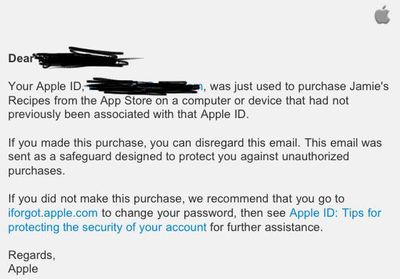
fraudprotectemail
MacRumors reader Michael had his iPhone replaced at an Apple Retail Store. After the first App Store purchase on the replaced phone, he received the above email. The email doesn't require confirmation of the purchase, but is instead a simple notification that a new device has been used and requests the user change their password if they don't recognize the activity.

Apple already requires credit card users to reenter the 3 or 4 digit CID number from the back of their credit card (front in the case of American Express) to authenticate the new device, however users with balances from iTunes Store Gift Cards aren't required to perform any special authentication other than entering their AppleID password.

Popular Stories

iPhone 18 Pro Deep Red Feature

iPhone 18 Pro Launching in Two Months With These 12 New Features

Friday July 17, 2026 10:39 am PDT by
It is now mid-July, and that means the iPhone 18 Pro and iPhone 18 Pro Max are now just two months away. The devices are expected to look similar to the iPhone 17 Pro and iPhone 17 Pro Max, but there will still be many year-over-year changes, with rumored features including a smaller Dynamic Island, 5G via satellite, and more. Apple is expected to unveil the iPhone 18 Pro, iPhone 18 Pro Max, ...
iPhone 18 Pro and Pro Max Feature

'Apple Upgrade' Program Reportedly Launching Next Week

Tuesday July 21, 2026 8:30 am PDT by
Apple and Klarna are partnering on a new "Apple Upgrade" program set to launch in the U.S. on Tuesday, July 28, according to Bloomberg's Mark Gurman. The program will allow you to finance most iPhone, iPad, Mac, and Apple Watch models, with a 24-month term for iPhones and Apple Watches and a 36-month term for iPads and Macs. Customers will be able to pay off the device early during the term, ...
iPhone 18 Pro Deep Red Feature

iPhone 18 Pro Launching in Two Months With These 12 New Features

Tuesday July 21, 2026 6:22 am PDT by
It is now mid-July, and that means the iPhone 18 Pro and iPhone 18 Pro Max are now just two months away. The devices are expected to look similar to the iPhone 17 Pro and iPhone 17 Pro Max, but there will still be many year-over-year changes, with rumored features including a smaller Dynamic Island, 5G via satellite, and more. Apple is expected to unveil the iPhone 18 Pro, iPhone 18 Pro Max, ...

Top Rated Comments

EricNau Avatar
195 months ago
It's a step in the right direction, but seems incomplete without an easy way to contact Apple regarding a fraudulent charge.

Doesn't this email sort of send the message that "we know your account may have been jeopardized, but we don't want to help you fix it"? :confused:
Score: 4 Votes (Like | Disagree)
195 months ago
I got this months ago... not new like the others said.
Score: 3 Votes (Like | Disagree)
Epic Xbox Revie Avatar
195 months ago
This isn't new...:rolleyes:
Score: 3 Votes (Like | Disagree)
195 months ago
To all the folks that said they got these emails a while ago and that it isn't new:

Why didn't you send it in? :-)

Because it didn't seem news worthy?
Score: 2 Votes (Like | Disagree)
195 months ago
Does anybody know if it's possible to transfer your purchase history and account into a new username?

You can simply change your Apple ID on your account. You can't create a new account (with new ID) and transfer the purchases with it. Making a second account is a bad idea because they can not be merged together. Just change the Apple ID on your account to save you a lot of hassle.

Follow this link:
https://appleid.apple.com/cgi-bin/WebObjects/MyAppleId.woa/69/wa/directToSignIn?wosid=ex52wgHT0SbfvcBuEHQosM&localang=en_US

sign into your account, and where it says Apple ID, there should be a small 'edit' link in the right corner. Edit the Apple ID as you wish. (If no 'edit' then this means the ID is in use with, or has been in use with mobile me and can not be changed at all)

if you have devices, sign out of your iTunes account on all of them, and sign back in using your new ID.
Score: 2 Votes (Like | Disagree)
195 months ago
To all the folks that said they got these emails a while ago and that it isn't new:

Why didn't you send it in? :-)

Didn't think it was new worthy tbh... still not convinced it is...
Score: 2 Votes (Like | Disagree)