One AirPod Not Working? How to Fix the Problem - MacRumorsOpen MenuShow RoundupsShow Forums menuVisit ForumsOpen Sidebar
Skip to Content

One AirPod Not Working? How to Fix the Problem

by

Apple's AirPods are designed to work seamlessly with all of Apple's Bluetooth-supporting devices, and the wireless earbuds usually live up their billing, but that doesn't mean they work perfectly for everyone one hundred percent of the time.


A particularly irritating problem that can sometimes occur with any model of AirPods is when one AirPod drops the connection intermittently or stops working altogether for no apparent reason. If you've been hit by this bug, following the steps below should help you resolve it.

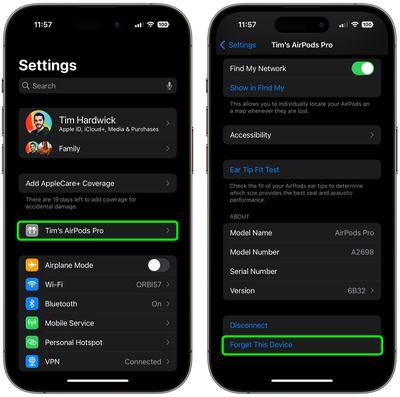
  1. Launch the Settings app on your iPhone or iPad.
  2. Tap the name of your AirPods, just below your Apple ID banner. Alternatively, tap Bluetooth, and then tap the 'i' icon next to your AirPods in the list.
  3. Scroll down to the bottom of the menu and tap Forget this Device.
    airpods forget device 1

  4. Ensure that both AirPods are in their charging case, the case is closed, and that the case has charge.
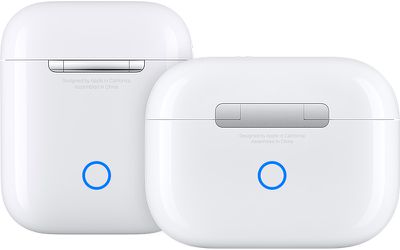
  5. Locate the small button on the back of the case, near the bottom. It's flush with the case and the same color as it, so you might need to feel about for it. If you have AirPods 4, Apple has moved the capacitive button to the front of the case, concealing it just below the status light.
    airpods airpods pro setup button

  6. Open the charging case lid.
  7. For AirPods 4 (both models), double-tap the front of the case until the status light flashes white. For all other AirPods models, press and hold the button for at least 15 seconds. If you are using a first-generation or non-wireless second-generation/third-generation AirPods charging case, the case's internal light between the AirPods will flash white and then amber, indicating the AirPods have reset. If you are using a Wireless Charging Case for AirPods Pro or AirPods 4, you can find this light on the front of the case.
  8. Now, close the lid of your AirPods case and then open it up again.
    airpods paired card

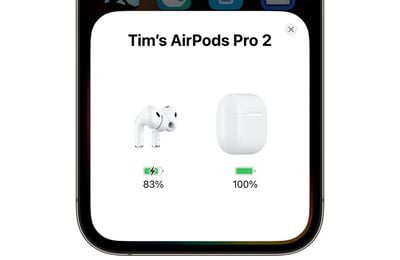
  9. Hold the AirPods case with open lid next to your iPhone or iPad. Your iOS device should recognize the AirPods and you'll see a popup to connect them.
If the above steps don't solve the problem, try resetting your iPhone's network settings. In the Settings app's main menu select General ➝ Reset ➝ Reset Network Settings, then try re-pairing your AirPods by repeating the steps above.

Time for new AirPods or AirPods Pro?

Check our constantly updated guide for best deals on AirPods.

Related Roundups: AirPods 4, AirPods Pro 3
Related Forum: AirPods

Top Rated Comments

comp.doc Avatar
96 months ago
I’ve only had to do the nuclear fix twice in two years of ownership. Most of the time simply popping them back in the case for a few seconds does the trick.
Score: 10 Votes (Like | Disagree)
djlythium Avatar
96 months ago
What if both AirPods are working, but for about 50% of their advertised talk time due to battery degradation? o_O
Score: 8 Votes (Like | Disagree)
Smith288 Avatar
96 months ago
Or suck the wax out of it. LOL

https://www.reddit.com/r/airpods/comments/5xrrhu/one_side_louder/?utm_source=share&utm_medium=ios_app
Score: 8 Votes (Like | Disagree)
96 months ago
Ive had mine for 2 years and almost 2 months (January after the launch), and mine last anywhere between 30-60 min. I've used them nearly every day, so I'm not complaining, I'm just impatiently waiting for the next gen
Score: 4 Votes (Like | Disagree)
96 months ago
So if your Airpods aren’t working try un-pairing and re-pairing with your device.

That’s the Bluetooth equivalent of turn it off and back on again, which does in fact solve most problems. :D
Score: 3 Votes (Like | Disagree)
furbzv1 Avatar
88 months ago
bringing this back.. im having this issue where my right airpod loses connection or doesnt connect back after inserting to ear. sometimes putting the airpod in the case fixes it. sometimes i have to put both back and wait a few mins- should i ask apple for replacement?
Score: 2 Votes (Like | Disagree)

Popular Stories

AirPods Pro Beta Firmware 2

Apple Releases Updated AirPods Beta Firmware With iOS 27 Features

Tuesday June 23, 2026 2:34 pm PDT by
Apple today released updated beta firmware for the AirPods Pro 2, AirPods Pro 3, AirPods 4, and AirPods Max 2. The firmware is limited to developers at the current time, and it has a build number of 9A5304b. In iOS 27, iPadOS 27, and macOS Golden Gate, Apple is adding a new AirPods interface and support for custom EQ. AirPods are also compatible with the new Siri AI. With iOS 26, iPadOS...
iOS 27 Beta Hints at New Apple Product Such as AirPods Ultra Feature

iOS 27 Beta Hints at New Apple Product Such as 'AirPods Ultra'

Friday July 3, 2026 8:44 am PDT by
The second iOS 27 developer beta seemingly hints at a new Apple product, according to code uncovered by app designer and developer Sam Henri Gold. The code mentions a product codenamed B790 that can relay "two images from cameras on either side of [a] user's head." Gold speculated that the code could be referring to Apple's rumored smart glasses, but a more likely possibility is AirPods with ...
AirPods Pro Beta Firmware 2

Apple Releases New AirPods Beta Firmware With iOS 27 Features

Tuesday July 7, 2026 11:19 am PDT by
Apple today released a third version of the beta firmware it is testing for the AirPods Pro 2, AirPods Pro 3, AirPods 4, and AirPods Max 2. The firmware is limited to developers at the current time, and it has a build number of 9A5314b. In iOS 27, iPadOS 27, and macOS Golden Gate, Apple is adding a new AirPods interface, a slider for Adaptive mode, and support for custom EQ, so the firmware...