Apple Intelligence is what Apple calls its artificial intelligence feature set, previewed at WWDC in June 2024. The first Apple Intelligence features launched with iOS 18, and Apple continued rolling out new Apple Intelligence capabilities in iOS 26 and iOS 27.

Writing Tools
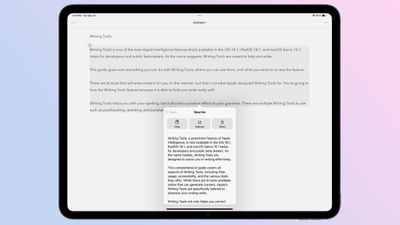
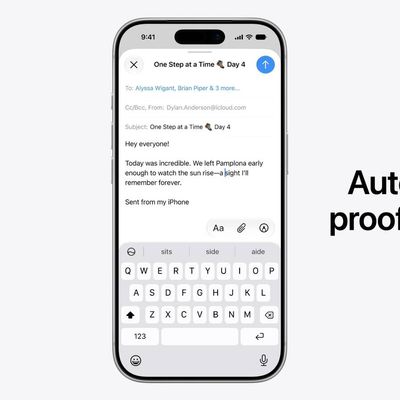
- Proofread text checks for spelling and grammar errors, including word choice and sentence structure. You can accept all suggestions with a tap or go through them one by one with explanations.
- Rewrite cleans up what you've written and shifts the tone without impacting your content. Options include Friendly, Professional, and Concise.
- You can select text and get a summary of it with Apple Intelligence. You can choose to create a paragraph, pull out key points, make a list, or create a table. Summaries are available in Mail, Messages, and more.
- There is an open-ended Writing Tools option that lets you describe a change you want to make to something you've written. You can choose any mood or writing style that you want, with varying degrees of success. If you want something to be more flowery or elaborate, Writing Tools can make it happen. You can also ask for your text to be converted into a different format, like a poem.
- Writing Tools has a "Compose" feature that uses Siri ChatGPT integration. With this option, Siri can leverage ChatGPT to compose writing from scratch rather than just rewriting text.
- As of iOS 27, Writing Tools can generate text from scratch without having to rely on ChatGPT.
You can select any text on your iPhone, iPad, or Mac and use Apple Intelligence to access Writing Tools for summaries and other features.
Siri AI

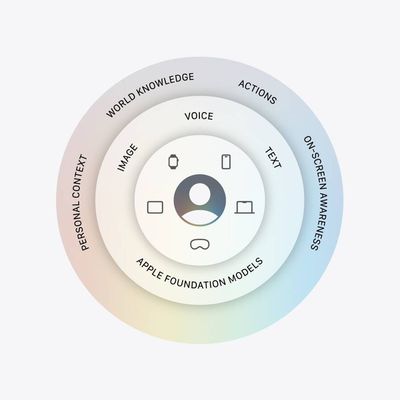
Introduced with iOS 27, Siri AI is more knowledgeable, more capable, and unlike other chatbots, able to tap into your personal data in apps like Mail, Messages, and Photos. Apple says Siri has understanding and reasoning that wasn't available before, with four main improvements that change how Siri works.
All of the different Siri functions come together to allow Siri to do far more than it could before. You can have full back-and-forth conversations with Siri, and include multiple tasks in a single request.
Personal Context Understanding
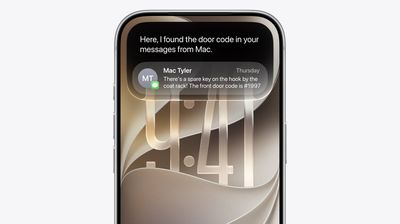
Apple overhauled its search index, and Siri has access to emails, text messages, files, photos, notes, and more. Siri can find content from across your apps, but it also understands that content. You can ask Siri to surface photos, bring up information from emails or texts, or find files, and the Apple Intelligence semantic index behind the scenes finds what you need.
- What was that movie my brother told me to watch last week?
- Can you get me the directions to that place I was supposed to meet Eric tomorrow?
- What video games did John recommend to me last year?
- Find images with pancakes from 2024
- What was the name of that restaurant I ate at in February?
- What's the confirmation number for my upcoming flight?
- What do I need to do tomorrow?
- Show me my photos from the music festival last weekend
- What's the door code Sarah texted me?
- Find the lease my landlord emailed me last month
- Who did I have lunch with two Tuesdays ago?
Broad World Knowledge
Apple can search the web for up-to-date information to answer questions about anything, similar to other chatbots. Siri can analyze documents and get information from the web for additional context, help come up with recipes, do party prep, help with homework, give gardening tips, assist with DIY projects, and much more.
- When is the Suki Waterhouse show in SF?
- How can I get tickets?
- I'm planning a birthday party, can you find me some good cake recipes?
- What's the difference between pine warblers and goldfinches?
- What's the Hurricanes score?
- What are the hours for the closest Ace Hardware?
- What's a good substitute for buttermilk?
- What's a 15% tip on $84?
- Help me plan a 5-day trip to Lisbon
Onscreen Awareness
Siri knows what's on your screen and can answer questions about it. Siri can tell what you're looking at, read text, and analyze images.
Siri can tell you where a photo was taken if there's something recognizable in it, and you can ask questions about any app you're in without having to provide specifics.
- Where was this photo taken?
- Summarize this
- Can you give me directions here?
- What are the best native plant options for a shady spot near my house?
- Does this document look correct?
- What is this?
- Translate this menu
- Explain what this chart is showing
App Actions
App Actions allow Siri to use tools in apps to complete requests. Siri can use some apps on your behalf, including apps from Apple and third-party apps that have implemented App Actions support.
- Write a quick response to this email
- Send all the photos from today to Eric
- Add a 3pm Tuesday meeting with the neighbor to my calendar
- Add these photos to the cat album
- Get me directions to the post office, but add a stop at the coffee shop first
- Move my 2pm meeting to Thursday
Siri Design
On the iPhone, a new Search and Ask Siri interface replaces the former Spotlight search option, and it's available from the Dynamic Island. A swipe down from the middle of the iPhone's display brings up Search or Ask, where you can type or speak a question or request to Siri.
An animation is displayed as Siri is thinking, and then the Siri bubble expands into a short response. If you swipe down on a response, it brings up a text bar where you can provide clarification or ask another question. A "+" button lets you add images or documents to the conversation.
Some responses use rich information cards pulled from apps. If you ask Siri about the weather, you'll see the current weather forecast. If you ask about upcoming calendar events, you'll see them listed in the Calendar app format.
You can also access Siri by pressing the side button or by using the "Siri" and "Hey Siri" wake phrases.
Systemwide Context
Siri works in any app. You can select text or images, then ask Siri about the selection. If you see an image in Safari you want to know more about, you can long press it to select and then ask Siri whatever you want about it.
Siri App
There is a dedicated Siri app where you can start new conversations or revisit past conversations you've had with Siri.

The app has a card-style interface with details on your most recent conversations across all of your devices. You can also use the search button to find conversations, and there's a pin option for conversations that you revisit frequently.
Write with Siri
In iOS 27, you can write with Siri anywhere you type with a systemwide Write with Siri feature. Siri can draft documents from scratch, and in Mail and Messages, it can use the same writing style that you normally use.
Siri can give you feedback on your writing if you select your text and ask Siri how it sounds, and as you type in apps, there's automatic proofreading for misspellings and grammar. Siri can also edit, and you just need to describe the change that you want to make to something you've written, such as changing the tone to be more professional.
- Make this email sound more formal
- Turn these bullet points into a paragraph
- Shorten this to three sentences
- Draft a thank you note for a gift
- Rewrite this to be friendlier
- What do you think of this presentation?
- How can I improve this email?
For more on Siri AI, make sure to check out our dedicated guide.
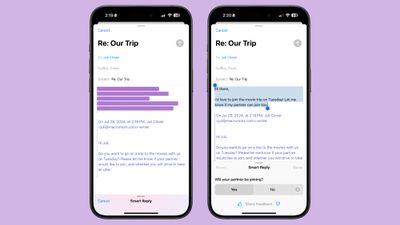
- There is a summarize button for summarizing any of your incoming emails, plus you will see a brief summary of an email in your inbox list rather than the first few lines of the email.
- Mail surfaces time sensitive messages first when applicable, putting them at the top of your inbox so you see what's important right away.
- Smart Reply provides quick-tap responses to emails that you've been sent, with contextual options based on what's in the email.
- Multiple notifications from Mail will be summarized on your Lock Screen so you can see what's in an email without opening the app.
Messages

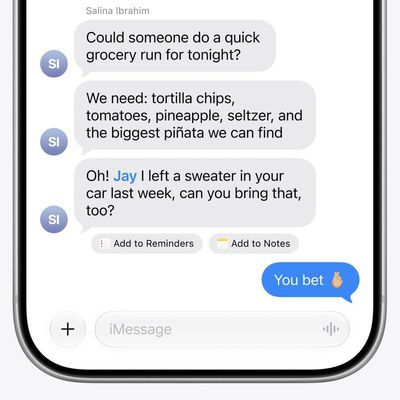
- Messages has Smart Reply options for incoming texts, which analyze the content of messages to offer suggestions of what you might want to say.
- Multiple Messages notifications are summarized on your Lock Screen.
- You can use all of the Writing Tools features in the Messages app for proofreading and refining what you're planning to send.
Photos
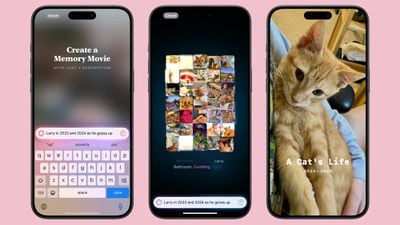
- You can create a Memory Movie with just a description, such as "My cat in 2024," or "Orlando in the summer." The feature automatically picks relevant photos and chooses songs, but you can tweak through the Memory Mixes feature or choose a mood to guide the direction of the audio. You can also add in specific scenes and images you want to see throughout the memory when you're creating the prompt.
- Natural language search is available in Photos, so you can just describe what you're looking for, such as "Eric rollerskating while wearing green."
- Search can also find specific moments in video clips.
- Search offers up smart complete suggestions for narrowing down what you might want to find.
Clean Up
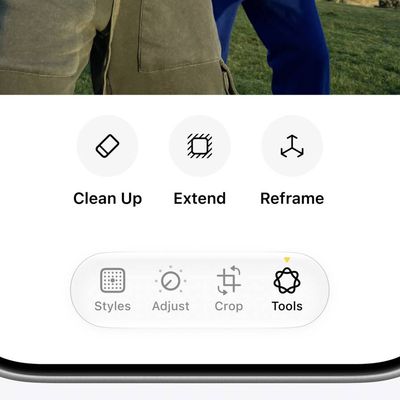
The Photos app also includes "Clean Up," a feature that lets you remove unwanted objects from your photos. The Clean Up tool in the Photos app is able to automatically detect objects in an image that might not be wanted, but you can also tap, circle, or brush over an unwanted object to remove it.
Zooming in on an image can help with using a finger as a brush to remove smaller blemishes and issues with an image, and it is intelligent enough not to remove part of a person even if a person or main subject is selected.
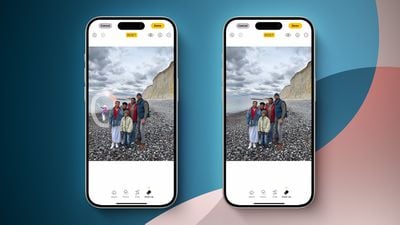
Clean Up works on all images in the Photos library, including older images and images captured by other devices like a point and shoot camera or a DSLR.
Transcription Summaries
In Notes and other apps, you can record audio and get a transcript along with a summary of your transcript, which is useful for recording lectures and other audio. Transcription isn't an Apple Intelligence feature, but summaries are.
Focus Modes
There is a dedicated Reduce Interruptions Focus Mode that only shows you important notifications that need attention while filtering out everything else.
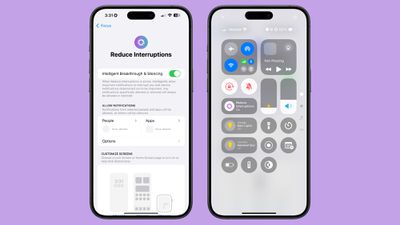
When customizing an existing Focus mode or creating a new one, there is a new toggle to turn on Intelligent Breakthrough and Silencing. This option allows important notifications to interrupt you, while muting notifications that are not important, which is the same thing that the Reduce Notifications Focus does. You can override the notification settings for specific apps and people, which is how it worked prior to iOS 18.1.
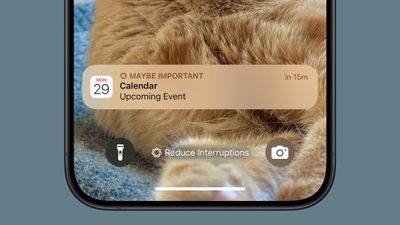
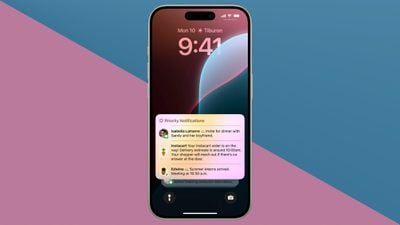
Notification Summaries
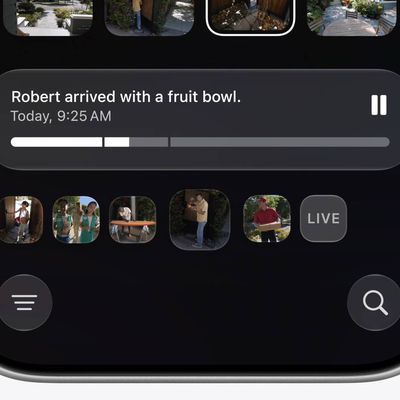
Your incoming notifications are summarized so you can see what's new for each app at a glance.
Phone
Summaries of transcriptions generated from your phone calls are supported. You can record a phone call and get a transcription in iOS 18, which is not an Apple Intelligence feature. What does require Apple Intelligence, though, is getting a summary from that transcription without reading through the entire thing.
Note that you can start a recording by tapping on the record button in the upper left corner of the display when on a phone call. All participants are notified that the call is being recorded before the recording starts.
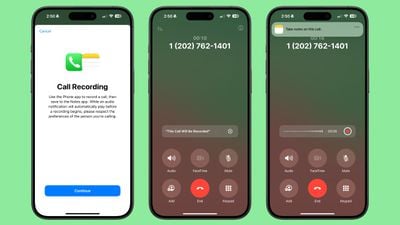
Recorded phone calls are stored in the Notes app, where you can tap in to view a transcript and get a summary generated from that transcript.
Safari
When reading an article in Reader Mode, there is an option to have Apple Intelligence summarize the article for you.
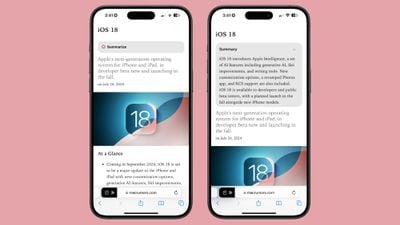
Image Playground
Image Playground can be used to generate images in cartoon-like styles using a text-based prompt. Apple has built-in suggestions and concepts that you can choose from, like costumes, locations, items, and themes.
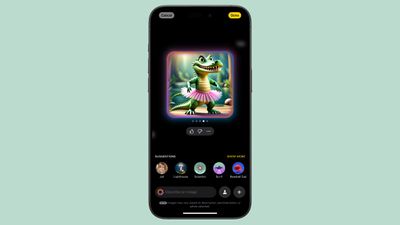
While Image Playground is a standalone app, it is also integrated into the Messages and Notes app. In these apps, Apple can use context from what you've typed for image generation suggestions.
For inspiration, you can upload or take a photo, and then get a cartoon AI version of it, and you can also use images of friends and family members pulled from the People album in the Photos app.
You can start with a base suggestion or photo and then continue to add to it until you get what you want. You can remove suggestions at any time, and save your favorite creations for use in other apps. Anytime you create something with Image Playground, you'll get multiple options so you can choose the best one.
There are only Animation and Illustration styles for Image Playground, so there is no option for creating photorealistic images.
Image Wand
Image Wand is basically the same thing as Image Playground, but in the Notes app. When you have notes that you've taken, you can circle an empty spot or some text and Image Wand will add a contextually relevant image.

So if you have notes on photosynthesis, you can add in an image of a plant under the sun. Image Wand isn't able to generate complex images, so if you want a picture of the internal structure of mitochondria, you're out of luck, but it can make a stylized image featuring the organelle.
On an iPad, you can draw a rough sketch of what you want to add to your notes with an Apple Pencil, and then use Image Wand to generate something more polished.
Genmoji
Genmoji are custom emoji characters that you can create using a text-based description. If there's an emoji you can't find but need, like a duck eating a sandwich or an alligator skateboarding, Genmoji can make it for you.
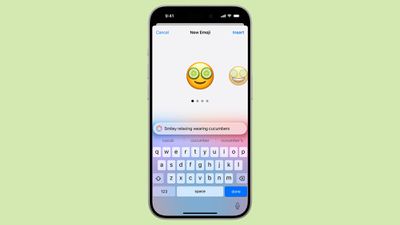
Genmoji aren't too far off from Image Playground images, but the generation system tends to want to add a person for a lot of requests. You can choose yourself or a friend or family member, or just use a generic emoji character as your base.
In Messages and other apps, Genmoji behave like emoji, but they're not going to display properly for anyone running an operating system earlier than iOS 18.1, or on an Android device.
To create a Genmoji character, tap into the Emoji keyboard and tap on the Emoji with a "+" button next to the search bar. From there, you can type in your idea.
Siri ChatGPT Integration
Siri ChatGPT integration lets Siri hand requests over to OpenAI's ChatGPT. ChatGPT is off by default, but you can turn it on in the Apple Intelligence and Siri section of the Settings app.
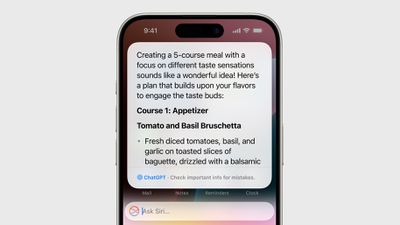
If ChatGPT integration is enabled, Siri will consult ChatGPT for complex requests. Complex requests might include creating an image, generating text from scratch, making recipe ideas based on what's in your refrigerator, describing what's in a photo, and more.
Siri analyzes each request to see if it's something that needs to be answered by ChatGPT, but you can also automatically invoke ChatGPT for a request by using a request like "Ask ChatGPT to give me a chocolate chip cookie recipe."
Siri asks your permission before querying ChatGPT, but there is an option to turn off that extra permission step by toggling off "Confirm ChatGPT Requests" in the ChatGPT section of Settings.
You don't need an account to use ChatGPT, and it is free, but if you have a paid account, you can sign in. If you're not signed in, OpenAI does not store any of your ChatGPT requests, nor is your information used for training ChatGPT. If you sign in, ChatGPT can save a copy of your queries. Apple does not store ChatGPT queries.
ChatGPT can be used with Siri, but it is also integrated into Writing Tools and Visual Intelligence. With Writing Tools, ChatGPT can generate text, and with Visual Intelligence, ChatGPT can answer questions about what the Camera sees.
Visual Intelligence
Visual Intelligence is a feature that lets you ask Siri about images that you take. There's a dedicated Siri AI mode in the Camera app in iOS 27, plus a Visual Intelligence mode you can get to when long pressing on the Camera Control button.

If you point the camera at a store, for example, you can see ratings, hours, and other information. If you take a photo of an object, you can get more information about the object from ChatGPT, or use it with Google Search to find similar images. The Google Search feature is a good way to search for products that you want to find.
Other Visual Intelligence features include reading text out loud, detecting phone numbers and addresses to add them to the Contacts app, copying text, and summarizing long passages of text.
Apple Intelligence Device Requirements
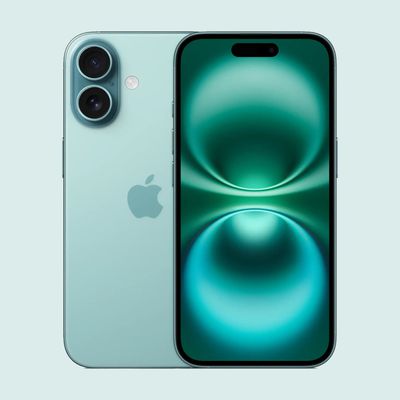
Apple Intelligence requires a device with one of Apple's newest chips and 8GB RAM. Eligible models are listed below.