Apple Intelligence: What to Know About Summaries and Smart Replies - MacRumorsOpen MenuShow RoundupsShow Forums menuVisit ForumsOpen Sidebar
Skip to Content

Apple Intelligence: What to Know About Summaries and Smart Replies

Summaries and smart reply options aren't the flashiest of Apple Intelligence features, but these are capabilities that Apple is introducing in iOS 18.1 that have the potential to be useful for most people's day-to-day device usage.

apple intelligence black

Summaries

Summaries are available across the operating system and can be used in different ways for apps, notifications, emails, and more.

Mail and Messages

In your email inbox in the Mail app, you'll see an AI summary of the main content of the email message, so you can tell whether it's important at a glance. You don't get a lot of information, but it's enough to give context when the title doesn't unveil what an email is about. When you tap into an email, you can use the "Summarize" option at the top to get an overview.
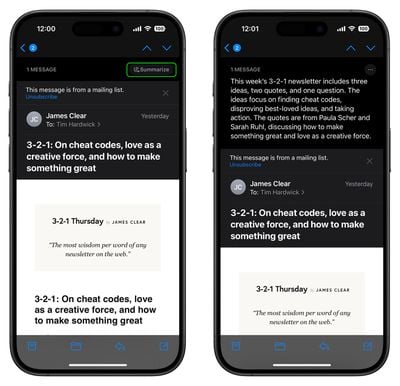
mail
You'll see summaries of incoming messages on the Lock Screen so you can decide whether it's important to respond. It's particularly useful for long messages, because it's good at pulling out the most important bits. You can also see summaries of unread messages right in the Messages app.
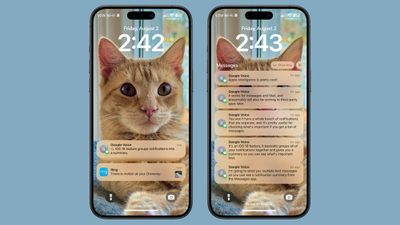
ios 18 messages summary
You can turn off Messages summaries by going to Settings > Apps > Messages and toggling off Summarize Messages. Turn off Mail summaries the same way, but in the Mail section.

Notifications

For almost all of your notifications, ‌Apple Intelligence‌ can group them up and give you a short, one-sentence summary of what's in them. Tapping expands the stack so you can see everything individually.
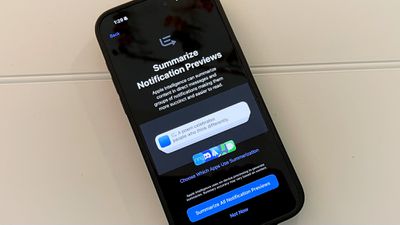
summarize notification previews
Notification summaries work for built-in apps like Messages, and also your third-party apps. ‌Apple Intelligence‌ tries to pick out what's most relevant. For messaging apps or email, it'll give a short summary of one or two messages, while aggregates like camera motion notifications are grouped up so you can see which areas had motion activations at a glance.

Notification summaries are automatic when you have ‌Apple Intelligence‌ on, but if you want to turn them off, you can do so by opening up the Settings app, going to Notifications, and turning off Summarize Previews. You can disable the feature entirely or on a per-app basis.

Safari

Safari supports a new ‌Apple Intelligence‌ Summary feature that lets you get an overview of webpages or articles. If you see a purple sparkle on the URL bar, you can tap it to view a summary.
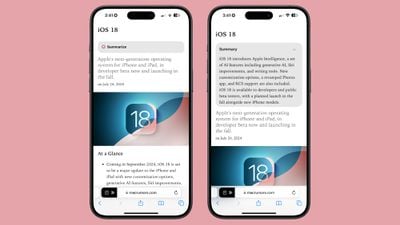
ios 18 1 safari summarize
Summaries are technically part of Reader Mode, but you don't always have to enter into Reader Mode to view one. Summaries show up automatically for longer articles, but if you're not seeing one, tap into Reader Mode and then tap on the Summarize button.

You can also select any text anywhere in Safari, then tap on Writing Tools, and choose Summary to get a summary of your highlighted text. This summarize feature is part of Writing Tools.

Summaries tend to be a paragraph at most, so you're not always going to get a full picture of what's in an article. It's more of an overview to let you know whether it's worth reading.

Notes

In the Notes app, you can select text and choose the Writing Tools Summary option just like you can in Safari, but there are also summaries created for recorded phone call transcripts and transcripts of voice memo recordings captured with the Notes app.
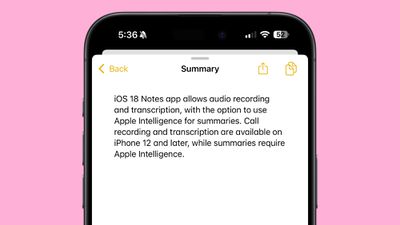
ios 18 notes transcript summary
In a note with a recording, tap into it and you'll see a "Summary" option at the top that you can choose to get a summary of a transcript. Note that phone call recording, voice memos in notes, and transcripts of those recordings are available to everyone. It's only the summary feature that's an ‌Apple Intelligence‌ feature.

Other Apps

In all apps, you can select any text and use Writing Tools to generate a summary of that text, just like you can in Safari and Notes.

Smart Replies

Smart Replies are a feature in Mail and Messages, and you'll see them in the suggestions bar above the keyboard.
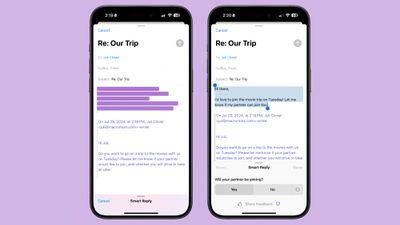
ios 18 1 smart replies
Smart Replies can be useful when you're replying to a message that has a clear question in it, such as "Do you want to go to the movies tonight?" or "Did you see [insert popular TV show here] last night?"
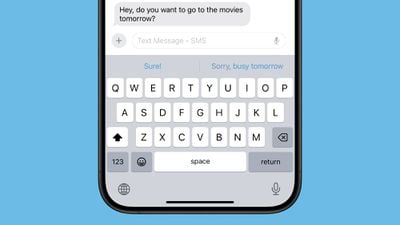
ios 18 1 messages smart reply
It is less useful for most other responses. Smart Replies don't seem to learn from individual tone or voice, and most of the time, the suggestions don't always sound like they came from a human. It tends to use a lot of "haha" responses and exclamation points, and when it's not suggesting haha as a reply, it's often rephrasing what the other person said, which is not generally how people respond to messages.

How Useful Are These Features?

Smart Replies and other ‌Apple Intelligence‌ features are in beta right now, and will be released in a beta capacity, too. Summaries have room for improvement in terms of thoroughness, but the option is already useful, particularly when viewing notifications on the Lock Screen or scrolling through your email messages.

Summaries for longer form content could stand to be more detailed, and right now, you're only going to get a high level overview.

Smart Replies are of questionable use at the current time, and hopefully this is something that will get a lot better when the personal context Siri features are released next year. Right now, Smart Replies can almost be more of an annoyance, but we are in the very early days of ‌Apple Intelligence‌.

Apple Intelligence Requirements

To use the summary and smart reply ‌Apple Intelligence‌ features, you need a device capable of ‌Apple Intelligence‌. That includes the iPhone 15 Pro, the iPhone 15 Pro Max, any iPhone 16 model, any iPad with an M-series chip, and any Mac with an M-series chip.

‌Apple Intelligence‌ features do not work on any other devices because of the processing power and memory required.

Release Date

‌Apple Intelligence‌ is in the iOS 18.1, iPadOS 18.1, and macOS Sequoia 15.1 betas at the current time. The betas are available to developers and public beta testers, and the updates are expected to see a release on Monday, October 28.


Related Forums: iOS 18, iPadOS 18

Popular Stories

duo aquarium

More Fun iPhone Duo Apps: 30 New Picks to Try

Friday November 6, 2026 3:27 pm PST by
When the iPhone Duo launched, we shared a list of some of the fun apps developers created for the new form factor. Two weeks out, developers are continuing to come up with fresh ideas, so we thought we'd share some of our favorites. Games Marbles Unhinged ($2.99) - Marbles Unhinged is a marble maze designed for the Duo. When you fold it, the floor turns into a ramp. If you stand the top...

apple pro tell logo

Apple Launching Five New Products Today

Thursday November 5, 2026 12:59 am PST by
Apple is launching five new products on Friday, November 6, following pre-orders that opened last week, including its first touchscreen MacBook Pro models. The following new products will be available from today: iPad mini with OLED display and A20 Pro chip iMac with M6 chip 14-inch MacBook Pro with M6 chip 14-inch MacBook Pro with OLED touchscreen 16-inch MacBook Pro with OLED...
iOS 28 AI

Apple Taking New Approach to Developing iOS 28 and macOS 28

Sunday November 8, 2026 7:42 am PST by
Apple has made a change to its development process for iOS 28, macOS 28, and corresponding software updates, according to Bloomberg's Mark Gurman. In his Power On newsletter today, he said Apple separates development of each year's new operating systems into three major stages. Typically, he said each stage consists of four weeks of coding followed by a four-week "convergence" period where...

Top Rated Comments

Nermal Avatar
27 months ago
Apple "Intelligence" also managed to move a hurricane to a different country:


Attachment Image
Score: 14 Votes (Like | Disagree)
Seoras Avatar
27 months ago
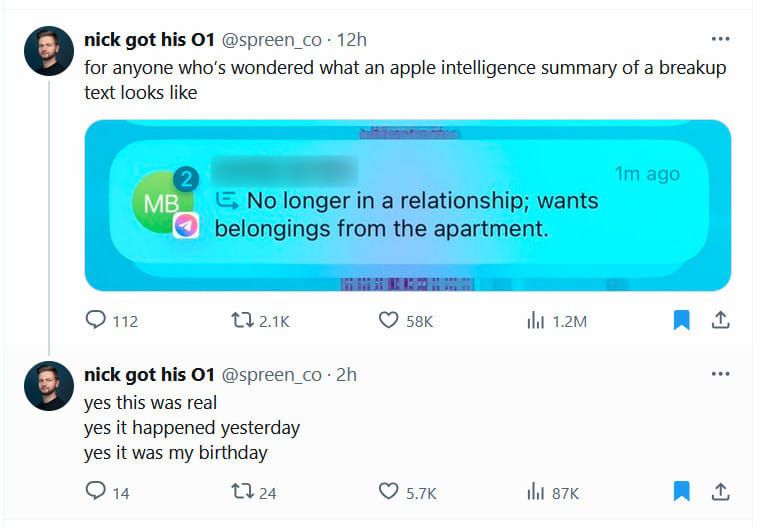
A guy running the Apple AI 18.1 beta found out he got dumped by his girlfriend by the AI summary ('https://arstechnica.com/ai/2024/10/man-learns-hes-being-dumped-via-dystopian-ai-summary-of-texts/').


Attachment Image
Score: 11 Votes (Like | Disagree)
carswell Avatar
27 months ago
Maybe I'm not a power user -- I only receive and send 20-30 email messages on a normal work day -- but I can't imagine using either feature.

If someone's taken the time to write me, I want to read what they've written. Not only do I not trust AI to catch nuances or understand unmentioned context, I want to be alert to things like tone of voice (important when dealing with clients and friends). Also, I hate receiving canned replies, which are devoid of wit and actual human touches and sentiments, and have zero interest in letting some soulless piece of software speak on my behalf.

ETA: Can you imagine a context where a PO'ed client gets back to you and says, "Why didn't you do what I asked?" and your reply is "Sorry, I only read the summary, not your message." That's the-dog-ate-my-homework lame. They wouldn't be a client for long.
Score: 9 Votes (Like | Disagree)
cjsuk Avatar
27 months ago
The best models get 60-70% right.

I can read it myself and get it 100% right.

So this can piss off. I hope there is a toggle somewhere for that.
Score: 8 Votes (Like | Disagree)
27 months ago
Yep, I am not wanting any part of Apple's nanny interpretation of my emails and messages. Just wait until the summary leaves out something really important.
Score: 8 Votes (Like | Disagree)
27 months ago
The most important thing about Apple Intelligence to most Apple users is where the disable/off/uninstall button is.
Score: 6 Votes (Like | Disagree)
Latest Stories
Apple Store Subscription Sign-Up Controversy Exposed
4 hours ago
Siri AI Rumored to Become 'More Like an Agent' as Early as Next Year
14 hours ago
Apple Taking New Approach to Developing iOS 28 and macOS 28
16 hours ago
Early Apple Black Friday Deals on Apple Watch, MacBook Air, and More
1 day ago
'Backglow' Lets You Customize New MacBook Pro's Glowing Apple Logo
1 day ago
Top Stories: Apple Product Launches, iOS 27.3 Beta, and More
2 days ago
More Fun iPhone Duo Apps: 30 New Picks to Try
2 days ago
Hands-On With Apple's New OLED Touchscreen MacBook Pro
2 days ago
Apple Store With All-New Design Opening Soon in Southern California
2 days ago
Control the Glowing Apple Logo on Your New MacBook Pro
2 days ago
Apple Shares New 'Apple Card: Apply and Use in Minutes' Ad
3 days ago
Apple Says More Than 100,000 Apps Optimized for iPhone Duo, Here's What's Still Missing
3 days ago
Early Black Friday Deals Kickoff With Steep Discounts on Apple Watch Ultras and More
3 days ago
The MacRumors Show: iOS 27.3 Looks Like a Huge Update
3 days ago
Best Buy's Black Friday Event Begins With Sitewide Savings on Apple, TVs, More
3 days ago
Apple Releasing Yet Another Two New Products Next Week
3 days ago
MacBook Air Drops to Lowest Price in Months With Amazon's $250 Discount
3 days ago
Apple Rumored to Drop the iPhone's Action Button Next Year
3 days ago
Apple's Extended Return Policy Now in Effect for 2026 Holiday Season
3 days ago
Apple Music Classical Updated With New Icon and Refreshed Design
3 days ago
OLED iPad Mini, M6 iMac, and New MacBook Pros Available From Today
3 days ago
Apple Surveys iPhone Duo Buyers About Crease and Camera
3 days ago
Apple's First Touchscreen Mac is Now Arriving to Customers
3 days ago
Claude Gets Personal Finance Feature With Bank Account Linking
3 days ago
Apple Arcade Adds Crossy Road Rush and NBA 2K27
3 days ago
Apple's New HomeView Smart Home Hub: Here's How Much RAM It Has
3 days ago
iPad Mini vs. iPad Air Buyer's Guide: Now Just $50 Apart
3 days ago
First iOS 27.3 and macOS Golden Gate 27.3 Public Betas Now Available
4 days ago
Apple Announces a New Mac Sales Record
4 days ago
Paid $200 for Logic Pro? Apple Says You Won't Get This New Feature
4 days ago