

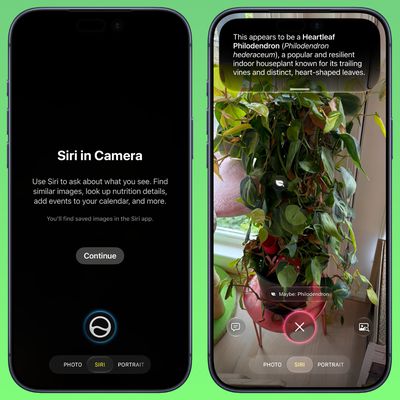
iOS 27: Use Visual Intelligence in the Camera App
In iOS 27, available now, Apple has made some changes and additions to the iPhone's stock Camera app, including the addition of a new Siri mode.
Available in addition to the Video, Photo, and other camera modes, Siri mode can be accessed by swiping across the mode carousel at the bottom of the screen.
The new mode uses Visual Intelligence to identify objects in the frame and provide...
Read Full Article • 4 comments
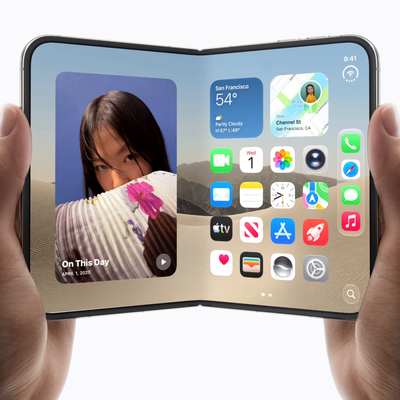
iPhone Duo Pre-Orders Go Live Next Month - How to Prepare
Apple unveiled the iPhone Duo on September 9 at the company's "Surprise and Shine" event. Apple's first foldable is the biggest shake-up of the iPhone design in almost a decade, and it's sure to be one of the hardest devices in years to actually get your hands on. If you're keen to be among the first owners of an iPhone Duo, here are some tips on how to give yourself the best chance.
Apple ...
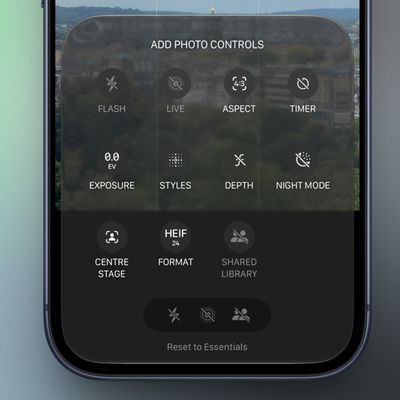
iOS 27: Customize Controls in the Camera App
In the iOS 27, available now, Apple has added the long-rumored ability to customize the Camera app's controls. Far from the rigid interface of previous iOS versions, you can now pick which controls appear in the Camera app, right down to the flash, exposure, timer, depth of field, photo styles, and resolution.
It's a notable development for a stock app that Apple has historically kept locked ...
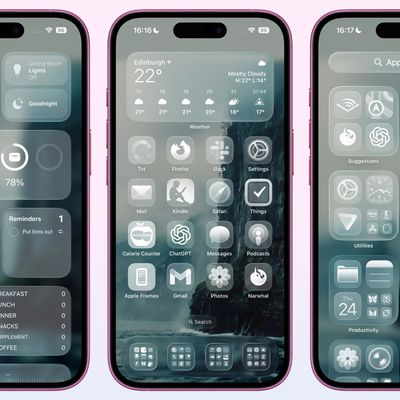
Get Clear App Icons on Your iPhone Home Screen
When Apple released iOS 26 in September 2025, it introduced the new Liquid Glass design overhaul, which adopts translucent elements throughout the system interface and in stock apps. iOS 27, available now, builds on Liquid Glass by refining the visual effect to make contents more readable and the interface more consistent, but the overall style remains the same.
On the Home Screen, the search ...
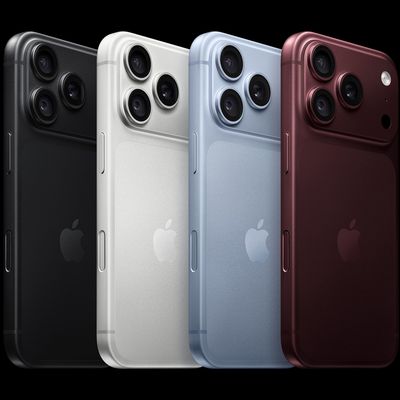
How to Pre-Order iPhone 18 Pro and Get the Model You Want
Apple unveiled the iPhone 18 Pro and iPhone 18 Pro Max on September 9 at its "Surprise and shine" event. If you're keen to be among the first to get your hands on one, here are some tips on how to give yourself the best chance. If you're looking to grab a foldable iPhone Duo, check out our separate guide.
Pre-orders for the new iPhone 18 Pro models opened on Saturday, September 12 at 5:00...
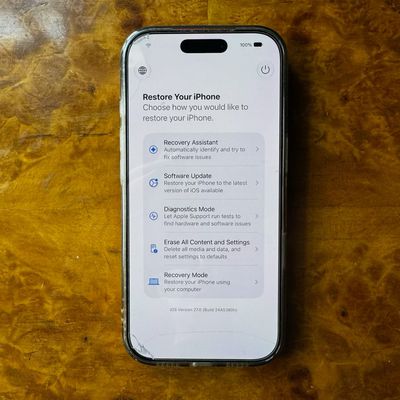
iOS 27: Access the New iPhone Recovery Screen
Since iOS 26, a malfunctioning iPhone has been able to boot itself into Recovery Assistant, with no Mac or PC required. However, you could only get there if your device failed to start up and dropped into recovery on its own.
In iOS 27, now available to download, Apple has removed that limitation, and you can now manually boot into a Mac-style recovery screen whenever you like.
The new...
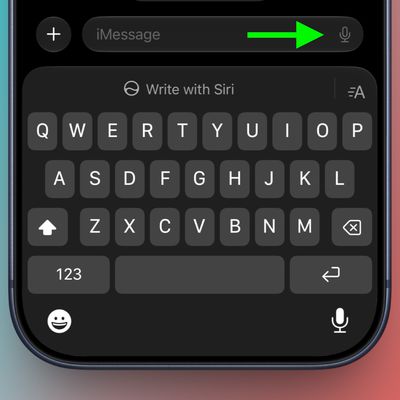
iOS 27 Lets You Hide the Messages Button Everyone Hits by Mistake
If you accidentally press the dictation or voice icon after sending a text in Messages, your music may pause while your iPhone starts listening. It's a small annoyance, but a frequent one, since the dictation/audio icon sits so close to the send arrow that stray taps are almost inevitable. In iOS 27 and iPadOS 27, Apple has finally given you a way to get rid of it.
The issue is one that...
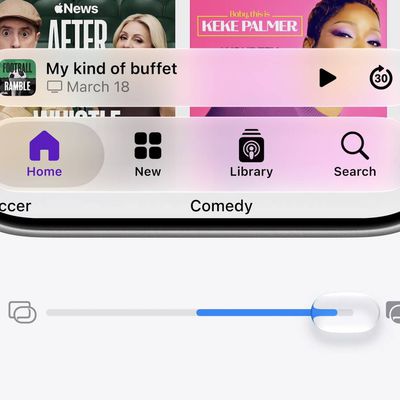
iOS 27: Tone Down Liquid Glass Transparency
If you've never been a fan of Liquid Glass – Apple's glass-like interface effect introduced in iOS 26 – then there's some good news in iOS 27. Apple has added a setting that lets you finely adjust the level of translucency, giving you more control over the look and feel of your iPhone.
Perhaps you find notifications too see-through, or you want to see more of your wallpaper through...
iOS 27 Finally Unlinks Alarm Volume From Your iPhone Ringer
For the better part of two decades, an iPhone's alarm volume has matched its ringer. In other words, if you slide the ringtone volume down to silence your iPhone overnight, you're also turning your alarm's volume down with it. That's no longer the case in iOS 27, which is available to download now.
Settings now includes an "Alarms and Timers" section with its own Match Ringtone Volume...
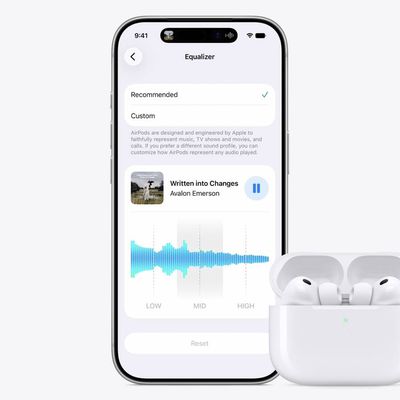
Set a Custom EQ for Your AirPods in iOS 27
Sony, Bose, and Sennheiser owners have been able to adjust the audio frequency spectrum of their headphones for years, whereas AirPods owners have had to make do with Apple's default tuning. That's no longer the case in iOS 27, which adds a three-band equalizer to the AirPods settings screen. You can download the new update in the Settings app via General ➝ Software Update.
It's worth...
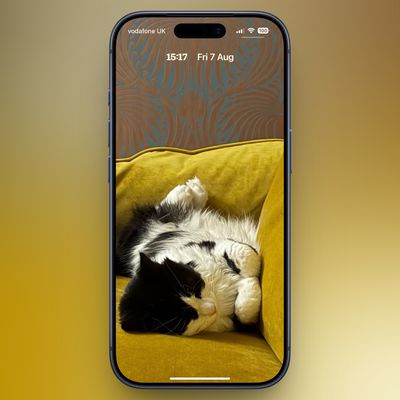
iOS 27's New Compact Clock Gives Your Wallpaper Room to Breathe
In iOS 26, Apple let you stretch the Lock Screen clock down your iPhone's display until it dwarfed everything else. In iOS 27, now available to download, Apple has a new clock option that does the opposite, with the introduction of a compact mode that shrinks the time to roughly the size of the date and tucks it into the row at the top of the screen.
The result is a Lock Screen that...

How to Watch Apple's 'Surprise and Shine' September 9 Event
Apple is hosting an online streaming event for the public and press on Wednesday, September 9 at 10:00 a.m. Pacific Time. The company is expected to announce new iPhone 18 Pro models and a new foldable "iPhone Duo" alongside new Apple Watch models, and potentially AirPods 5 and other products during the event, dubbed "Sunshine and Shine." Here's how you can watch it and when, wherever you are in...
Open the Current App's Settings From Control Center
Recently, Daring Fireball's John Gruber resurfaced an old tip that lets you quickly access the settings menu for the currently opened app on your iPhone. If you find it a hassle digging through the Settings app to find the associated app menu, this solution saves you the bother.
It uses a simple Shortcut – made conveniently downloadable courtesy of Quinn Nelson – that you can add to Control ...

How to Install macOS 27 Golden Gate Public Beta 6
Apple has made the sixth macOS 27 Golden Gate public beta available for testing before the new Mac operating system's official release in the fall. Keep reading to learn whether you should install it on your Mac, and if so, how to go about it.
Getting access to the macOS Golden Gate public beta is simple, and can be done by enrolling your Mac in Apple's free Apple Beta Software Program. The...
How to Install iOS 27 Public Beta 6 on Your iPhone
Apple this week made available the sixth public beta of iOS 27, bringing a more stable version of the software to a wider audience following lengthy testing by developers. Keep reading to learn how to prepare your device for the beta software and how to install it.
Signing up to get the iOS 27 or iPadOS 27 public beta is simple once you know how – it can be done by enrolling an...

All the Gestures to Trigger Reaction Effects in FaceTime
Since iOS 17 and iPadOS 17, Apple has included Messages-like reactions in FaceTime that lighten up your video with visual effects. But rather than triggering them with words, you can trigger them using physical hand gestures.
Subscribe to the MacRumors YouTube channel for more videos.
When you're on a FaceTime video call on an iPhone running iOS 17 or later, or an iPad running iPadOS 17 or...
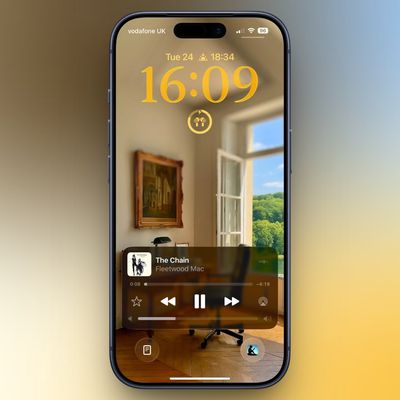
Add a Volume Slider to Your iPhone Lock Screen
Your iPhone's Lock Screen has built-in media playback controls that appear whenever music, a podcast, or other audio is playing. What you might not realize is that those controls can also include a volume slider that lets you adjust the volume without you having to unlock your iPhone or fumble for the physical buttons.
Originally, Apple included a volume slider in the Lock Screen media...
How to Downgrade From iOS 27 Beta to iOS 26
If you installed iOS 27 Beta or iPadOS 27 Beta through Apple's Developer Program, you may decide you want to downgrade because of usability or stability issues. Keep reading to learn how it's done.
Apple's beta versions of its major software updates can be buggy, especially the early releases. While that isn't necessarily the case for the latest iOS 27 beta, you may still find apps not...

Stop Others Using Your Instagram Photos in AI Prompts: Here's How
On July 8, Meta launched Muse Image, an AI image generator now built into Meta AI, Instagram, and WhatsApp. It can do the typical text-to-image generative trick, but one feature in particular is causing controversy: Anyone can mention (@) a public Instagram account inside the Meta AI app, and it will use that account's photos as the basis of an AI-generated image.
If your Instagram account...
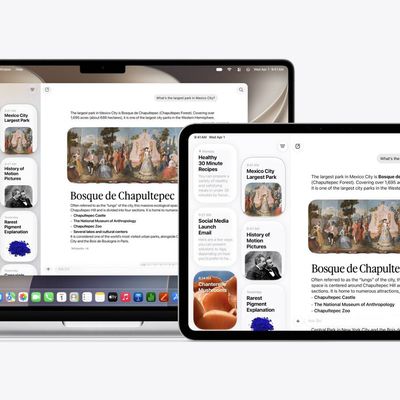
Bypass Siri AI Waitlist on macOS 27 Golden Gate Beta: Here's How
If you installed the macOS 27 Golden Gate developer beta and have signed up to the Siri AI waitlist but are still waiting to be accepted, there's a Terminal command workaround that enables the new virtual assistant on your Mac immediately.
If you're still reading, since you're on the first macOS 27 developer beta, we're assuming you are running it on a test machine, and not on your primary...














