Unlike other iPhones, iPhone Duo can enter StandBy mode without a charger. You only need to fold the Duo in half or in a tent orientation and you'll see widgets, music, calendar, weather, and more – even when you're away from a power source.
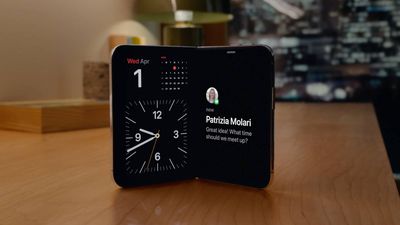
Here's how to set up iPhone Duo StandBy mode without a charger:
- Open Settings, tap StandBy, and make sure StandBy is turned on.
- On the same screen, tick off the folding positions you want to enable, and make sure the Only While Charging toggle is off.
- Now, lock your iPhone Duo, partially fold it like a book or a tent, and set it down on a flat surface.
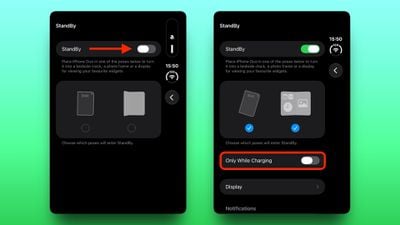
StandBy will start automatically in either supported position. When the display lights up, tap the current face, then swipe left or right to change it to a different style and content mode. Some faces also support swiping up and down to change content.
If you find StandBy to be a power drain, simply turn on Only While Charging to ensure the mode is restricted to charging sessions in future.
Related Roundup: iPhone Duo
Buyer's Guide: iPhone Duo (Buy Now)
Related Forum: iPhone