gfxCardStatus Allows Easy Control of MacBook Pro Graphics Cards - MacRumorsOpen MenuShow RoundupsShow Forums menuVisit ForumsOpen Sidebar
Skip to Content

gfxCardStatus Allows Easy Control of MacBook Pro Graphics Cards

by

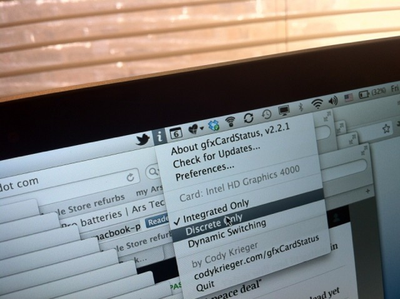
gfxCardStatus allows users to control which graphics card is enabled -- integrated or discrete -- on MacBook Pro models with multiple graphics cards. By more precisely controlling when each graphics card is enabled, users can improve system performance or battery life. gfxCardStatus is a menu bar application for OS X that allows MacBook Pro owners to view which GPU is in use at a glance, and switch between them on-demand.
NewImage
Ars Technica has much more, including the fact that the Retina MacBook Pro can be pushed to nearly 10 hours of battery life with some minor battery saving techniques:

I was consistently able to get between 8 and 8.5 hours of continuous use from the Retina MacBook Pro when running integrated graphics only. Turning down screen brightness to just two "dots," a technique I often use to maximize battery life when using a MacBook Air during conferences, caused OS X to report potential battery life as high as 10 hours. I simply didn't have the stamina to test that claim, but I did make one nine-hour run with OS X reporting a nine percent remaining battery capacity.

gfxCardStatus is a free download from creator Cody Krieger's website.

Top Rated Comments

yetanotherdave Avatar
182 months ago
I'll try this out on my mid 2009 mbp, where you have to log out, back in to switch cards... not hoping for much, but it'd be very nice!

edit: Wow! It works! Or at least claims to, will have to do some testing. Why can't apple make it work this easy??????
Score: 4 Votes (Like | Disagree)
181 months ago
Why can't apple make it work this easy??????
Because switching-on-the-fly was the main new feature of the next model...
Score: 3 Votes (Like | Disagree)
alphaod Avatar
182 months ago

Makes sense too, as if your at a desk your likely to be plugged in to the mains so why does it matter the dGPU is running or not?

Because most of the time the dGPU runs hotter than the integrated GPU hence my computer spends more time sounding like a jet engine.
Score: 2 Votes (Like | Disagree)
kockgunner Avatar
182 months ago
This app saved me when by 2010 MBP with the 330GT graphics card's display kept turning black only solved by a reboot. The problem didn't appear on the Intel chip so I used this program to keep it on Intel until I had the chance to go to the Apple store to replace the logic board.
Score: 2 Votes (Like | Disagree)
182 months ago
I have been using this for a while now on my early 2011 MBP. It works good, i only wish it could somehow force the integrated HD3000 when connected to an external display. Because now it always goes to the discrete with an external display.
Score: 2 Votes (Like | Disagree)
AriX Avatar
181 months ago
For YEARS?
How many people have multiple graphics cards?
Haha... well, now that you mention it, I guess it's only been about 2 years :)
Most 15"/17" MacBook Pros sold since 2009, if I remember correctly, have 2 graphics cards - one discrete card that is very powerful, but somewhat power-hungry, and an integrated one that is much less powerful but draws less power.

Mac OS X automatically switches between the available graphics cards. When you connect an external display, load something up in Flash, start a game, etc. the OS will switch to the better graphics card, and when you're done, it will switch back to save power. But it's not perfect, and a lot of apps will inadvertently force the system to use the better graphics card. For example, Google Chrome and Skype, among many others. gfxCardStatus provides a lot of control over which card is in use at any given time, and can also just notify you when the system decides that you should be using a different graphics card, and shows you why exactly the switch was made (under "dependencies"). It's a great utility.
Score: 1 Votes (Like | Disagree)

Popular Stories

macOS 27 on MacBook Pro

Apple Says macOS 27 Won't Be Compatible With These Macs

Wednesday June 3, 2026 8:29 am PDT by
During WWDC 2025, Apple revealed that macOS 26 Tahoe would be the final major macOS version for Intel-based Macs. macOS 27 will be compatible with Apple silicon Macs only, meaning that you will need a Mac with an M-series chip or a MacBook Neo with an A18 Pro chip in order to install the software update. Apple will unveil macOS 27 during its WWDC 2026 keynote this Monday, June 8, and the...
MacBook Neo on Yellow Feature

MacBook Neo is So Popular That Apple Reportedly Doubled Production

Wednesday June 3, 2026 9:24 am PDT by
On an earnings call in late April, Apple's CEO Tim Cook said that customer response to the MacBook Neo was "off the charts," and the popularity of the laptop has reportedly led the company to significantly boost production. Apple supply chain analyst Ming-Chi Kuo this week said he believes that MacBook Neo shipments to Apple were doubled from an initial target of 5 million units to 10...
iphone 18 pro blue%402x

iPhone 18 Pro: Dark Cherry, Light Blue, and Dark Gray Chassis Leaked [Update]

Thursday June 4, 2026 5:18 am PDT by
Update: Since publication, new information has come to light suggesting the images have been AI-manipulated and are not in fact iPhone 18 Pro chassis parts. The original article follows. The color options Apple is reportedly planning for the upcoming iPhone 18 Pro and ‌iPhone 18 Pro‌ Max have appeared online today in the form of images of chassis parts of unknown authenticity....