

New 'Vidyo' iOS App Allows Users to Record Their iPhone Screens [Update: Pulled] - MacRumorsOpen MenuShow RoundupsShow Forums menuVisit ForumsOpen Sidebar
Skip to Content

New 'Vidyo' iOS App Allows Users to Record Their iPhone Screens [Update: Pulled]

by

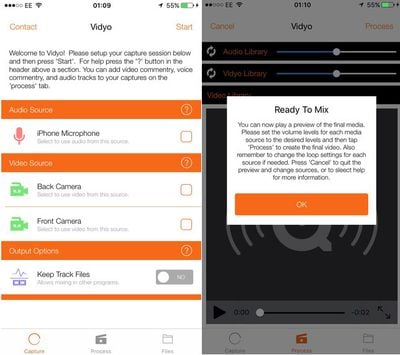
Innovative Developers LTD has launched a new app called "Vidyo!" that allows users to easily capture video of their iPhone screen right on the device. Users can capture their screen within any app and edit or add background music and commentary to their video captures.
vidyo
According to MacStories, the app works by simulating an AirPlay mirroring connection to the app itself. Capturing begins when a user toggles "Device Screen" within the app, exits the app and then chooses Vidyo! as an AirPlay source in Control Center.

While the app is currently in the App Store, it's unclear whether Apple will pull the app as it simulates AirPlay mirroring. Apple doesn't currently provide APIs for iOS devices to act as AirPlay receivers and, according to App Store Review Guideline 2.5, apps can be rejected for using non-public APIs.

Vidyo! is available in the App Store for $4.99. [Direct Link]

Update 1/7 9:30 a.m.: Vidyo has been removed from the App Store and is no longer available for download.


Tag: Vidyo

Top Rated Comments

Seoras Avatar
136 months ago
You can do this for free using your Mac and QuickTime Player.
Plug your iOS device into the Mac, launch QT and select menu File->New Movie Recording
You'll probably see yourself as it defaults to the web cam.
On the right of the red circle record button on the video preview screen is a reversed ^ icon.
Click on it for a drop down menu allowing you to choose the video source.
Score: 20 Votes (Like | Disagree)
136 months ago
Why must Apple approve things and then decide a week later that it goes against their rules. It's kind of annoying. Just review them properly the first time.
That's kind of like asking why do people have to make mistakes in anything and not just do it all right the first time? Basic reality seems to be the answer.
Score: 9 Votes (Like | Disagree)
ArtOfWarfare Avatar
136 months ago
Seems like a privacy risk. What's preventing a malicious app that uses this same technique from recording everything that you are doing?
You need to go to Control Center and set that Air Play should send video to the app. So they can't do it without you knowing - you have to manually turn on Air Play.

Also, the status bar turns blue, so you're aware while its recording.

I had $30 in the App Store that I've had sitting there for 4 years... So I just went ahead and spent $5 on the app. Not sure if I'll ever need it or not, but the $5 wasn't doing me any good just sitting in my iTunes Account.
Score: 7 Votes (Like | Disagree)
136 months ago
You can do this for free using your Mac and QuickTime Player.
Plug your iOS device into the Mac, launch QT and select menu File->New Movie Recording
You'll probably see yourself as it defaults to the web cam.
On the right of the red circle record button on the video preview screen is a reversed ^ icon.
Click on it for a drop down menu allowing you to choose the video source.
Now imagine not having to rely on a Mac in this post-PC era.

Yeah.
[doublepost=1452147219][/doublepost]These are the types of apps I'd like to start seeing more of on the AppStore. iOS is becoming more open and so is the AppStore, but it still feels like they're just scratching the surface.
Score: 6 Votes (Like | Disagree)
LCPepper Avatar
136 months ago
Not sure this is worth buying just in case Apple pulls it...
Score: 6 Votes (Like | Disagree)
MonstaMash Avatar
136 months ago
Seems like a privacy risk. What's preventing a malicious app that uses this same technique from recording everything that you are doing?
Score: 4 Votes (Like | Disagree)

Popular Stories

macOS 27 on MacBook Pro

Apple Says macOS 27 Won't Be Compatible With These Macs

Wednesday June 3, 2026 8:29 am PDT by
During WWDC 2025, Apple revealed that macOS 26 Tahoe would be the final major macOS version for Intel-based Macs. macOS 27 will be compatible with Apple silicon Macs only, meaning that you will need a Mac with an M-series chip or a MacBook Neo with an A18 Pro chip in order to install the software update. Apple will unveil macOS 27 during its WWDC 2026 keynote this Monday, June 8, and the...
MacBook Neo on Yellow Feature

MacBook Neo is So Popular That Apple Reportedly Doubled Production

Wednesday June 3, 2026 9:24 am PDT by
On an earnings call in late April, Apple's CEO Tim Cook said that customer response to the MacBook Neo was "off the charts," and the popularity of the laptop has reportedly led the company to significantly boost production. Apple supply chain analyst Ming-Chi Kuo this week said he believes that MacBook Neo shipments to Apple were doubled from an initial target of 5 million units to 10...
iphone 18 pro blue%402x

iPhone 18 Pro: Dark Cherry, Light Blue, and Dark Gray Chassis Leaked [Update]

Thursday June 4, 2026 5:18 am PDT by
Update: Since publication, new information has come to light suggesting the images have been AI-manipulated and are not in fact iPhone 18 Pro chassis parts. The original article follows. The color options Apple is reportedly planning for the upcoming iPhone 18 Pro and ‌iPhone 18 Pro‌ Max have appeared online today in the form of images of chassis parts of unknown authenticity....













