

Apple today released OS X 10.11.4 to the public, marking the launch of the third update to the El Capitan operating system that was first released on September 30. In testing since January 11, OS X 10.11.4 comes two months after the release of OS X 10.11.3.
The OS X 10.11.4 update is available to all OS X El Capitan users and can be downloaded through the Software Update mechanism in the Mac App Store.

OS X 10.11.4 introduces Live Photos support in the Messages app, expanding the number of ways Live Photos can be viewed on a Mac. Prior to OS X 10.11.4, Live Photos could only be viewed through the Mac Photos app. Live Photos in Messages are denoted by the concentric circle icon that marks a Live Photo, and a click on a Live Photo will bring up a mini photo viewer that will play the photo animation.

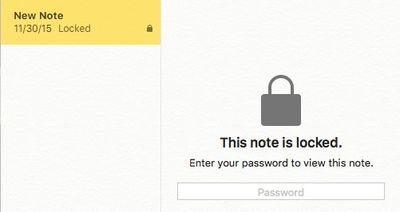
The update includes support for password protected Notes, a feature that is also available within iOS 9.3. With password protection, individual notes within the Notes app can be locked with a password that must be entered before content can be viewed. Also new is an option to import notes from other note-taking apps like Evernote.
Aside from the minor new features in Notes an Messages, OS X 10.11.4 includes no other obvious outward-facing changes, instead focusing primarily on under-the-hood performance improvements and bug fixes to address issues that have surfaced since the launch of OS X 10.11.3. Here's a full list of features and bug fixes included, according to the release notes:
- Adds the ability to passcode-protect notes containing personal data in Notes
- Adds the ability to sort notes alphabetically, by date created, or date modified in Notes
- Adds the ability to import Evernote files into Notes
- Adds support for sharing Live Photos between iOS and OS X via AirDrop and Messages
- Addresses an issue that may cause RAW images to open slowly in Photos
- Adds the ability for iBooks to store PDFs in iCloud, making them available across all your devices
- Fixes an issue that prevented loading Twitter t.co links in Safari
- Prevents JavaScript dialogs from blocking access to other webpages in Safari
- Fixes an issue that prevented the VIPs mailbox from working with Gmail accounts
- Fixes an issue that caused USB audio devices to disconnect
- Improves the compatibility and reliability of Apple USB-C Multipart Adapters
Almost all of Apple's OS X El Capitan updates have been focused on improving performance rather than introducing new features and OS X 10.11.4 is no exception.
Update: There are security updates available for OS X Yosemite and OS X Mavericks.



















Top Rated Comments
http://swcdn.apple.com/content/downloads/39/52/031-53826/4eea1jmuta47vh33hyakz1ajyqn6dyvu2f/OSXUpdCombo10.11.4Auto.pkg
Don't forget to install the firmware update first though:
http://swcdn.apple.com/content/downloads/41/46/031-53822/ohlz4gfgdao83g9sqz3loxwdpy41c12jrz/FirmwareUpdate.pkg
Also for faster download here is the delta for those on 10.11.3 (or 10.11.4 betas):
http://swcdn.apple.com/content/downloads/41/46/031-53822/ohlz4gfgdao83g9sqz3loxwdpy41c12jrz/OSXUpd10.11.4.pkg
This delta is the one I'll use because it is faster than the combo. But again remember to install the firmware update first.
Build number is 15E65.
Alternative links:
delta: https://support.apple.com/kb/DL1868?viewlocale=en_US&locale=en_US
combo: https://support.apple.com/kb/DL1869?viewlocale=en_US&locale=en_US
You don't need to install the firmware update if you use these alternative links because it will be incorporated into it.