

WhatsApp Updates With New Group Features and More Admin Controls - MacRumorsOpen MenuShow RoundupsShow Forums menuVisit ForumsOpen Sidebar
Skip to Content

WhatsApp Updates With New Group Features and More Admin Controls

by

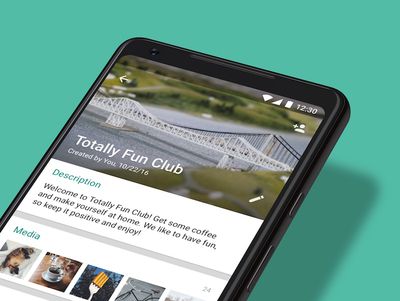
Facebook-owned chat app WhatsApp today updated its iOS and Android applications with a collection of new features aimed at making group chats more in-depth and easier to catch up with. The update also introduces revamped administrator controls to enhance a group's privacy during chats.
whatsapp may 2018 update
To start, users can set a short blurb under their group info to highlight the "purpose, guidelines, or topics" that will be the main focus of the discussions. This way, when a new member joins the blurb will appear at the top of the chat and they'll understand the general goal of the group.

When users have been away from a group chat for a period of time, they can now catch up on any messages that specifically mentioned them, in a similar vein to Discord and Slack. Users can find the catch-up feature behind a new @ button at the bottom right corner of chat. Additionally, a new participant search lets users find anyone in their group through a search bar on the group info page.

whatsapp update may 2

Groups have been an important part of the WhatsApp experience, whether it's family members connecting across the globe or childhood friends staying in touch over the years. There are also people coming together in groups on WhatsApp like new parents looking for support, students organizing study sessions, and even city leaders coordinating relief efforts after natural disasters. Today, we're sharing improvements that we've made to groups.

For admins, there is a new control to restrict which members can change the group's subject, icon, and description. Admins can also now remove admin permissions of other group participants, while group creators can no longer be kicked out of the group they started. The company said that it has also introduced a safeguard that will protect users from repeatedly being added to groups they have already left.

The updates are rolling out today for WhatsApp on iOS [Direct Link] and Android.

Top Rated Comments

thewap Avatar
105 months ago
Deleted WhatsApp after the facebook takeover.
Score: 3 Votes (Like | Disagree)
105 months ago
Deleted WhatsApp after the facebook takeover.
I used it briefly recently as a work group is on it. After using Telegram for several years it is like stepping back in time, it is so frustrating to use, it is astonishing to me that it is as popular as it is. Even more so with Zuckerberg snooping.
Score: 2 Votes (Like | Disagree)

Popular Stories

Whatsapp Feature

WhatsApp Plus Lands on iPhone With Custom Themes, Icons, and More

Monday May 11, 2026 2:41 am PDT by
WhatsApp has started rolling out its paid WhatsApp Plus subscription to iOS, following beta testing of the new personalization-focused tier amongst a small group of users, reports WABetaInfo. The plan is light on practical features, and is aimed more at heavier users who want to customize various aspects of the WhatsApp experience. It gives you access to premium sticker packs with fullscreen ...
meta ai incognito chat

Meta AI App Gets 'Incognito Chat' as OpenAI Faces Lawsuits Over Stored Chat Logs

Wednesday May 13, 2026 1:23 pm PDT by
The Meta AI app and Meta AI on WhatsApp have a new "incognito chat" option, which Meta CEO Mark Zuckerberg said is a "completely private way to interact with AI." Zuckerberg also said that Meta AI's incognito mode is the first major AI product where there is no log of conversations stored on servers. Zuckerberg likened the feature to end-to-end encryption, and said no one will be able to...
whatsapp wabetainfo share sheet%402x

WhatsApp Begins Rolling Out Redesigned Media Share Sheet on iOS

Tuesday May 19, 2026 7:46 am PDT by
WhatsApp is rolling out a new media attachment sheet on iOS, providing iPhone users with a faster way to share their most recent files without losing sight of the chat. Usually in WhatsApp, sharing media within a chat requires you to tap a plus button to reveal the app's custom share sheet, and then tap into photos to see your full library, which takes over most of the screen. As spotted...















