

Darkroom for iOS Gains Photo Editing Extension, Drag & Drop, and Files App Support - MacRumorsOpen MenuShow RoundupsShow Forums menuVisit ForumsOpen Sidebar
Skip to Content

Darkroom for iOS Gains Photo Editing Extension, Drag & Drop, and Files App Support

by

Darkroom for iOS, a popular photo editing app, today received a major update that adds a lot of new functionality to improve the way it interacts with the iPhone and the iPad.

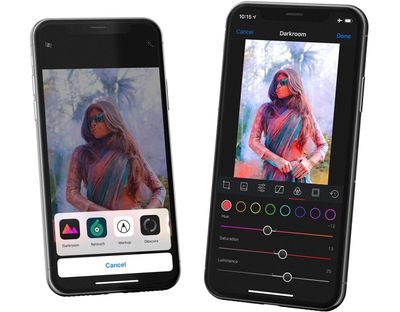
In the Photos app, you will find a new photo editing extension for using Darkroom's tools to edit images without leaving the ‌Photos‌ app. You can tap on the (...) menu when editing an image to get to the Darkroom settings.
darkroom1
A new Share Extension within the ‌Photos‌ app will allow you to choose an "Edit in Darkroom" feature to open up Darkroom from ‌Photos‌ for the full editing experience. There's also a Copy to Darkroom feature that you can use to transfer images from apps like Dropbox or Files over to Darkroom for editing purposes.

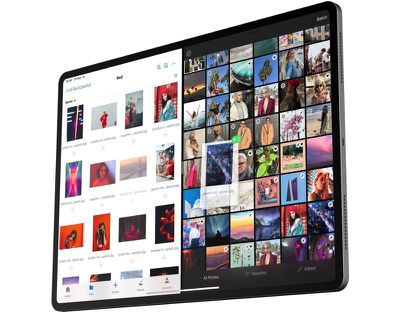
On the ‌iPad‌, Drag & Drop support has been implemented, so you can drag and drop photos into the Darkroom library to start a photo editing session while in Split-View mode on a supported device. You can Drag & Drop a single photo or multiple photos.
darkroom2
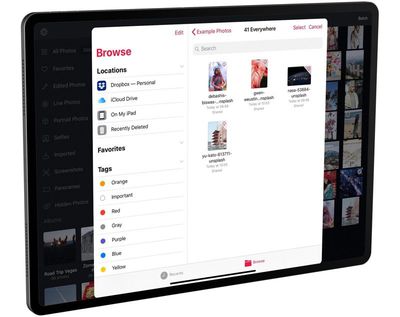
When using Darkroom, the Album Picker in the app has been updated to work with the Files app, so you can browse various images that you've stored in files or in third-party storage apps like Dropbox. Imported files are stored in a new Imported Smart Album.
darkroom3
Many other small improvements have been added to Darkroom, including sorting photos by Date Added, Batch tool enhancements on the ‌iPad‌, better responsiveness, and a change that disables location data by default.

Darkroom can be downloaded from the App Store for free, but unlocking all of the app's tools will cost $9.99. [Direct Link]


Popular Stories

macOS 27 on MacBook Pro

Apple Says macOS 27 Won't Be Compatible With These Macs

Wednesday June 3, 2026 8:29 am PDT by
During WWDC 2025, Apple revealed that macOS 26 Tahoe would be the final major macOS version for Intel-based Macs. macOS 27 will be compatible with Apple silicon Macs only, meaning that you will need a Mac with an M-series chip or a MacBook Neo with an A18 Pro chip in order to install the software update. Apple will unveil macOS 27 during its WWDC 2026 keynote this Monday, June 8, and the...
MacBook Neo on Yellow Feature

MacBook Neo is So Popular That Apple Reportedly Doubled Production

Wednesday June 3, 2026 9:24 am PDT by
On an earnings call in late April, Apple's CEO Tim Cook said that customer response to the MacBook Neo was "off the charts," and the popularity of the laptop has reportedly led the company to significantly boost production. Apple supply chain analyst Ming-Chi Kuo this week said he believes that MacBook Neo shipments to Apple were doubled from an initial target of 5 million units to 10...
iphone 18 pro blue%402x

iPhone 18 Pro: Dark Cherry, Light Blue, and Dark Gray Chassis Leaked [Update]

Thursday June 4, 2026 5:18 am PDT by
Update: Since publication, new information has come to light suggesting the images have been AI-manipulated and are not in fact iPhone 18 Pro chassis parts. The original article follows. The color options Apple is reportedly planning for the upcoming iPhone 18 Pro and ‌iPhone 18 Pro‌ Max have appeared online today in the form of images of chassis parts of unknown authenticity....















