Netflix is Finally Letting You Turn Off Those Annoying Autoplay Previews - MacRumorsOpen MenuShow RoundupsShow Forums menuVisit ForumsOpen Sidebar
Skip to Content

Netflix is Finally Letting You Turn Off Those Annoying Autoplay Previews

by

Netflix today announced the launch of a new toggle that will let Netflix users turn off autoplay previews, which has been a controversial Netflix feature for years now.

When browsing through Netflix, the service is designed to play previews of the content that you stop on, which usually includes a trailer. Until today, Netflix has offered no option to turn these previews off.
netflixautoplay
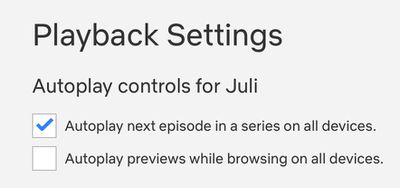
As of now, though, you can disable them by opening up Netflix, selecting your profile, selecting Playback Settings and toggling off "Autoplay previews while browsing on all devices."


Changing the setting will prevent content from playing while you swap through different shows and movies. The setting will need to be enabled on a per-profile basis as it is not account wide.


Tag: Netflix

Top Rated Comments

twistedpixel8 Avatar
80 months ago

Now where is my god damn „already watched“ button
I’d also like a button for “I started watching but it was ****. Stop bugging me to finish watching it.”
Score: 12 Votes (Like | Disagree)
MisterSavage Avatar
80 months ago
I couldn't turn this feature off fast enough when I heard about this.
Score: 7 Votes (Like | Disagree)
itsmilo Avatar
80 months ago
Now where is my god damn „already watched“ button
Score: 6 Votes (Like | Disagree)
iBreatheApple Avatar
80 months ago
I actually prefer this and for years I wished content had trailers. Conversely, I hate it when clicking on a show for the first time auto starts the first episode.
Score: 5 Votes (Like | Disagree)
randolorian Avatar
80 months ago
This was so annoying that I found myself avoiding Netflix. Maybe I won't cancel now. ;-)
Score: 5 Votes (Like | Disagree)
MisterSavage Avatar
80 months ago

I’d also like a button for “I started watching but it was ****. Stop bugging me to finish watching it.”
I literally just finished looking up how to do this. You have to do it from a web browser. Go into the menu, select "viewing activity", and then hit the circle with a line through it next to the item you don't care about. They say within 24 hours they'll stop suggesting you finish watching it.
Score: 4 Votes (Like | Disagree)