

New ElevationHub Combines Cord Management With SD Card Slot and USB-A Port - MacRumorsOpen MenuShow RoundupsShow Forums menuVisit ForumsOpen Sidebar
Skip to Content

New ElevationHub Combines Cord Management With SD Card Slot and USB-A Port

by

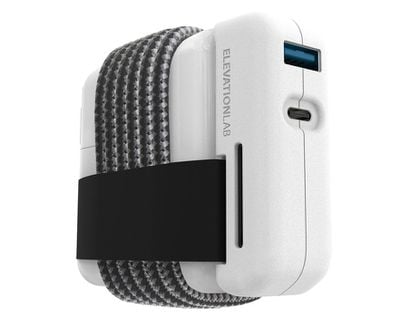
ElevationLab today announced the launch of the ElevationHub, a unique product that combines cable management with an SD card slot and USB-A 3.0 port.
elevationhub1
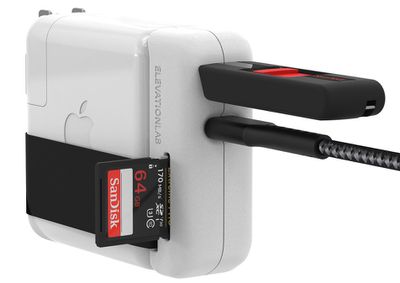
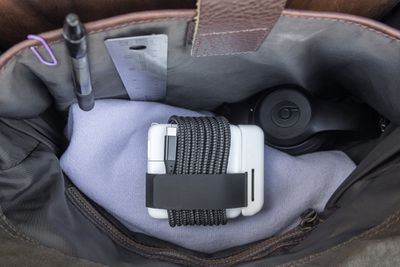
The ElevationHub attaches to the power adapter of a MacBook Pro or MacBook Air, adding a rubberized velcro-lined strap that keeps the USB-C cord wound up while also delivering extra ports that MacBook models no longer have.
elevationhub2
ElevationLab says that the ElevationHub was designed to "perfectly meet the geometry" of USB-C MacBook chargers, turning it into a single unit. It works with the 30W, 61W, 87W, and 96W power adapter options from Apple, though passthrough charging is limited to 61W.

elevationhub3
The ElevationHub can be purchased standalone or with a six-foot braided USB-C 3.0 cord available for an extra $10. ElevationLab says the cord provides 10x faster data speeds (5Gb/s) than the USB-C cable that ships with the MacBook.
elevationhub4
The ElevationHub can be pre-ordered from the ElevationLab website for $49.95 with the braided USB-C cord or $39.95 without it. Pre-sale customers can get a 20 percent discount with the promo code TIDY, and orders will ship out in mid-July.


Top Rated Comments

macobyte Avatar
76 months ago
Finally, a USB-C hub that puts the extra ports six feet away from my laptop and a foot off the ground under my desk. Ordering now!
Score: 8 Votes (Like | Disagree)
Wahlstrm Avatar
76 months ago
Perfect for people who use TimeMachine with their MacBook, automatic backup with every charge.
Score: 6 Votes (Like | Disagree)
76 months ago

So it can't even charge a 16" MacBook Pro properly...
That depends on what your standard for ‘properly’ is. If charging a 16” MBP takes two hours to reach 80% (after that the charging speed slows down anyway such that the difference between 61 and 96 W becomes basically irrelevant) while the device is at sleep, than it takes about three hours with a 61 W charger. The time to 100% might then differ between three and four hours for these two chargers. Of course, that difference becomes larger the more you use the computer while it is charging.

And if your criteria for ‘charging properly’ is charges-at-the-maximum-speed-the-device-will-allow, then a lot of iPhones have shipped with a charger that can’t even charge them properly (all iPhones that came with a 5-W charger since, I think, the iPhone 7, which includes even the iPhone 11).
Score: 5 Votes (Like | Disagree)
76 months ago


* USB-C (passthrough up to 61W, USB 3.0)

So it can't even charge a 16" MacBook Pro properly...
Score: 3 Votes (Like | Disagree)
filmbuff Avatar
76 months ago

“passthrough charging is limited to 61W”

Rendering it mostly useless for MacBook Pro users.
Your 16" Macbook will charge fine at 61W. Just slower. Your 13" Macbook will charge at 18W, I've done it. Just very slowly.
Score: 2 Votes (Like | Disagree)
flottenheimer Avatar
76 months ago
Great thinking. Truly innovative design — I love it!
Score: 2 Votes (Like | Disagree)
















