Face ID and Touch ID Logins Coming to Websites With Safari Web Authentication API
Apple allows Touch ID and Face ID to be used in lieu of a password to access sensitive apps like those for banking or password management, and in the future, Face ID and Touch ID will also be able to be used for authentication purposes when logging into a website.
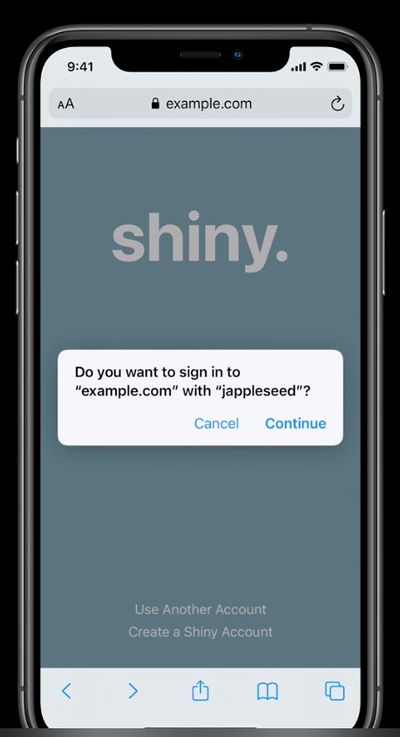
Apple outlines the feature in a WWDC20 engineering session called "Meet Face ID and Touch ID for the web," which covers how web developers can use Face ID and Touch ID on their websites with the Web Authentication API.
An initial login on a website that supports the feature will require a username, passcode, and two-factor authentication code to be entered, but after that, Face ID or Touch ID can handle the login process. Signing in this way will require users to click on the sign in button, after which Safari will ask for confirmation. With the confirmation, a Face ID (or Touch ID) scan is done, and the user is able to log in.
Apple says Face ID and Touch ID authentication is beneficial because it's frictionless, simple, and secure. The online session described it as "phishing resistant."
But more importantly, it is Phishing-resistant. Safari will only allow public credentials created by this API to be used within the Web site they were created, and the credential can never be exported out from the authenticater they were created in as well. This means that once a public credential has been provisioned, there is no way for a user to accidentally divulge it to another party. Cool right?! This is the overview of the Web Authentication standard.
Additional detail about the feature, including instructions on how web developers can enable it, can be found in the full video along with the accompanying resources.
Popular Stories
Bloomberg's Mark Gurman has high expectations for Apple's first foldable iPhone.
In his Power On newsletter today, he said the foldable iPhone will be "the most significant overhaul in the iPhone's history."
"iPhone 4, iPhone 6 and iPhone X were clearly a big deal, but this is a whole new design," he said.
Like Samsung's Galaxy Z Fold 7, the foldable iPhone will reportedly open up like ...
iOS 26.5 is now available for developers, and while it doesn't include any new Siri capabilities, there are some major changes for the European Union, and smaller tweaks for features available worldwide.
Suggested Places
In the Maps app, there's a new "Suggested Places" feature that recommends locations to visit based on trending places nearby and recent searches. When Apple launches ads in ...
Apple has been celebrating its upcoming 50th anniversary by hosting surprise performances and other events around the world over the past few weeks, and now Bloomberg's Mark Gurman has revealed details about the company's grand finale.
In a social media post, Gurman said Apple's celebrations will conclude this week with a finale at its Apple Park headquarters for employees.
A special...
Popular Stories
Bloomberg's Mark Gurman has high expectations for Apple's first foldable iPhone.
In his Power On newsletter today, he said the foldable iPhone will be "the most significant overhaul in the iPhone's history."
"iPhone 4, iPhone 6 and iPhone X were clearly a big deal, but this is a whole new design," he said.
Like Samsung's Galaxy Z Fold 7, the foldable iPhone will reportedly open up like ...
iOS 26.5 is now available for developers, and while it doesn't include any new Siri capabilities, there are some major changes for the European Union, and smaller tweaks for features available worldwide.
Suggested Places
In the Maps app, there's a new "Suggested Places" feature that recommends locations to visit based on trending places nearby and recent searches. When Apple launches ads in ...
Apple has been celebrating its upcoming 50th anniversary by hosting surprise performances and other events around the world over the past few weeks, and now Bloomberg's Mark Gurman has revealed details about the company's grand finale.
In a social media post, Gurman said Apple's celebrations will conclude this week with a finale at its Apple Park headquarters for employees.
A special...