Waze Now Lets Users Send Directions From Desktop to Mobile App - MacRumorsOpen MenuShow RoundupsShow Forums menuVisit ForumsOpen Sidebar
Skip to Content

Waze Now Lets Users Send Directions From Desktop to Mobile App

Google-owned navigation app Waze now lets users send directions from the Waze website straight to the mobile app, thanks to an update announced this week.
waze live web phone
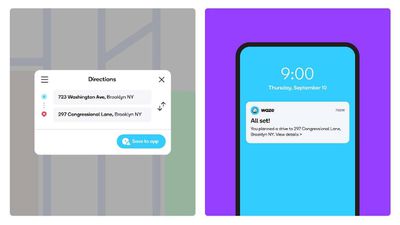
The change means Waze users can now plan and view their journey on a bigger screen via the Waze Live Map, which features real-time traffic information, and then send the details from the desktop to the Waze app on their iPhone.

To use the new feature, make sure you've updated to the latest version of Waze, then follow the steps below:

  1. On a desktop web browser, visit the Waze Live Map.
  2. Click the Log In button in the top-right corner.
  3. Scan the QR code that appears with your iPhone's camera to log in.
  4. Plan your route by setting an origin, a destination point, and when you want to travel.

  5. Click Save to App.
  6. Open the Waze app on your iPhone and you should see the pre-planned route ready to follow. If you planned to arrive at a particular time, the app will send you a reminder of when you need to leave, taking into account real-time traffic conditions.

Waze can be downloaded from the App Store for free. [Direct Link]

Tag: Waze

Popular Stories

Apple Card iPhone 16 Pro Feature

Apple Card Promo to Offer Free AirPods Pro 3

Friday May 15, 2026 8:59 am PDT by
Starting as early as next week, customers who sign up for an Apple Card at Apple's retail stores in the U.S. will receive $249 cash back when they purchase AirPods Pro 3, according to Bloomberg's Mark Gurman. The promotion has yet to be officially announced by Apple, so exact terms and conditions are not available at this time. AirPods Pro 3 are priced at $249 in the U.S., so customers who...
Apple WWDC25 iOS 26 CarPlay Light mode 250609

Six Popular iPhone Apps Now Available on CarPlay

Thursday May 14, 2026 9:10 am PDT by
Apple's CarPlay system for accessing iPhone apps on a vehicle's dashboard screen has received six popular apps in recent weeks: ChatGPT, Perplexity, Grok, Google Meet, WhatsApp, and the indie artist streaming platform Audiomack. Make sure you have the latest version of each app and they will automatically appear on CarPlay. ChatGPT Starting with iOS 26.4, CarPlay supports voice-based...
ipad mini 7 blue

OLED iPad Mini: Release Date, Pricing, and What to Expect

Thursday May 14, 2026 5:08 am PDT by
According to the latest rumors, Apple is close to launching its next-generation iPad mini. So what should we expect from the successor to the iPad mini 7 that Apple released over a year ago? Read on to find out. Processor and Performance Apple is working on a next-generation version of the iPad mini (codename J510/J511) that features the A19 Pro chip, according to information found in code...

Top Rated Comments

74 months ago
I use Waze on a daily basis. I’ve tried to use Apple Maps but it’s not the same. Having real time reports that a cop is ahead or an accident reported is too important not to have.

Does Apple Maps have live traffic updates?
Score: 5 Votes (Like | Disagree)
74 months ago

Apple Maps has very good live traffic. It just looks different than Google where Google likes to also show you were there isn’t traffic (green) and Apple only shows you where it is.

Apple also does a better job of NOT showing “traffic” at areas like stop signs or traffic lights unless there is a true back-up outside of the normal flow in those areas.
I disagree. The crowdsourced alerts (police and accidents) are the most valuable, but those also happen to be the alerts that Apple Maps doesn’t support. Apple Maps integration with Apple Watch makes it great if you don’t have CarPlay or for walking directions, but the value of having alerting and near real-time data feeding in from drivers far surpass the data Apple is getting from DOTs.

In addition, I find Apple Maps‘ ”selective” use of traffic colors confusing and inconsistent. As much as I hate to admit it, I prefer the way Google shows traffic lines/colors for all roads where they have data.
Score: 4 Votes (Like | Disagree)
74 months ago

What? I can do this since Apple Map launched on a Mac.
We know this. This is for people that use Waze. Jesus.
Score: 4 Votes (Like | Disagree)
74 months ago

Still can't choose it as defaultnNav app in Carplay, pretty sure Apple let you do that about 12 months ago. The only app I can see that does is Magic Earth.
Google Maps now works with the CarPlay Dashboard as of a week or two ago. But I agree, I’ve only been waiting for Waze support...

This is a cool feature, though. Reminds me of the 2000s, when no one had cellular data, this was how you got trip and map data onto your Pocket PC or car. I used to plan a trip on the PC and the app or website would give you a file to load onto an SD card. Or for the car, it pushed OTA but was slow and you could only store 5 at a time.
Score: 4 Votes (Like | Disagree)
oneMadRssn Avatar
74 months ago

I use Waze on a daily basis. I’ve tried to use Apple Maps but it’s not the same. Having real time reports that a cop is ahead or an accident reported is too important not to have.

Does Apple Maps have live traffic updates?
Apple Maps does have live traffic updates, which are imo just as good as any other (Google, Waze). Apple Maps is missing the speed trap alerts though, which is huge.

However, in my area Apple maps shows whether the intersection ahead is a light or a stop sign. I find that pretty helpful when navigating suburban grids and I wish other apps had that.
Score: 2 Votes (Like | Disagree)
MozMan68 Avatar
74 months ago
I use Waze on a daily basis. I’ve tried to use Apple Maps but it’s not the same. Having real time reports that a cop is ahead or an accident reported is too important not to have.

Does Apple Maps have live traffic updates?
Apple Maps has very good live traffic. It just looks different than Google where Google likes to also show you were there isn’t traffic (green) and Apple only shows you where it is.

Apple also does a better job of NOT showing “traffic” at areas like stop signs or traffic lights unless there is a true back-up outside of the normal flow in those areas.
Score: 2 Votes (Like | Disagree)