

'Controlly' App Turns a Game Controller Into a Remote Control for Macs - MacRumorsOpen MenuShow RoundupsShow Forums menuVisit ForumsOpen Sidebar
Skip to Content

'Controlly' App Turns a Game Controller Into a Remote Control for Macs

Controlly, a new app available in the Mac App Store, is designed to turn a gaming controller into a full-featured remote control that can be used with a Mac.
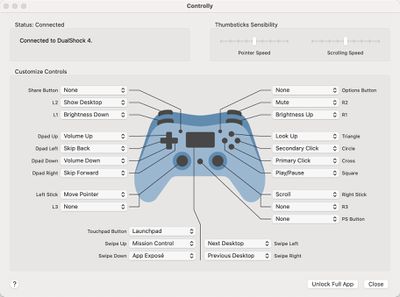
controlly app
With the app installed and a gaming controller connected, the different keys on the controller can be mapped to various functions such as displaying the desktop, adjusting screen brightness, tweaking volume, controlling media playback, accessing Launch Pad, launching Mission Control, and more.

There's even an option to use the controller in lieu of a mouse with controls for moving the mouse pointer, clicking, right clicking, and scrolling. You can essentially set any function on the Mac to be performed with a click of a controller button, which is handy if you want an alternate input method. There's also an option to create custom shortcuts that can be launched with a controller.

Note that to use the app, you must enable the Accessibility feature that allows apps to control your computer. This is available in System Preferences, and the app setup will walk you through it. Without the control option enabled, Controlly does not work.
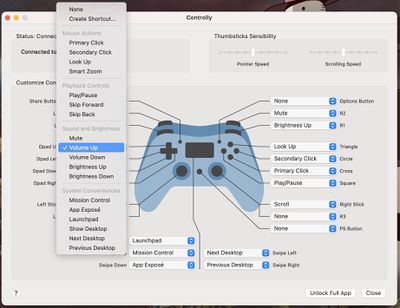
controlly key mapping options
Most wireless controllers should be able to work with Controlly after being paired via Bluetooth to a Mac. We tested with the PlayStation 4 DualShock controller and the app worked flawlessly, with the controller able to perform all of the appropriate mapped actions.


Controlly can be downloaded for free and used for seven days to test it out, but after that, there's a one-time $3.99 in-app purchase to unlock full functionality. [Direct Link]


Popular Stories

macOS 27 on MacBook Pro

Apple Says macOS 27 Won't Be Compatible With These Macs

Wednesday June 3, 2026 8:29 am PDT by
During WWDC 2025, Apple revealed that macOS 26 Tahoe would be the final major macOS version for Intel-based Macs. macOS 27 will be compatible with Apple silicon Macs only, meaning that you will need a Mac with an M-series chip or a MacBook Neo with an A18 Pro chip in order to install the software update. Apple will unveil macOS 27 during its WWDC 2026 keynote this Monday, June 8, and the...
MacBook Neo on Yellow Feature

MacBook Neo is So Popular That Apple Reportedly Doubled Production

Wednesday June 3, 2026 9:24 am PDT by
On an earnings call in late April, Apple's CEO Tim Cook said that customer response to the MacBook Neo was "off the charts," and the popularity of the laptop has reportedly led the company to significantly boost production. Apple supply chain analyst Ming-Chi Kuo this week said he believes that MacBook Neo shipments to Apple were doubled from an initial target of 5 million units to 10...
iphone 18 pro blue%402x

iPhone 18 Pro: Dark Cherry, Light Blue, and Dark Gray Chassis Leaked [Update]

Thursday June 4, 2026 5:18 am PDT by
Update: Since publication, new information has come to light suggesting the images have been AI-manipulated and are not in fact iPhone 18 Pro chassis parts. The original article follows. The color options Apple is reportedly planning for the upcoming iPhone 18 Pro and ‌iPhone 18 Pro‌ Max have appeared online today in the form of images of chassis parts of unknown authenticity....

Top Rated Comments

70 months ago

NO. We do not need apps to turn every device into every other device.
Perhaps others see value in things you don’t...? Using a controller might be a decent ergonomic choice for people with large hands, or perhaps folks with disabilities or dexterity issues.

No harm in getting more out of something.
Score: 23 Votes (Like | Disagree)
MrGimper Avatar
70 months ago

NO. We do not need apps to turn every device into every other device.
I love these posts which sound like someone is holding a gun to your head and forcing you to use/purchase it :rolleyes:
Score: 21 Votes (Like | Disagree)
nathan_reilly Avatar
70 months ago

NO. We do not need apps to turn every device into every other device.
I think this is so misguided. You might not need it but someone else could really benefit from it. And does it hurt you that it exists now? Or are you like imagining this developer could have solved some important (to you) problem instead of this unimportant (to you) problem? My god.
Score: 8 Votes (Like | Disagree)
70 months ago

NO. We do not need apps to turn every device into every other device.
I would, um, say that's precisely what we need. :)

I do wish they were Preference Panes instead of apps though, from an UI/aesthetic standpoint. But you can't sell those in the App Store...
Score: 6 Votes (Like | Disagree)
70 months ago

NO. We do not need apps to turn every device into every other device.
oh ok.

we'll just tell the developers to take the app of the store because you said we don't need it. smart! /sarcasm
Score: 5 Votes (Like | Disagree)
Sharewaredemon Avatar
70 months ago

Perhaps others see value in things you don’t...? Using a controller might be a decent ergonomic choice for people with large hands, or perhaps folks with disabilities or dexterity issues.

No harm in getting more out of something.
Yep, or simply being able to do a few things with your computer using the controller that's already in your hands after you finish playing a game, when you might not be physically close to your computer, or it's not somewhere ergonomic for the trackpad and keyboard.
Score: 5 Votes (Like | Disagree)















