

iPadOS 14.5 Beta Adds Apple Pencil Scribble Support for German, French, Spanish, Italian and Portuguese - MacRumorsOpen MenuShow RoundupsShow Forums menuVisit ForumsOpen Sidebar
Skip to Content

iPadOS 14.5 Beta Adds Apple Pencil Scribble Support for German, French, Spanish, Italian and Portuguese

Apple in iPadOS 14 introduced an Apple Pencil feature called "Scribble," which lets users write in any text field on the iPad, with the handwritten text then converted automatically into typed text.
scribble ipados 14 5 beta
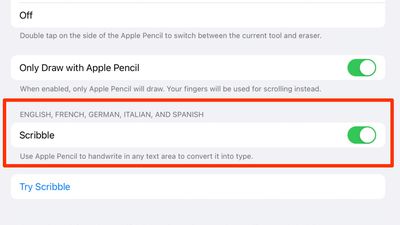
At launch, Scribble was limited to the English and Chinese languages, but with iPadOS 14.5 beta that's available to developers and public beta testers, Apple is expanding Scribble support to German, French, Spanish, Italian, and Portuguese.

With the beta installed on an ‌iPad‌, users in these countries can now write in their native languages, and iPadOS is able to accurately translate the text. Enabling a language is done through the "Keyboard" section of the Settings app.

Any supported language that is enabled as a Keyboard option will be listed under "Scribble" in the ‌Apple Pencil‌ settings on an ‌iPad‌, and that language will be available for use when writing, with special characters supported.

Scribble can be used across iPadOS 14 for writing out iMessages, conducting Safari searches, looking for directions in Maps, creating Notes, scheduling Calendar events, and more. It comes with other features such as Smart Selection for copy/pasting handwritten notes, and there's built-in data detection that converts numbers and email addresses to make them tappable.

Apple's Feature Availability page continues to list just English and Chinese as available Scribble options, but that should change when iPadOS 14.5 sees an official release in early spring.

There are many other changes and feature additions that Apple is introducing in iPadOS 14.5, including support for the most recent gaming controllers, an Apple loading logo that's properly displayed horizontally when the ‌iPad‌ is in landscape mode, new emoji characters, and more, with everything new listed in our iOS 14.5 guide.


Related Forum: iOS 14

Popular Stories

iCloud iPhone 17 Pro

iPhone Users Who Pay for iCloud Storage Get Two New Perks on iOS 27

Thursday July 2, 2026 6:10 am PDT by
If you pay for certain iCloud+ storage plans beyond the 5GB that Apple offers for free, you will receive two more perks on iOS 27 at no additional cost. A summary of the two new iCloud+ perks on iOS 27:Increased daily usage limits for some new Apple Intelligence features, including image generation in the revamped Image Playground app. HomeKit Secure Video cameras receive generated video...
iPhone 4 on Black Feature

Apple Facing One of Its Worst Leaks Since the iPhone 4

Thursday July 2, 2026 9:53 am PDT by
Apple supplier Tata Electronics recently suffered a cyberattack that resulted in thousands of confidential files being published on the dark web, and this reportedly included some photos and documents related to the upcoming iPhone 18 Pro. We have elected not to share any of the leaked photos in this story due to the illegal nature in which they were obtained, but they can easily be found...
American Express Gold Apple Pay Feature

American Express Announces New Apple Pay Feature

Tuesday June 30, 2026 10:27 am PDT by
American Express today announced that you can now redeem Membership Rewards points when checking out with Apple Pay on the web and in apps on the iPhone and iPad. When checking out with Apple Pay on iOS 18 or iPadOS 18 or later, tap on your eligible American Express card (Platinum, Gold, Green, and others) and select the Membership Rewards points option. You can use points to cover all or...

Top Rated Comments

BWhaler Avatar
70 months ago
I’ve said it before, but 14.5 is looking like it’s epic.

I just hope behind the scenes Apple is stomping out thousands and thousands of bugs. Crush that backlog. We care more about it just works than new features.
Score: 4 Votes (Like | Disagree)
tzm41 Avatar
70 months ago
14.5 is getting better and better!
Score: 4 Votes (Like | Disagree)
70 months ago
That’s great. Usually it takes years for Apple to release features for other countries and languages. Hopefully more languages follow soon.
Score: 2 Votes (Like | Disagree)
yurc Avatar
70 months ago
I had already using dedicated input software like this since iOS 10, called Mazec (for Japanese text), they even can use finger not limited just with Apple Pencil so virtually compatible with any iOS device not just iPad.


But well still faster to typing normally though, I am use this input method because it nice to have and I think it would useful someday.

Attachment Image
Score: 2 Votes (Like | Disagree)
70 months ago

I'm moving the US. To be able to communicate with the folks there, should I learn Chinese or Spanish?
Learn from urbandictionary.com. You’ll have no problem communicating with people on Wall Street with that language.
Score: 1 Votes (Like | Disagree)
chriscl Avatar
70 months ago
Happy to see Scribble in German, finally. I switch between German and English so having Scribble in both will be a real boon.
Score: 1 Votes (Like | Disagree)















