

Pixelmator Pro 2.2 Update Adds macOS Monterey Support, 28 Shortcuts Actions, New Split Comparison View, and More - MacRumorsOpen MenuShow RoundupsShow Forums menuVisit ForumsOpen Sidebar
Skip to Content

Pixelmator Pro 2.2 Update Adds macOS Monterey Support, 28 Shortcuts Actions, New Split Comparison View, and More

Pixelmator 2.2 got its public release on Tuesday. The latest major update to the popular image editing app includes support for macOS Monterey and Shortcuts, as well as a new Split Comparison View, a new Bokeh effect, and more.
Pixelmator Pro 2
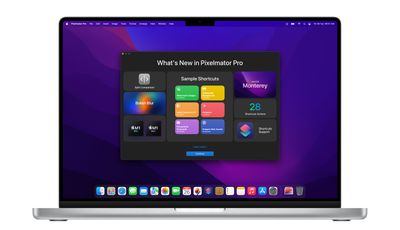
With Monterey bringing Shortcuts to the Mac for the first time, Pixelmator is adding 28 dedicated actions, including all ML-based tools (Super Resolution, Enhance, Denoise, Match Colors, and Crop) and some Shortcuts-exclusive features, like automatic background removal for photos of people. For more information, Pixelmator has provided a tutorial on using Shortcuts with the app.

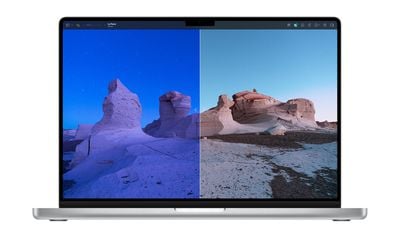
This update also brings a new split-screen comparison view, allowing users to see all their edits more closely. Split comparison view can be turned on by Option-clicking the Show Original button or force clicking the canvas when using the Color Adjustments and Effects tools. Users can also press the Control + C keyboard shortcut or add the new compare button to the Pixelmator Pro toolbar by clicking View > Customize Toolbar.
Pixelmator Pro 2
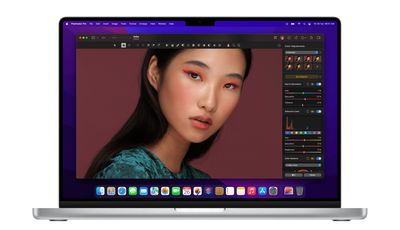
In addition, there's an all-new Bokeh blur effect, while users can now open Pixelmator Photo files in Pixelmator Pro, and the maximum brush spacing has been increased from 100% to 1000%. Elsewhere, new FaceTime Portrait Masks mean whenever users insert photos of themselves with the ‌FaceTime‌ camera, they'll get an automatically created portrait mask applied to that layer. Some other more minor changes are listed in the full release notes.

Lastly, Pixelmator Pro's developers say users can expect features like ML Super Resolution to be up to 15 times faster on the latest MacBook Pro models when compared to the most recent Intel-powered Mac devices, thanks to Apple's new M1 Pro and M1 Max chips.
Pixelmator Pro 2
The latest Pixelmator Pro update is free for all existing users of Pixelmator Pro, which costs $39.99 in the Mac App Store.


Popular Stories

macOS 27 on MacBook Pro

Apple Says macOS 27 Won't Be Compatible With These Macs

Wednesday June 3, 2026 8:29 am PDT by
During WWDC 2025, Apple revealed that macOS 26 Tahoe would be the final major macOS version for Intel-based Macs. macOS 27 will be compatible with Apple silicon Macs only, meaning that you will need a Mac with an M-series chip or a MacBook Neo with an A18 Pro chip in order to install the software update. Apple will unveil macOS 27 during its WWDC 2026 keynote this Monday, June 8, and the...
MacBook Neo on Yellow Feature

MacBook Neo is So Popular That Apple Reportedly Doubled Production

Wednesday June 3, 2026 9:24 am PDT by
On an earnings call in late April, Apple's CEO Tim Cook said that customer response to the MacBook Neo was "off the charts," and the popularity of the laptop has reportedly led the company to significantly boost production. Apple supply chain analyst Ming-Chi Kuo this week said he believes that MacBook Neo shipments to Apple were doubled from an initial target of 5 million units to 10...
iphone 18 pro blue%402x

iPhone 18 Pro: Dark Cherry, Light Blue, and Dark Gray Chassis Leaked [Update]

Thursday June 4, 2026 5:18 am PDT by
Update: Since publication, new information has come to light suggesting the images have been AI-manipulated and are not in fact iPhone 18 Pro chassis parts. The original article follows. The color options Apple is reportedly planning for the upcoming iPhone 18 Pro and ‌iPhone 18 Pro‌ Max have appeared online today in the form of images of chassis parts of unknown authenticity....

Top Rated Comments

Kaptajn Haddock Avatar
60 months ago
By far my favorite photos editor. Blazing fast on my M1 Mac mini.
Score: 12 Votes (Like | Disagree)
PsykX Avatar
60 months ago
At this point I don't really know why one would choose Photoshop over Pixelmator.

Of course it's a new app to learn, it's Mac-only, etc. but it's ridiculously fast, well crafted and so much fun to use.
Score: 8 Votes (Like | Disagree)
Kylo83 Avatar
60 months ago
I wish we still had apples Aperture app back, we need a Lightroom alternative that uses the power of macOS
Score: 5 Votes (Like | Disagree)
FSMBP Avatar
60 months ago
One of top third party apps on my Mac (and it isn't an subscription, thank god)...Can't wait to use this new version on an M1 :)
Score: 5 Votes (Like | Disagree)
60 months ago
I love how fast they always are to adapt to new OS Updates and Hardware.
Score: 3 Votes (Like | Disagree)
star-affinity Avatar
60 months ago
Really impressive app that feels (because it is?) truly macOS native.
Score: 3 Votes (Like | Disagree)














