

Plex Launches 'Discover' and 'Universal Watchlist' Features to Help Users Find and Watch Content Across Streaming Services - MacRumorsOpen MenuShow RoundupsShow Forums menuVisit ForumsOpen Sidebar
Skip to Content

Plex Launches 'Discover' and 'Universal Watchlist' Features to Help Users Find and Watch Content Across Streaming Services

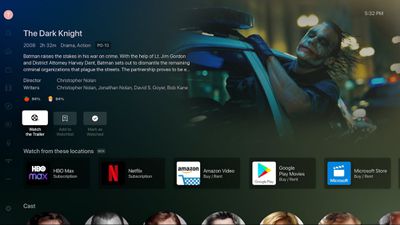
Media management platform Plex today announced a new "Discover" feature that's designed to make it easier for people to find what they want to watch across different streaming services. With Discover, customers can add any TV show or movie into their Plex Watchlist, and receive information on where to find it.
plex discover
The feature will inform users which streaming service has the content that they want to watch, and if the user has a subscription to that service, the content can be watched directly from Plex. It's similar to how the Apple TV app works, but it is more universal because it does not require an Apple device, and it also works with all streaming services, Netflix included.

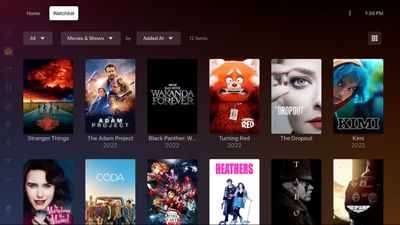
To go along with Discover, Plex is debuting the Plex Universal Watchlist, which is an all-in-one watchlist that lets customers keep track of anything that they want to watch. The Universal Watchlist will display newly available titles from shows that are still airing, and it will let users know where the content they want to watch is available.
plex watchlist
Plex says that its new feature set is meant to turn Plex into a one-stop shop for all media content. In addition to supporting watchlists and content from streaming services, Plex offers a selection of free, ad-supported TV shows and movies, plus it supports personal media libraries and live content.

More information about Discover and Universal Watchlist can be found on the Plex website. Plex is free to use, but upgraded personal media management features require the $4.99 per month Plex Premium package.


Tag: Plex

Popular Stories

plex logo

Plex Tripling Lifetime Plex Pass Price to $750 in July

Tuesday May 19, 2026 3:53 pm PDT by
Media platform Plex today said that it is increasing the price of its Lifetime Plex Pass option to $750, which is a $500 increase from the current $250 price tag. Plex said that the updated price reflects the "real, ongoing value" of the software that it plans to build and maintain. The company has considered removing the Lifetime Plex Pass because recurring subscriptions pay for long-term...
macOS 27 on MacBook Pro

Apple Says macOS 27 Won't Be Compatible With These Macs

Wednesday June 3, 2026 8:29 am PDT by
During WWDC 2025, Apple revealed that macOS 26 Tahoe would be the final major macOS version for Intel-based Macs. macOS 27 will be compatible with Apple silicon Macs only, meaning that you will need a Mac with an M-series chip or a MacBook Neo with an A18 Pro chip in order to install the software update. Apple will unveil macOS 27 during its WWDC 2026 keynote this Monday, June 8, and the...
MacBook Neo on Yellow Feature

MacBook Neo is So Popular That Apple Reportedly Doubled Production

Wednesday June 3, 2026 9:24 am PDT by
On an earnings call in late April, Apple's CEO Tim Cook said that customer response to the MacBook Neo was "off the charts," and the popularity of the laptop has reportedly led the company to significantly boost production. Apple supply chain analyst Ming-Chi Kuo this week said he believes that MacBook Neo shipments to Apple were doubled from an initial target of 5 million units to 10...

Top Rated Comments

55 months ago

Plex still cannot play 4K content locally, without buffering, this involves no streaming over internet. SSD drive inside iMac running Plex on that same iMac.

I heard Plex is not designed to do this, Plex is maybe intentionally not focused on playing 4K content.

Just hoping against hope that one day, Plex will suddenly add “plays 4K content“ as a brand new feature.
I play 4K content via Plex every weekend. Works just fine for me. Streams from a NUC pulling the media files of a NAS... and plays on Apple TV's throughout my house over WiFi. 4K content does need quite a bit more CPU than 1080 content does though.

I am even able to stream it over the internet when I travel... though that is heavily dependent on wherever I am having a fast enough download bandwidth to handle it.... which is rare.
Score: 14 Votes (Like | Disagree)
pi=e=3 Avatar
55 months ago

Plex still cannot play 4K content locally, without buffering, this involves no streaming over internet. SSD drive inside iMac running Plex on that same iMac.

I heard Plex is not designed to do this, Plex is maybe intentionally not focused on playing 4K content.

Just hoping against hope that one day, Plex will suddenly add “plays 4K content“ as a brand new feature.
No idea what you're talking about, I stream 4K HDR from my NAS (off a standard 10TB HDD, no SSD here) to my ATV Plex client all the time.
Score: 13 Votes (Like | Disagree)
55 months ago

Plex still cannot play 4K content locally, without buffering, this involves no streaming over internet. SSD drive inside iMac running Plex on that same iMac.

I heard Plex is not designed to do this, Plex is maybe intentionally not focused on playing 4K content.

Just hoping against hope that one day, Plex will suddenly add “plays 4K content“ as a brand new feature.
plex plays 4k content locally just fine. Been doing it for years. Nor does it need an SSD. In fact I can stream multiple 4k streams on my local network and outside my home to friends and family simultaneously without issue.
It direct plays on my local network and to some of my friends/family who have supported devices. No transcoding needed and it uses no CPU for that.

If you're buffering then there's a problem with your network, or it's trying to transcode with a weak CPU/GPU due to a client not supporting the codecs it needs. But that's easy to see.

But 4k absolutely works just fine. I watch 4k content almost daily with it. Across a variety of devices.
Score: 12 Votes (Like | Disagree)
55 months ago
So I just installed the update and gave it a try.

You pick from a list which services you subscribe to and it lets you search their libraries. When you try to watch a show.... it pulls up a list of services and shows which ones you indicated that you subscribe to that have the content... and you pick the one you want to stream it from.

Then it passes you OUT of Plex App... and INTO the App for the streaming service... and right to the episode you want to watch.

I am not sure how it handles "Watched" episode tracking, havent watched any episodes yet.
Score: 8 Votes (Like | Disagree)
55 months ago
I love this… I wonder what their privacy policy is, and how they got Netflix to work with them, yet Apple can not. This is one of my favorite features of Apple TV, the Watch Now area. I think this Plex offering is a much-needed service now that there are so many streaming options.
Score: 7 Votes (Like | Disagree)
55 months ago
Now that's a nice update!
Score: 6 Votes (Like | Disagree)














