Apple Releases Swift Playgrounds 4.1 for iPad and Mac
Following the launch of iOS 15.5 and macOS Monterey 12.4, Apple today released Swift Playgrounds 4.1, the latest version of the iPad and Mac app that is designed to teach users how to code and build apps.
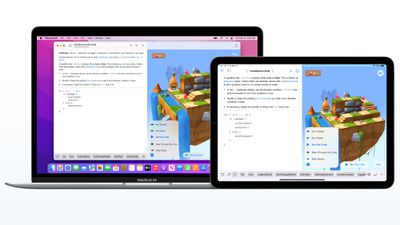
On the Mac, Swift Playgrounds 4.1 adds a host of new features including support for building Mac apps with SwiftUI with macOS 12.4 or later, guided walkthroughs that teach SwiftUI app building basics, live updates in App Preview as changes are made, and App Store Connect integration for uploading finished apps to the App Store.
Apple's full release notes for the Mac version of Swift Playgrounds are below.
Swift Playgrounds 4.1 introduces new features, new content and bug fixes. New features include:
- Build Mac apps with SwiftUI (requires macOS 12.4 or later)
- Guided walkthroughs teach SwiftUI app building basics
- App Preview shows live updates as you make changes to your app
- Apps built with Swift Playgrounds run and install to the Applications folder
- App Store Connect integration lets you upload your finished app to the App Store (requires Apple Developer Program account)
- Smart, inline code suggestions help you write code quickly and accurately
- Project-wide search finds results across multiple files
- Snippets Library provides hundreds of SwiftUI controls, symbols, and colors
- Swift Package support lets you include publicly available code to enhance your apps
- App Projects make it easy to move projects to Xcode and back
The iOS version of Swift Playgrounds 4.1 doesn't add quite as many new features, but it does include a new "Keep Going with Apps" feature to help users better understand how data moves throughout SwiftUI apps. It also adds "Animating Shapes" to teach users how to create, modify, and animate shapes, plus it includes "Capturing Photos," which offers an advanced look at creating a camera.
Swift Playgrounds for Mac can be downloaded from the Mac App Store, and Swift Playgrounds for iPad can be downloaded from the iOS App Store.
Popular Stories
Bloomberg's Mark Gurman has high expectations for Apple's first foldable iPhone.
In his Power On newsletter today, he said the foldable iPhone will be "the most significant overhaul in the iPhone's history."
"iPhone 4, iPhone 6 and iPhone X were clearly a big deal, but this is a whole new design," he said.
Like Samsung's Galaxy Z Fold 7, the foldable iPhone will reportedly open up like ...
iOS 26.5 is now available for developers, and while it doesn't include any new Siri capabilities, there are some major changes for the European Union, and smaller tweaks for features available worldwide.
Suggested Places
In the Maps app, there's a new "Suggested Places" feature that recommends locations to visit based on trending places nearby and recent searches. When Apple launches ads in ...
Apple has been celebrating its upcoming 50th anniversary by hosting surprise performances and other events around the world over the past few weeks, and now Bloomberg's Mark Gurman has revealed details about the company's grand finale.
In a social media post, Gurman said Apple's celebrations will conclude this week with a finale at its Apple Park headquarters for employees.
A special...
Popular Stories
Bloomberg's Mark Gurman has high expectations for Apple's first foldable iPhone.
In his Power On newsletter today, he said the foldable iPhone will be "the most significant overhaul in the iPhone's history."
"iPhone 4, iPhone 6 and iPhone X were clearly a big deal, but this is a whole new design," he said.
Like Samsung's Galaxy Z Fold 7, the foldable iPhone will reportedly open up like ...
iOS 26.5 is now available for developers, and while it doesn't include any new Siri capabilities, there are some major changes for the European Union, and smaller tweaks for features available worldwide.
Suggested Places
In the Maps app, there's a new "Suggested Places" feature that recommends locations to visit based on trending places nearby and recent searches. When Apple launches ads in ...
Apple has been celebrating its upcoming 50th anniversary by hosting surprise performances and other events around the world over the past few weeks, and now Bloomberg's Mark Gurman has revealed details about the company's grand finale.
In a social media post, Gurman said Apple's celebrations will conclude this week with a finale at its Apple Park headquarters for employees.
A special...