

Google Drive Gains Support for Cut, Copy, and Paste Shortcuts Across Multiple Chrome Tabs - MacRumorsOpen MenuShow RoundupsShow Forums menuVisit ForumsOpen Sidebar
Skip to Content

Google Drive Gains Support for Cut, Copy, and Paste Shortcuts Across Multiple Chrome Tabs

Google has announced long-omitted support for using keyboard shortcuts to cut, copy, and paste files in Google Drive on the web – but only if you're accessing the service through its Chrome browser.

Google Drive
In what may come as a surprise to some, Google Drive on the web has never offered access to clipboard functions, despite providing keyboard shortcuts to perform several actions on selected items.

The new support for ⌘ + C (or Ctrl + C on PC), ⌘ + X, and ⌘ + V to copy, cut and paste Google Drive files should save users time by allowing them to copy one or more files and move them to new locations in Drive – and across multiple Chrome tabs – with fewer clicks.

Google says a link to the file and its title is now captured when copying a file, which allows users to paste them into a document or an email. In addition, copying a file and pressing ⌘ + Shift + V key creates shortcuts for organizing files in multiple locations without necessarily creating duplicate files.
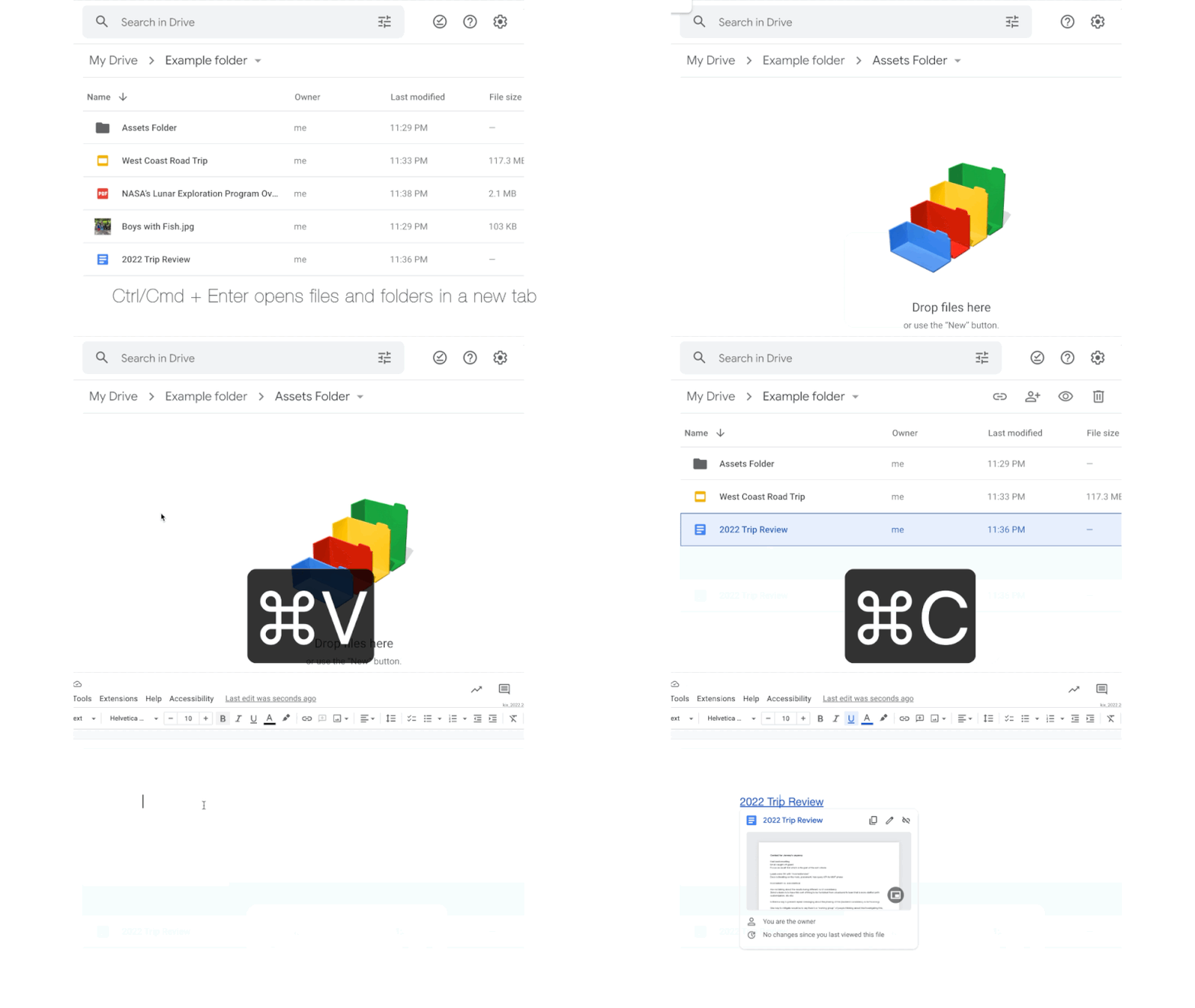
copy paste google drive
Lastly, Chrome users can now open files or folders in a new tab using ⌘ + Enter, which should make it easier to view multiple files at once, or use different tabs to more easily organize files between two different folder locations.

Earlier this month, Google Docs gained an additional new feature that allows users to select multiple sections of text and apply actions such as delete, copy, paste, or format to all selections at the same time.


Top Rated Comments

50 months ago
As a web dev, this isn't quite as trivial as you think. I suspect this is a "work around" to tab sandboxing.

Each tab has its own process and memory, and they won't be able to access and / or modify each others content. So when you did cmd+c on one tab, the other wouldn't be "aware" of the content that has been "copied". Google have probably added a feature to Chrome that will listen for this behaviour, then pass it between the sandboxed processes safely.

I suppose they could pass the information back to the server and then have it retrieved on a polling basis, but that would be extra load on infrastructure, and wouldn't work offline.

Just even more evidence that Google Chrome is the new IE 6.
Score: 9 Votes (Like | Disagree)
GeoStructural Avatar
50 months ago

It's 2022 and you're only providing this functionality now? Sorry I'm scratching my head and feeling very perplexed!
Which means iCloud will gain the functionality in 2035.
Score: 7 Votes (Like | Disagree)
50 months ago
cmd + c to copy, but ctrl + v to paste?
Score: 5 Votes (Like | Disagree)
Leon Ze Professional Avatar
50 months ago
It's 2022 and you're only providing this functionality now? Sorry I'm scratching my head and feeling very perplexed!
Score: 4 Votes (Like | Disagree)
Leon Ze Professional Avatar
50 months ago

As a web dev, this isn't quite as trivial as you think. I suspect this is a "work around" to tab sandboxing.

Each tab has its own process and memory, and they won't be able to access and / or modify each others content. So when you did cmd+c on one tab, the other wouldn't be "aware" of the content that has been "copied". Google have probably added a feature to Chrome that will listen for this behaviour, then pass it between the sandboxed processes safely.

I suppose they could pass the information back to the server and then have it retrieved on a polling basis, but that would be extra load on infrastructure, and wouldn't work offline.

Just even more evidence that Google Chrome is the new IE 6.
Thanks for the great explanation.
Score: 3 Votes (Like | Disagree)
DHagan4755 Avatar
50 months ago
So weird this is now a feature…in 2022.
Score: 3 Votes (Like | Disagree)
















