

Apple Seeds Sixth Public Beta of macOS 13 Ventura - MacRumorsOpen MenuShow RoundupsShow Forums menuVisit ForumsOpen Sidebar
Skip to Content

Apple Seeds Sixth Public Beta of macOS 13 Ventura

Apple today seeded the sixth beta of macOS Ventura to its public beta testing group, allowing non-developers to test the new macOS Ventura operating system ahead of its release. The sixth beta comes following the fifth public beta and it corresponds with eighth developer beta released earlier this week.
clock weather macos ventura
Public beta testers can download the macOS 13 Ventura update from the Software Update section of the System Preferences app after installing the proper profile from Apple's beta software website.

macOS Ventura introduces Stage Manager, a new multi-tasking option for focusing on a task while having other apps waiting in the wings. ‌Stage Manager‌ puts your main app front and center, tucking your other apps to the side for quick access.

Continuity Camera allows you to use your iPhone as a webcam for your Mac, offering much better camera quality than the built-in Mac camera. Apple is building special stands to hold the iPhone with a Mac, and there are neat features like Desk View, which uses the Ultra Wide lens.

Handoff now works with FaceTime so you can answer calls on the Mac and then transfer them over to another device, and Messages is gaining undo, edit, and mark as unread features. SharePlay now works in Messages in addition to ‌FaceTime‌, and the Mail app has been overhauled. Search is more relevant, emails can be scheduled, and there's even an option to undo an email for up to 10 seconds after it's sent.

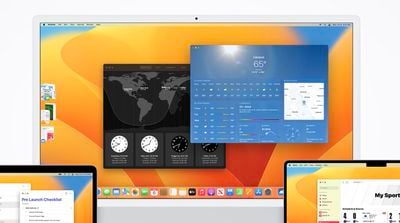
Apple brought the Weather and Clock apps to the Mac, redesigned System Preferences and renamed it System Settings, and added support for Shared Tab Groups. Passwords are being replaced with more secure Passkeys in iOS 16 and macOS Ventura, and there are updates to Spotlight, Visual Lookup, Live Text, and more.

There are a ton of other features in macOS Ventura, and we have a full rundown available in our dedicated macOS Ventura roundup.


Related Forum: macOS Ventura

Popular Stories

iphone 18 pro blue%402x

iPhone 18 Pro: Dark Cherry, Light Blue, and Dark Gray Chassis Leaked [Update]

Thursday June 4, 2026 5:18 am PDT by
Update: Since publication, new information has come to light suggesting the images have been AI-manipulated and are not in fact iPhone 18 Pro chassis parts. The original article follows. The color options Apple is reportedly planning for the upcoming iPhone 18 Pro and ‌iPhone 18 Pro‌ Max have appeared online today in the form of images of chassis parts of unknown authenticity....
Aston Martin CarPlay Ultra Screen

Apple Says CarPlay Ultra is Coming to These Vehicle Brands

Thursday May 21, 2026 11:53 am PDT by
Last year, Apple launched CarPlay Ultra, the long-awaited next-generation version of its CarPlay software system for vehicles. Nearly a year later, CarPlay Ultra is still limited to Aston Martin's latest luxury vehicles, but that should change fairly soon. In May 2025, Apple said many other vehicle brands planned to offer CarPlay Ultra, including Hyundai, Kia, and Genesis. CarPlay Ultra...
iOS 27 All the New App Features

iOS 27: All the Rumored App Features

Wednesday June 3, 2026 3:48 pm PDT by
Siri is getting a major overhaul in iOS 27, but Apple also has some big updates planned for apps like Camera, Photos, and Wallet. There are multiple new AI features in the works, plus some non-AI upgrades. Camera Apple is moving Visual Intelligence from the Camera Control button to the Camera app in iOS 27, according to Bloomberg. There will be a Siri mode that will be available alongside...

Top Rated Comments

48 months ago

I'm not super excited about most of the features in Ventura but the (unexciting) mail ones seem the most useful: better searching and ability to undo a send. I just think 10 seconds is not enough time to undo. I would prefer they let the user set the time available to cancel a sent email (and adding a corresponding delay in sending), I'd want it more like 30-90 seconds and I wouldn't mind if my emails got delayed by that much.
You can choose between 10, 20 or 30 seconds.
Score: 4 Votes (Like | Disagree)
HiRez Avatar
48 months ago
I'm not super excited about most of the features in Ventura but the (unexciting) mail ones seem the most useful: better searching and ability to undo a send. I just think 10 seconds is not enough time to undo. I would prefer they let the user set the time available to cancel a sent email (and adding a corresponding delay in sending), I'd want it more like 30-90 seconds and I wouldn't mind if my emails got delayed by that much.
Score: 4 Votes (Like | Disagree)
rpmurray Avatar
48 months ago
Have they fixed the slowdowns in Safari? I won't ask about System Settings since that's a dumpster fire that will take until the middle of next year to work out.
Score: 2 Votes (Like | Disagree)
48 months ago
Downloading the public betas to my M1 iPad Air 5G and my M1 Mac Mini now... I can't wait until the actual releases are made in a bit. I hopped on the beta bandwagon due to the expanded focus modes - they actually made it possible to separate my work and home lives without having to use separate accounts on my Mac. (I am a freelance writer working from home.)

This makes me curious about Apple's plans for iWork. I dumped Office for iWork '09 and have been a fanboy ever since. Paired with Scrivener and the occasional forays with Google Docs, I have never needed to use Microsoft Word. Though I will admit I miss the old full-screen mode from Pages '09. The new one just isn't the same.
Score: 2 Votes (Like | Disagree)
48 months ago

It's something more fundamental broken in Mail.app on Ventura PB 6. If you drag an image attachment, for example, to a Finder folder, it drags some corrupt file with the extension .inet or something similar. Eventually it works after a few tries. This was working in earlier betas and, of course, every other past OS.

I feel like Apple has some people randomly punching keys to code at their company lately. It's very frustrating that both hiring quality software engineers and having proper quality control have simultaneously taken a nosedive. I realize this is Beta, but it's unacceptable to be breaking old functionality at this point in the beta cycle.

Wishing for OSX Snow Leopard.
Me too. They've been progressively worsening mail, tiny bit by bit, ever since. Or maybe it was since Mountain Lion. Either way, it's been a long crappy road.

That said, I have to admit that this bug, unlike others I've seen (and a few of which I've posted here), has not recurred. It might have been related to mdworkers or other stuff running after install which, once done, isn't a problem anymore.

Even if so, it's ugly as ****.
Score: 1 Votes (Like | Disagree)
cponto Avatar
48 months ago

Awesome! It worked.
Not right away, mind you. I restarted my MacBook and it still showed the Ventura wallpaper. I then checked the UUID folder which had my wallpaper in it and restarted again. That’s when my own wallpaper was on the log in screen.
Thanks 😊
I'm glad it worked for you! I forgot to say that you had to change the wallpaper for the image to be generated in the Desktop Pictures folder. This has been happening since the start on Monterey, it still is. I reported it more than 30 times. They marked it as a bug, but not a priority bug. And now I see that Ventura continues with the same bug, so the users and the reports we make are apparently no longer a priority for Apple. It's a pity. That's why I don't report more bugs, because only 2 times I was asked for "help" to solve one. In fact, this one I even sent them a step-by-step video so they could see what I was talking about, but nothing has happened.
Greetings!

----

Me alegra que ta haya funcionado! Olvidé decir que había que cambiar el papel tapiz para que se generara la imagen en la carpeta Desktop Pictures. Esto sucede desde el inicio en Monterey, aún sigue sucediendo. Lo reporté más de 30 veces. Lo marcaban como que era un bug, pero no de prioridad. Y ahora veo que en Ventura continúan con el mismo bug, así que los usuarios y los reportes que hacemos por lo visto han dejado de ser prioridades para Apple. Una pena. Es por ello que no reporto más bugs, porque solo 2 veces me pidieron "ayuda" para resolver uno. De hecho, este les envié hasta un video con un paso por paso para que vieran de qué les hablaba, pero nada ha pasado.
Saludos!
Score: 1 Votes (Like | Disagree)














