Apple Releases Second Rapid Security Response Update for macOS Ventura 13.2 Beta - MacRumorsOpen MenuShow RoundupsShow Forums menuVisit ForumsOpen Sidebar
Skip to Content

Apple Releases Second Rapid Security Response Update for macOS Ventura 13.2 Beta

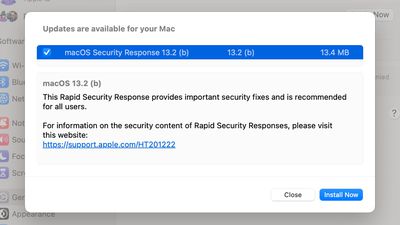
Apple today released a second Rapid Security Response (RSR) update for the macOS Ventura 13.2 beta, with the update coming almost a month after Apple provided the first Rapid Security Response test on the Mac.
rapid security response ventura b
macOS Rapid Security Response 13.2 (b) is applied to the Mac automatically upon restart, and it is also added to Safari when the Safari app is exited and then reopened.

The first RSR release for the Mac appeared to be a test that did not add new features, with Apple instead making sure the feature works before it is deployed for an actual security update. Today's update is just 13.4MB in size, suggesting it is once again a test. Rapid Security Response is an iOS 16 and macOS Ventura feature released as part of those updates.

Apple has also previously released ‌several iOS 16‌ Rapid Security Responses in a test capacity.

Popular Stories

macOS 27 on MacBook Pro

Apple Says macOS 27 Won't Be Compatible With These Macs

Wednesday June 3, 2026 8:29 am PDT by
During WWDC 2025, Apple revealed that macOS 26 Tahoe would be the final major macOS version for Intel-based Macs. macOS 27 will be compatible with Apple silicon Macs only, meaning that you will need a Mac with an M-series chip or a MacBook Neo with an A18 Pro chip in order to install the software update. Apple will unveil macOS 27 during its WWDC 2026 keynote this Monday, June 8, and the...
MacBook Neo on Yellow Feature

MacBook Neo is So Popular That Apple Reportedly Doubled Production

Wednesday June 3, 2026 9:24 am PDT by
On an earnings call in late April, Apple's CEO Tim Cook said that customer response to the MacBook Neo was "off the charts," and the popularity of the laptop has reportedly led the company to significantly boost production. Apple supply chain analyst Ming-Chi Kuo this week said he believes that MacBook Neo shipments to Apple were doubled from an initial target of 5 million units to 10...
iphone 18 pro blue%402x

iPhone 18 Pro: Dark Cherry, Light Blue, and Dark Gray Chassis Leaked [Update]

Thursday June 4, 2026 5:18 am PDT by
Update: Since publication, new information has come to light suggesting the images have been AI-manipulated and are not in fact iPhone 18 Pro chassis parts. The original article follows. The color options Apple is reportedly planning for the upcoming iPhone 18 Pro and ‌iPhone 18 Pro‌ Max have appeared online today in the form of images of chassis parts of unknown authenticity....

Top Rated Comments

gank41 Avatar
45 months ago

if it's rapid, why is it asking the user to install it? just install it already
Because it can be much worse to just restart your computer (cough cough Windows cough cough) while actively working within an application or saving documents as opposed to just delivering an update to you rapidly, and then telling you to restart.
Score: 8 Votes (Like | Disagree)
45 months ago
I don't want Apple installing anything on my computer unless I ok it. Why, because Apple software updates lately are not very reliable and I don't want to troubleshoot a bunch of problems right in the middle of having to deliver for my business.
Score: 6 Votes (Like | Disagree)
Realityck Avatar
45 months ago
Small update (13.4 MB), immediately shut down Safari if running and restarted Mac after it was through.

13.2 beta 1 after 2nd rapid update = Safari Version 16.2 (18614.4.1)
13.2 beta 1 after 1st rapid update = Safari Version 16.2 (18614.4.1.500.1)
13.2 beta 1 = Safari Version 16.2 (18614.4.1)
13.1 RC = Safari Version 16.2 (18614.3.7.1.5)

Looks like a test just to see if could issue a rapid security release involving Safari versions. Note the toggling of safari versions.

They had to do it today because likely tomorrow Jan 10 they release the MacOS 13.2 beta 2 and likely updating to a Safari 16.3 release.
Score: 6 Votes (Like | Disagree)
Benjamin Nabulsi Avatar
45 months ago
if it's rapid, why is it asking the user to install it? just install it already
Score: 4 Votes (Like | Disagree)
gank41 Avatar
45 months ago

Who restarts their mac??
Well, considering the current state of macOS, 👋 I have to reboot every 4-8 days or so. Either on my M1 MBP or my Intel Mac mini, after days of uptime, some kind of memory issue gets going and everything either crashes or becomes so slow I have to reboot. There's also the issue (for me, at least) of just looking at the Notification Center, and just scrolling thru causes a kernel panic.

I am old enough to remember OS X being great at Memory Management and having a 2010 MBP go almost 45 days without a reboot. But macOS is not OS X
Score: 2 Votes (Like | Disagree)
45 months ago

I don't want Apple installing anything on my computer unless I ok it. Why, because Apple software updates lately are not very reliable and I don't want to troubleshoot a bunch of problems right in the middle of having to deliver for my business.
Then go to software update settings and make sure "install security updates" is disabled.

Note that Apple has never released one of these rapid security updates for a non-beta version yet, and I sure hope you're not "delivering for your business" on a macOS beta.
Score: 2 Votes (Like | Disagree)


















