iOS 17 Lets You Insert Contacts and Passwords into Any Text Field - MacRumorsOpen MenuShow RoundupsShow Forums menuVisit ForumsOpen Sidebar
Skip to Content

iOS 17 Lets You Insert Contacts and Passwords into Any Text Field

Apple is making contact and password sharing a lot easier in iOS 17 by letting users insert them into any text field they encounter in the system.
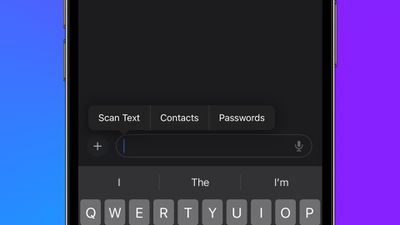
ios 17 contacts passwords
When long pressing in a text box, a new "Insert" option appears in the pop-up menu. Tapping it brings up another menu with two additional new options: "Contacts" and "Passwords."

Choosing Contacts takes you straight to your contacts list for you to make your selection, while tapping Password takes you to your passwords keychain after authentication.

The feature was tipped to MacRumors by Aaronp613. iOS 17 is available now in beta for members of Apple's Developer Program, and will be publicly released later this year.

Related Forums: iOS 17, iPadOS 17

Popular Stories

iphone 18 pro blue%402x

iPhone 18 Pro: Dark Cherry, Light Blue, and Dark Gray Chassis Leaked [Update]

Thursday June 4, 2026 5:18 am PDT by
Update: Since publication, new information has come to light suggesting the images have been AI-manipulated and are not in fact iPhone 18 Pro chassis parts. The original article follows. The color options Apple is reportedly planning for the upcoming iPhone 18 Pro and ‌iPhone 18 Pro‌ Max have appeared online today in the form of images of chassis parts of unknown authenticity....
Aston Martin CarPlay Ultra Screen

Apple Says CarPlay Ultra is Coming to These Vehicle Brands

Thursday May 21, 2026 11:53 am PDT by
Last year, Apple launched CarPlay Ultra, the long-awaited next-generation version of its CarPlay software system for vehicles. Nearly a year later, CarPlay Ultra is still limited to Aston Martin's latest luxury vehicles, but that should change fairly soon. In May 2025, Apple said many other vehicle brands planned to offer CarPlay Ultra, including Hyundai, Kia, and Genesis. CarPlay Ultra...
iOS 27 All the New App Features

iOS 27: All the Rumored App Features

Wednesday June 3, 2026 3:48 pm PDT by
Siri is getting a major overhaul in iOS 27, but Apple also has some big updates planned for apps like Camera, Photos, and Wallet. There are multiple new AI features in the works, plus some non-AI upgrades. Camera Apple is moving Visual Intelligence from the Camera Control button to the Camera app in iOS 27, according to Bloomberg. There will be a Siri mode that will be available alongside...

Top Rated Comments

39 months ago

This seems to only support iCloud Keychain for Passwords which renders the feature useless for people using third party password managers (probably most of them).
Yeah unless there's an open API for 1Password and others, this is not that great.
Score: 4 Votes (Like | Disagree)
39 months ago

And you can confirm that if you click the Passwords button that appears above the keyboard on a password field, it does show your 3rd party apps?
Yes, I am using 1Password and it opens when I use button above keyboard.
Score: 3 Votes (Like | Disagree)
Mr. Heckles Avatar
39 months ago

Apple, just make Keychain a full on 1Password/KeePass replacement already.
With Passkey coming, that’s more of a reason not to use an Apple only password manager.

Passkey is basically locking you into a platform. ('https://www.inc.com/shama-hyder/use-passwordless-logins-to-drive-brand-loyalty-with-secure-seamless-customer-experiences.html') If you never want to leave Apple, go for it.
Score: 2 Votes (Like | Disagree)
39 months ago
Very useful feature. Glad to see this on iOS 17
Score: 2 Votes (Like | Disagree)
39 months ago

This seems to only support iCloud Keychain for Passwords which renders the feature useless for people using third party password managers (probably most of them).
Super lame if that's the case. Keychain is useless for anyone needing proper cross platform compatibility.
Score: 2 Votes (Like | Disagree)
39 months ago
This seems to only support iCloud Keychain for Passwords which renders the feature useless for people using third party password managers (probably most of them).
Score: 2 Votes (Like | Disagree)


















