Apple Watch Series 9 and Ultra 2 Gaining New 'Double Tap' Gesture Control Feature - MacRumorsOpen MenuShow RoundupsShow Forums menuVisit ForumsOpen Sidebar
Skip to Content

Apple Watch Series 9 and Ultra 2 Gaining New 'Double Tap' Gesture Control Feature

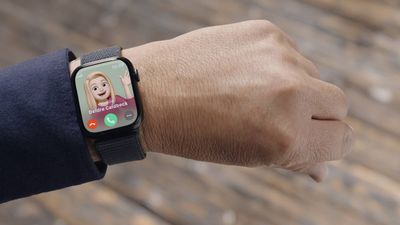
Following the announcement of the Apple Watch Series 9, Apple today detailed a new feature coming to the smartwatch next month. Called "Double Tap," the new gesture feature lets you control the Series 9 by tapping your thumb and index finger together twice.
f d193cf242e634347eaeea2044e050dd811cef19c
Users will be able to answer calls, stop alarms, open Smart Stack, play and pause Music, and more by using Double Tap. Apple said the new feature should make it easier to navigate the Apple Watch when you're one-handed, like walking your dog or holding a cup of coffee.

Double Tap will also be available on the new Apple Watch Ultra 2. The feature will be available in a software update next month for the Series 9 and Ultra 2.

Related Forum: Apple Watch

Popular Stories

youtube iphone apple watch health ad 2026

New Apple Ad Sells the iPhone and Apple Watch Health Pairing

Thursday April 23, 2026 11:18 am PDT by
Apple has published a new ad to appeal to customers in the market for an iPhone and Apple Watch pairing, highlighting the insights it can offer for your health. Titled simply "Health with iPhone + Apple Watch," the half-minute ad focuses on a woman waiting in line at a cafe who begins receiving unsolicited health and fitness advice from other people in the queue, as well as local residents,...
watchos 26 gradient light

This New Apple Watch Face Is Coming in watchOS 26.5

Friday April 24, 2026 5:51 am PDT by
iOS 26.5 and watchOS 26.5 will have a new Pride Luminance wallpaper and Apple Watch face when the updates are released in the coming weeks, according to Bloomberg's Mark Gurman. In a brief tweet, Gurman revealed that Pride Luminance will "Celebrate the vibrancy and individuality of the LGBTQ+ community and customize your watch face with colors from Pride flags." iOS 26.5 has been in...
modular ultra training load

watchOS 27 to Offer New Watch Faces, Including 'Modular Ultra' Variant

Monday May 4, 2026 5:58 am PDT by
For watchOS 27, Apple is testing new Apple Watch faces, and one of them is a simpler version of an existing Apple Watch Ultra watch face that could be coming to standard Series models. Writing in his latest Power On newsletter, Bloomberg's Mark Gurman reports that Apple is testing multiple new faces for watchOS 27, code-named "Orchid." One of them is said to be a "simplified take" on the...

Top Rated Comments

35 months ago
The finger tap thing isn't new. Perhaps the trigger of some specific functions are new, but in the current WatchOS you can use Assistive Touch to customize many different gestures using a finger tap(s) or even a fist clench.
Score: 16 Votes (Like | Disagree)
JPack Avatar
35 months ago
It almost seemed like Apple was about to make an entire event out of this one feature. 😄
Score: 9 Votes (Like | Disagree)
ApplesAreSweet&Sour Avatar
35 months ago
This "new" feature has been available since watchOS 8.3. Apple even did a video on it themselves, explaining what it does and how to set it up.

So Apple will be removing gesture controls for Series 8 and older if you upgrade to watchOS 10?


Attachment Image
Score: 8 Votes (Like | Disagree)
vertsix Avatar
35 months ago
Don't be fooled - this is already on your watch under Accessibility.
Score: 7 Votes (Like | Disagree)
35 months ago
The thing is most apple watches can already do this as an accessibility feature. It was almost comical this got such a long segment in the keynote.
Score: 6 Votes (Like | Disagree)
Johnny907 Avatar
35 months ago
It didn't gain Jack. This has been available under Accessibility since WatchOS 8.
Accessibility -> Assistive Touch -> Hand Gestures and then scroll down to Customize Gestures. Set Double Pinch to Tap and you can do everything shown in that promo right now. Or you can really get fancy and customize all the options like clenching your fist to go forward and back in menus.
I've been using these settings to control my watch during workouts for a couple years now, which is evidently how long it took Apple to figure out it had a useful feature it should promote, especially if it helps them sell a yawn of a new product that 100% isn't required to use it.
Score: 5 Votes (Like | Disagree)


















