Hate iOS 26's Liquid Glass Design? Here's How to Tone It Down - MacRumorsOpen MenuShow RoundupsShow Forums menuVisit ForumsOpen Sidebar
Skip to Content

Hate iOS 26's Liquid Glass Design? Here's How to Tone It Down

iOS 26 features a whole new design material that Apple calls Liquid Glass, with a focus on transparency that lets the content on your display shine through the controls. If you're not a fan of the look, or are having trouble with readability, there is a step that you can take to make things more opaque without entirely losing out on the new look.
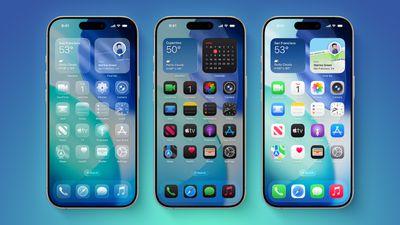
iOS 26 on Three iPhones
Apple has multiple Accessibility options that are designed to customize iOS for different visual needs, and one of these options is Reduce Transparency. Toggling on Reduce Transparency adds a darker background to translucent areas like the Control Center, app icons, and app folders, improving contrast.
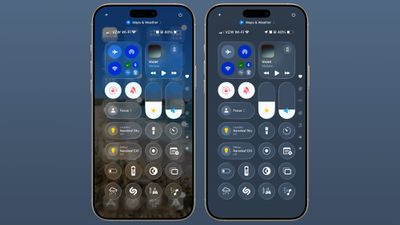
liquid glass reduce transparency 1
You can turn on Reduce Transparency by opening up the Settings app, going to Accessibility, selecting Display and Text Size, and tapping on the Reduce Transparency toggle. If you want to be able to turn the setting on and off quickly, you can add it to your Accessibility Shortcuts to get to it from the Control center interface.
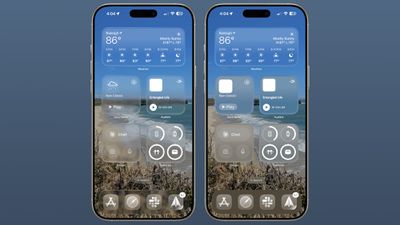
liquid glass reduce transparency 2
Activating Reduce Transparency does not remove all translucency from the iPhone's interface, but it does give everything more of an opaque look. It does not change the shape of buttons or return things to a pre-iOS 26 look.
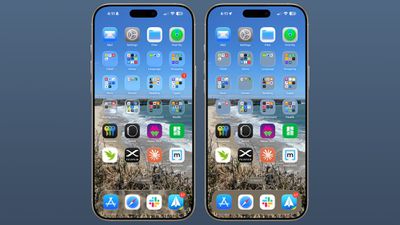
liquid glass reduce transparency 3
We're still very early in the beta testing process, and Apple will make tweaks and refinements to the Liquid Glass design based on user feedback. It's always tough to get used to an entirely new interface, so if you're a developer running the beta and you're having trouble adjusting or reading some text, temporarily activating Reduce Transparency might help ease the transition.
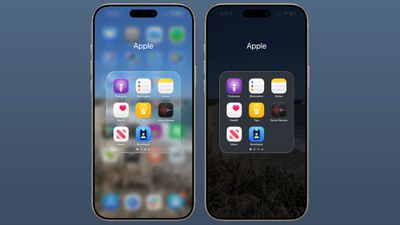
liquid glass reduce transparency 4
In all likelihood, most people will adjust to the updated Liquid Glass design within a few days. Apple hasn't made significant changes to app interfaces and layouts, so even though there's a whole new look for ‌iOS 26‌, Apple says it's still going to feel familiar to people.

Liquid Glass could look different by the time that ‌iOS 26‌ launches to the public, and we'll see it evolve over the next few months. Right now, ‌iOS 26‌ is limited to developers, but a public beta is coming in July. A launch will follow in September.


Related Roundups: iOS 26, iPadOS 26
Related Forum: iOS 26

Popular Stories

iOS 26

Apple Seeds Second iOS 26.5 and iPadOS 26.5 Release Candidates to Developers

Friday May 8, 2026 10:16 am PDT by
Apple today seeded new release candidate versions of upcoming iOS 26.5 and iPadOS 26.5 updates to developers for testing purposes, with the software coming five days after the first RC. It's not clear what's changed in the second RC, but Apple typically sends out another candidate if there are bugs that need to be addressed. Registered developers can download the betas from the Settings app ...
iOS 26

Apple Releases iOS 26.5 and iPadOS 26.5 With End-to-End Encrypted RCS, New Wallpaper, and Maps Updates

Monday May 11, 2026 10:06 am PDT by
Apple today released iOS 26.5 and iPadOS 26.5, the newest updates to the iOS 26 and iPadOS 26 operating systems. The software comes nearly two months after Apple released iOS 26.4 and iPadOS 26.4. The new software can be downloaded on eligible iPhones and iPads over-the-air by going to Settings > General > Software Update. Apple has also released iOS 15.8.8, iOS 16.7.16, iOS 18.7.9, and...
ios 26 5 rcs 1

iPhone-Android RCS Conversations Are End-to-End Encrypted in iOS 26.5

Monday May 11, 2026 10:25 am PDT by
End-to-end encryption (E2EE) for RCS messages between iPhone and Android devices is officially available, Apple confirmed today. Support is included in iOS 26.5, which is now available to everyone. End-to-end encrypted RCS messaging is available in a beta capacity, even though it is in the launch version of iOS 26.5. The feature is available with supported carriers and will roll out over...

Top Rated Comments

JaylenFast Avatar
13 months ago
I'm baffled that this passed Apple's entire design team. They need more frost and a darker effect on the background. Any colorful background makes this a mess. Definitely not ADA compliant, even with accessibility features on its low contrast.
Score: 70 Votes (Like | Disagree)
13 months ago
When one has to tweak the controls just to make it readable, then it shouldn't have been done in the first place. IMO.
Score: 52 Votes (Like | Disagree)
HouseLannister Avatar
13 months ago
Unintended side effects. Can’t see what text you are selecting with transparency off.


Attachment Image
Score: 43 Votes (Like | Disagree)
13 months ago
Just why would anyone want transparent icons on a phone ?

Come on - why stop here ? Take it to the next level and reduce the brightness to 10% and add noise to all sound output.
Score: 36 Votes (Like | Disagree)
GrassShark Avatar
13 months ago
I wish reduce transparency would also turn off the edge highlights. They look so bad.
Score: 32 Votes (Like | Disagree)
Populus Avatar
13 months ago
While the liquid glass of this first beta looks nice, I suspect it will get subtly tweaked to make it a little bit more frosty. Just a tiny bit. I think it’s a bit too transparent, at least in elements like the dock, but I this new look anyway.
Score: 28 Votes (Like | Disagree)