iOS 26 includes three small but meaningful changes for screenshots.
The upcoming software update adds a new Screen Capture menu to the Settings app, under General. In it, there are a few useful toggles.
First, there is now an option for HDR screenshots. When this format is selected, any HDR photos or videos in screenshots will actually appear in HDR with full dynamic range, when viewed on newer iPhone models and other supported devices.
Apple says HDR screenshots use the HEIF image format. There is still an option for SDR screenshots, which are saved as PNG files.
Second, CarPlay screenshots finally work on an opt-in basis. On iOS 18 and earlier, taking a screenshot on an iPhone connected to CarPlay generates both iPhone and CarPlay screenshots. Starting with iOS 26, however, only an iPhone screenshot is captured in this situation by default. CarPlay screenshot capture must be turned on manually.
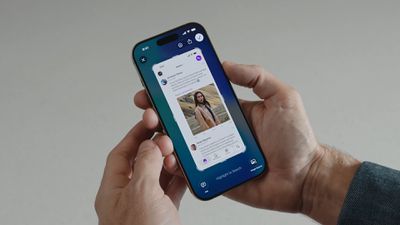
Third, when you take a screenshot on an iPhone 15 Pro or newer, you can now identify content within the screenshot by using the Visual Intelligence feature.
Apple has redesigned the screenshot interface on iOS 26, with Visual Intelligence options now shown at the bottom of the screen. "Ask" lets you ask ChatGPT about content in a screenshot, while "Image Search" can show you similar images to those in a screenshot across Google Images, Etsy, and Pinterest. There is also a "Highlight to Search" option that lets you conduct an image search for a specific object in a screenshot.
If you would rather have screenshots appear as thumbnails in the bottom-left corner of the screen, as they do on iOS 18 and earlier versions, you can turn off full-screen previews in the new Screen Capture settings menu.
iOS 26 is currently in beta, and the update should be released in September.