

Apple Releases First iOS 26 and iPadOS 26 Public Betas - MacRumorsOpen MenuShow RoundupsShow Forums menuVisit ForumsOpen Sidebar
Skip to Content

Apple Releases First iOS 26 and iPadOS 26 Public Betas

Apple is allowing members of its public beta testing program to download and install iOS 26 and iPadOS 26 starting today. You can sign up for the public betas on Apple's beta website. The first public beta features the same content as the fourth developer beta that came out earlier this week, though there is a new fourth beta available for developers as well.

iOS 26 Feature
Beta testers that have registered on Apple's website can download the ‌iOS 26‌ and ‌iPadOS 26‌ updates by opening the Settings app, going to the General section, tapping on Software Update, and choosing the ‌iOS 26‌ or ‌iPadOS 26‌ Public Beta options.

‌iOS 26‌ and ‌iPadOS 26‌ feature Apple's Liquid Glass design, with a visual aesthetic that focuses on transparency. Icons, menu buttons, navigation bars, and more reflect and refract light with subtle animations. There are pop-out menus in some areas, tab bars shrink down, and everything has a more rounded look.
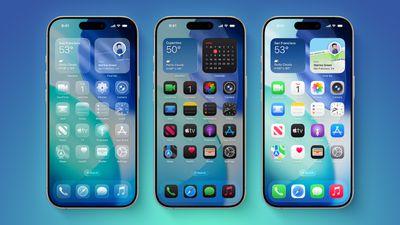
iOS 26 on Three iPhones
There are new Apple Intelligence features like Visual Intelligence for screenshots, updated order tracking in the Wallet app, new features in Reminders, and Live Translation for the Messages, Phone, and FaceTime apps. Image Playground has ChatGPT style options, and Genmoji supports mixing two or more emoji characters to make something new.
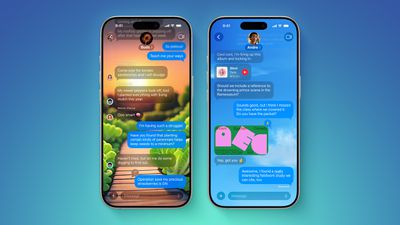
ten messages features
2D photos have a more 3D look with a Spatial Scene feature, and Safari has updated navigation. In the Phone app, there are new Call Screening and Hold Assist features that will save you time, while the Messages app supports customizable backgrounds and polls. Apple Music has a DJ-like AutoMix feature, CarPlay has an overhauled interface, there's a new Apple Games app, and Preview has come to the iPhone for the first time.
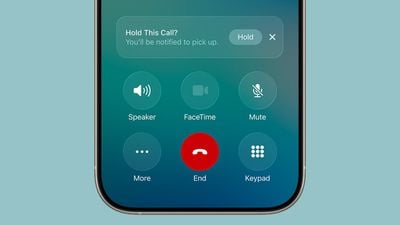
ios 26 call holding
For more on all of the new features in the updates, we have a dedicated iOS 26 roundup and a separate iPadOS 26 roundup.


Related Roundups: iOS 26, iPadOS 26
Related Forum: iOS 26

Popular Stories

iOS 26

Apple Seeds Second iOS 26.5 and iPadOS 26.5 Release Candidates to Developers

Friday May 8, 2026 10:16 am PDT by
Apple today seeded new release candidate versions of upcoming iOS 26.5 and iPadOS 26.5 updates to developers for testing purposes, with the software coming five days after the first RC. It's not clear what's changed in the second RC, but Apple typically sends out another candidate if there are bugs that need to be addressed. Registered developers can download the betas from the Settings app ...
iOS 26

Apple Releases iOS 26.5 and iPadOS 26.5 With End-to-End Encrypted RCS, New Wallpaper, and Maps Updates

Monday May 11, 2026 10:06 am PDT by
Apple today released iOS 26.5 and iPadOS 26.5, the newest updates to the iOS 26 and iPadOS 26 operating systems. The software comes nearly two months after Apple released iOS 26.4 and iPadOS 26.4. The new software can be downloaded on eligible iPhones and iPads over-the-air by going to Settings > General > Software Update. Apple has also released iOS 15.8.8, iOS 16.7.16, iOS 18.7.9, and...
ios 26 5 rcs 1

iPhone-Android RCS Conversations Are End-to-End Encrypted in iOS 26.5

Monday May 11, 2026 10:25 am PDT by
End-to-end encryption (E2EE) for RCS messages between iPhone and Android devices is officially available, Apple confirmed today. Support is included in iOS 26.5, which is now available to everyone. End-to-end encrypted RCS messaging is available in a beta capacity, even though it is in the launch version of iOS 26.5. The feature is available with supported carriers and will roll out over...

Top Rated Comments

turbineseaplane Avatar
11 months ago
Oh boy ... here we go

For anyone bold enough to install these, please do share your thoughts and screenshots.
Score: 20 Votes (Like | Disagree)
bekiil Avatar
11 months ago
Omg 😬 do I dare? Noooo Do I need to? YES 😬 Is it necessary? NO, bu I want to 😩
Conflicting feelings 😂
Score: 15 Votes (Like | Disagree)
11 months ago
Good luck! Sitting out the beta this year.
Score: 10 Votes (Like | Disagree)
JKidwell86 Avatar
11 months ago
There’s a new update for developers too
Score: 9 Votes (Like | Disagree)
11 months ago
Had no strong feelings about liquid glass before, but now I've installed it on my iPad and damn... it's rough. Big step backwards. Hoping it'll grow on me, but not sure it will.

So many elements are less visually defined (i.e. stock app icons, keyboard), and the transparency compounds that whilst also being quite distracting (particularly when scrolling). Combination of these things makes it more tiring to use. On top of that the return of embossed outlines on everything feels like a tacky throwback to the 00's, I thought we were past that.

For me the best interface design is one that you barely even notice, it almost fades into insignificance as you get on with your task. This new design wants to be noticed. It’s annoying me.
Score: 8 Votes (Like | Disagree)
chrono1081 Avatar
11 months ago
I've actually been running this since beta 1, it's surprisingly stable. There isn't really anything outside of some visual glitches and some compatibility with RCS text messaging that I've seen. (The text messaging sometimes fails on picture messages).
Score: 8 Votes (Like | Disagree)













