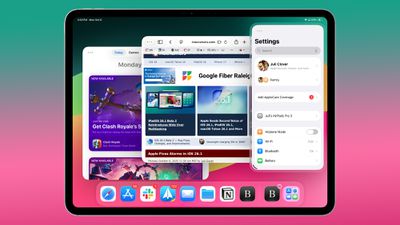
With the second beta of iPadOS 26.1, Apple tweaked multitasking on the iPad to reintroduce the Slide Over feature. Slide Over was removed in iPadOS 26 because Apple replaced it with a new windowed multitasking system, but some iPad users missed the feature.
The updated version of Slide Over works with all of the new iPadOS 26 multitasking features. You can have multiple app windows open, and then use Slide Over to quickly get to an app that overlays your windowed apps.
To use Slide Over in iPadOS 26.1, you'll need to tap on the green icon of an app's window to open up the window sizing controls. From there, you can tap on the "Enter Slide Over" button.
When an app has been put into Slide Over mode, it transitions into a Slide Over window that stays over your other open apps. You can swipe to hide the Slide Over app from view, and then swipe to bring it back again. The Slide Over window can be resized as needed, which is new in iPadOS 26.1.
Slide Over in iPadOS 26.1 beta 2 supports a single app, so it's not quite the same as the older version of Slide Over, but it should be a welcome addition to those who were missing the option.
Tuesday September 8, 2026 10:47 am PDT by Joe Rossignol
Apple today released iOS 26.6.2 with a fix for "an issue that prevents downloading a software update over a cellular connection."
The minor software update is rolling out now for the iPhone 11 series and newer. To update your iPhone, open the Settings app and tap on General → Software Update. It might take a few minutes for the update to be visible to everyone.
iOS 26.6.2 arrives...
Monday September 14, 2026 10:32 am PDT by Juli Clover
Alongside iOS 27, Apple today released iOS 26.7, an update to the existing iOS 26 software. Users who check for new software will see iOS 26.7 as the default update, with iOS 27 listed as an option at the bottom of the Software Update interface.
According to Apple's release notes, iOS 26.7 includes security fixes, but it does not have any other features.
Apple will eventually show iOS 27 ...
Monday September 14, 2026 11:36 am PDT by Juli Clover
Today's iOS 27 update addresses over 100 security vulnerabilities, which is a good reason to install the new software.
If you don't want to update to iOS 27 yet, Apple also released iOS 26.7 with over 80 security fixes. 75 of the fixes are shared across both updates, so iOS 26.7 addresses many of the same issues.
There are multiple kernel fixes, including one that could allow a malicious...