

Anker's $70 Nano Power Strip Clamps to Your Desk for Easy Access to 10 Ports - MacRumorsOpen MenuShow RoundupsShow Forums menuVisit ForumsOpen Sidebar
Skip to Content

Anker's $70 Nano Power Strip Clamps to Your Desk for Easy Access to 10 Ports

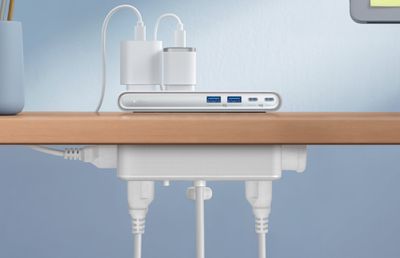
Anker this week launched a useful new accessory for your desk, debuting the 10-in-1 Nano Power Strip. Priced at $70, the Nano Power Strip has a unique clamp design that puts multiple ports on your desktop while eliminating cable clutter.
anker nano power strip 1
I was able to test out the Nano Power Strip ahead of when it launched, and found it to be a useful alternative to standard under-desk power strips. The power strip comes in black or white and it's made of plastic, but the matte finish adds aesthetic appeal, as does a silver front plate for some of the ports.

The clamp is adjustable with an included knob and it fits desktops from 0.6 inches to 1.8 inches. Unfortunately, I have a Parsons-style desk that's too thick to use the power strip as intended, so it's worth measuring. With my thicker desk, I can still attach it to a leg or the back of the desk, but it doesn't put all of the outlets in the ideal position. There are silicone pads at both sides of the clamp to keep furniture from being scratched.
anker nano power strip 2
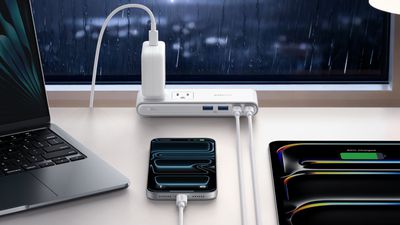
There are two outlets at the top, two outlets at the bottom, and two outlets at the sides, for a total of six outlets. There are two USB-C ports with 70W max charging (split between 45W and 25W when charging two devices), and two 12W USB-A ports. 70W isn't going to charge a MacBook Pro at its maximum speed, but it's enough for day-to-day use, and it'll fast charge most other Apple devices. I do wish there was more USB-C power and one less USB-A port, but it's easy enough to use one of the top outlets to plug in one of Anker's small multi-port power adapters.

With the power strip positioned at the edge of a desk, the two outlets on the top of the device are accessible from the desktop. The four other outlets are accessible from the bottom of the desk, so cables can be hidden away. The USB-A and USB-C ports are also meant to be used from the desktop, and the above-desk portion is slim, coming in at under an inch.

Because the Nano Power Strip attaches to a desk, it stays secure when plugging things in to the ports or the top outlets, which is convenient. I don't need to hold it down to unplug something, and it doesn't move around on a tabletop. If you've ever had a power strip with a bunch of heavy cables plugged in, you probably know what a hassle it can be trying to keep it upright.

The Nano Power Strip is a surge protector, and Anker says that it has overload, short-circuit, and temperature control.

Anker's Nano Power Strip can be purchased from the Anker website or from Amazon for $70.
Tag: Anker

Popular Stories

Aston Martin CarPlay Ultra Screen

Apple Says CarPlay Ultra is Coming to These Vehicle Brands

Thursday May 21, 2026 11:53 am PDT by
Last year, Apple launched CarPlay Ultra, the long-awaited next-generation version of its CarPlay software system for vehicles. Nearly a year later, CarPlay Ultra is still limited to Aston Martin's latest luxury vehicles, but that should change fairly soon. In May 2025, Apple said many other vehicle brands planned to offer CarPlay Ultra, including Hyundai, Kia, and Genesis. CarPlay Ultra...
iphone 18 pro blue%402x

iPhone 18 Pro: Dark Cherry, Light Blue, and Dark Gray Chassis Leaked [Update]

Thursday June 4, 2026 5:18 am PDT by
Update: Since publication, new information has come to light suggesting the images have been AI-manipulated and are not in fact iPhone 18 Pro chassis parts. The original article follows. The color options Apple is reportedly planning for the upcoming iPhone 18 Pro and ‌iPhone 18 Pro‌ Max have appeared online today in the form of images of chassis parts of unknown authenticity....
iOS 27 All the New App Features

iOS 27: All the Rumored App Features

Wednesday June 3, 2026 3:48 pm PDT by
Siri is getting a major overhaul in iOS 27, but Apple also has some big updates planned for apps like Camera, Photos, and Wallet. There are multiple new AI features in the works, plus some non-AI upgrades. Camera Apple is moving Visual Intelligence from the Camera Control button to the Camera app in iOS 27, according to Bloomberg. There will be a Siri mode that will be available alongside...

Top Rated Comments

9 weeks ago
Dreaming of the day companies stop putting USB-A ports in new hardware
Score: 13 Votes (Like | Disagree)
Mrkevinfinnerty Avatar
9 weeks ago

give it a few weeks and it will be on sale ...
Give it a few weeks it will be on fire.
Score: 3 Votes (Like | Disagree)
tgwaste Avatar
9 weeks ago
I cant believe there is no USB input on the bottom of this. That's so dumb.
Score: 3 Votes (Like | Disagree)
9 weeks ago

Note that it supports Anker's proprietary IQ charging, not the open USB PD standard.
This is not true. All these ports support USB PD.
Score: 2 Votes (Like | Disagree)
Tim Cook's Pool Boy Avatar
9 weeks ago

MacRumors content image

Cool product and I would consider it but I have all my wires coming from under the desk without a need to plug in on my desk. But what is with this weird photo on their page? She is using an iMac without a keyboard or mouse.
I do this often. She might be using the Universal Control feature through her MacBook? My iMac's magic keyboard and magic trackpad were both dead the other day. Used my Neo to do work on my iMac. Worked great.
Score: 2 Votes (Like | Disagree)
J InTech82 Avatar
9 weeks ago

MacRumors content image

Cool product and I would consider it but I have all my wires coming from under the desk without a need to plug in on my desk. But what is with this weird photo on their page? She is using an iMac without a keyboard or mouse.
You don't see the keyboard that's attached to the monitor-the laptop? Or the mouse she is holding right near the laptop? I mean I do agree tho, very weird photo!
Score: 2 Votes (Like | Disagree)















