iOS 27 Brings These Five New Features to Your iPhone Lock Screen - MacRumorsOpen MenuShow RoundupsShow Forums menuVisit ForumsOpen Sidebar
Skip to Content

iOS 27 Brings These Five New Features to Your iPhone Lock Screen

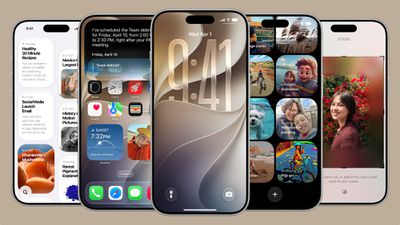
Apple unveiled iOS 27 at WWDC this week, and while the headline-grabbing Siri overhaul has received the most attention, the Lock Screen has picked up several refinements that you may have missed.
ios 27
Some are brand-new additions, while others are tweaks to features Apple introduced in iOS 26, but together they give you more control over how your Lock Screen looks and behaves.

Here are five to try if you plan to install the public beta next month, or when iOS 27 becomes generally available in the fall.

Extend Your Wallpaper
extend wallpaper ios 27
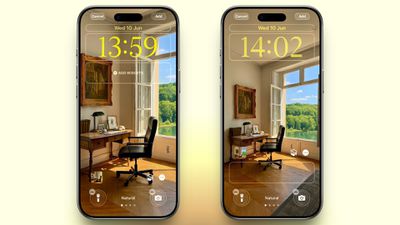
A new wallpaper extension feature in iOS 27 uses Apple Intelligence to automatically expand a photo beyond its original boundaries so it fills the entire Lock Screen more naturally. If a photo is cropped too tightly, doesn't match your iPhone's aspect ratio, or it leaves empty space when positioned on the Lock Screen, iOS 27 can generate additional image content around the edges with the "Extend" option. It will analyze the existing image and create matching background details that blend with the original photo, so there's no need for aggressive cropping. The Extend option can also be found in the Photos app.

Make the Clock Tiny
lock screen
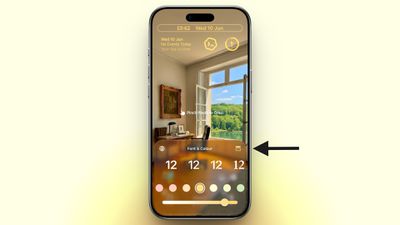
A new compact clock mode is available as a new Lock Screen layout option in iOS 27. Found in the top-right corner of the Font & Color panel, the option moves the time from its traditional large, centered position to a much smaller format alongside the date and widgets at the top of the screen. It's a nice option to have if you like a cleaner Lock Screen look that shows off your wallpaper more fully, and it's the complete opposite effect introduced in iOS 26 that stretches the clock down the screen.

Generate Wallpapers With AI
playground
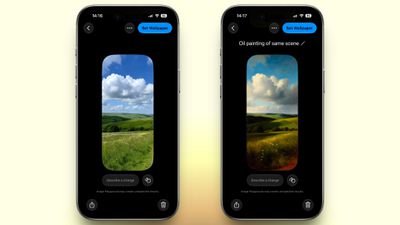
iOS 27 also expands Image Playground with support for AI-generated Lock Screen wallpapers. You can create custom backgrounds using text descriptions, and the app will generate entirely new images tailored to your preferred style, subject matter, or aesthetic, allowing you to set it directly as your Lock Screen wallpaper.

Change Liquid Glass Opacity
settings
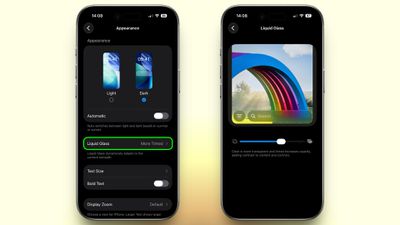
In iOS 27, Apple added a full Liquid Glass slider under Settings ➝ Appearance ➝ Liquid Glass. It changes the translucency of Liquid Glass elements, and you can choose a clear version of Liquid Glass that allows some of the background to show through, select a more opaque, tinted version that improves the legibility of text, or choose something in between. Granted, it's more of a system-wide customization feature than a Lock Screen-exclusive feature, but it directly impacts the look of your clock setup, buttons, widgets, and notifications.

New Siri Interface
ios 27 siri animation
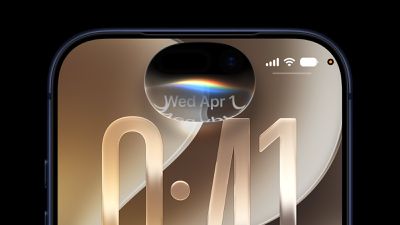
To go with Apple's tentpole "Siri AI" chatbot-style overhaul, iOS 27 introduces a redesigned Siri experience. Instead of the glowing light effect that previously traced the edges of the display, a swirling Siri orb now expands and animates within the Dynamic Island. Siri requests and responses are also now presented in a more compact interface surrounding the Dynamic Island, so interactions should feel more focused rather than completely taking over your Lock Screen.

Related Roundups: iOS 27, iPadOS 27

Popular Stories

google gemini intelligence

Google Previews Android 17 With 'Gemini Intelligence' a Month Before Apple's iOS 27 Reveal

Tuesday May 12, 2026 12:21 pm PDT by
Google today previewed Android 17, the next version of Android that it is bringing to smartphones and other devices. Android 17 includes multiple new AI features, and it comes about a month ahead of when Apple plans to unveil iOS 27 with new AI capabilities. Google is now calling the AI features on Android "Gemini Intelligence," branding similar to Apple Intelligence. Google said it is...
iOS 27 on iPhone 17 1

iOS 27 to Bring Customizable Camera App, Tweaks to Weather, Safari and Liquid Glass

Tuesday May 12, 2026 1:12 pm PDT by
Apple plans to make the Camera app more customizable in iOS 27, reports Bloomberg. Users will be able to select the features they want to see in the Camera app, like flash, exposure, timer, depth of field, photo styles, and resolution. Camera controls, labeled as widgets, will be able to be placed at the top of the Camera interface in any order. Users will be able to select widgets from a...
Finder Siri Feature

iOS 27 Getting Major Siri Redesign With Chat Interface and Dedicated App

Tuesday May 12, 2026 1:38 pm PDT by
Apple is introducing an overhauled version of Siri in iOS 27, evolving the personal assistant into a more capable chatbot and AI agent able to compete with ChatGPT, Claude, and Gemini. With Siri's transition, Apple will be making multiple Siri-related design changes in iOS 27, according to a new report from Bloomberg. Siri will largely live in the Dynamic Island in iOS 27, but there will also be...

Top Rated Comments

10 hours ago at 08:19 am
How about displaying the time with seconds. Much more useful than the rubbish on offer.
Score: 5 Votes (Like | Disagree)
11 hours ago at 06:43 am
Only 2 out of 5 features are genuine lock screen enhancements. The other 3 are either wallpaper tools (which already exist in the Photos app) or system-wide customisation features.
Score: 3 Votes (Like | Disagree)
sw1tcher Avatar
10 hours ago at 08:19 am

Anyone manage to extract this image, would make a nice watchOS background!
No need to extract it when you can just go to Tim Cook's tweet about it from September 9, 2024 and get it there.


View post on X

https://pbs.twimg.com/media/GW-RG4QbQAAfihG.jpg


A wider (desktop?) version can be found here:

https://www.macrumors.com/2026/03/29/apples-50th-anniversary-finale-revealed/
Score: 2 Votes (Like | Disagree)
Small White Car Avatar
11 hours ago at 07:20 am
What I really want is the ability to pick a photo album as a source of backgrounds and have my lock screen reference it as I make changes in the future.

I can do this on my Apple TV screensaver. I have an album on my phone and I can add or remove photos at any point and the screensaver will reflect that in the future.

But for some reason on my iPhone lock screen it’s a big hassle to add and remove photos from my rotating photo gallery. It’s a completely separate process and it never checks photo albums again after you import the photos.

This would be far more useful than anything listed in this article.
Score: 2 Votes (Like | Disagree)
ipedro Avatar
11 hours ago at 07:02 am
Anyone manage to extract this image, would make a nice watchOS background!

Attachment Image
Score: 2 Votes (Like | Disagree)
11 hours ago at 06:57 am
Omg the mini clock is so cute!

But yeh most of these aren’t really lock screen features are they.
Score: 2 Votes (Like | Disagree)