

iOS 27's Wi-Fi Settings Include Rebranded 'Connectivity Assist' Feature - MacRumorsOpen MenuShow RoundupsShow Forums menuVisit ForumsOpen Sidebar
Skip to Content

iOS 27's Wi-Fi Settings Include Rebranded 'Connectivity Assist' Feature

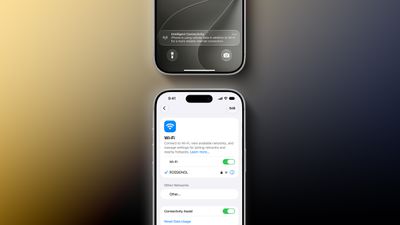
iOS 27 and iPadOS 27 include a rebranded Connectivity Assist feature that can help your iPhone stay connected to the internet.
iOS 27 Boosts Your iPhones Wi Fi With New Connectivity Assist Feature 2
Connectivity Assist can be found in the Settings app under Wi-Fi on iOS 27 and iPadOS 27. Apple's description of the feature says it lets you "use cellular data in addition to Wi-Fi for a more reliable internet connection."

A support document on Apple's website confirms that Connectivity Assist is the new name used on iOS 27 and iPadOS 27 for the feature previously known as Wi-Fi Assist, but it is unclear if there are any functionality changes.

On iOS 26 and earlier, Wi-Fi Assist automatically switches the device to cellular data when Wi-Fi connectivity is poor. Some early iOS 27 beta testers have speculated that Connectivity Assist seems to go further by offering combined Wi-Fi and cellular connectivity when it is active, but we have yet to confirm that claim.

On the iOS 27 beta, Flighty developer Ryan Jones and others have received a new "Intelligent Connectivity" notification when Connectivity Assist is active. It is possible that the feature now kicks in more aggressively.

On a related note, Apple said iOS 27 and iPadOS 27 offer "smoother network transitions."

"Your iPhone more seamlessly chooses the best available Wi‑Fi or cellular connection, so whether you're getting directions as you leave home or taking a FaceTime call as you step off a plane, you'll stay connected," the company explained.


Related Roundups: iOS 27, iPadOS 27
Related Forum: iOS 27

Popular Stories

iOS 27 Next to iPhone

Here's When iOS 27 Rolls Out Today in Every Time Zone [Update: It's Out]

Sunday September 13, 2026 3:00 am PDT by
Update 10:04 a.m.: iOS 27 is rolling out now, though it may take a bit for all users to see it, so keep checking! Apple is about to release iOS 27, which will finally deliver more advanced Siri AI capabilities as well as a variety of other refinements, improvements, and new features to iPhones. It's Apple's biggest software update of the year, and Apple announced at Wednesday's iPhone event...
iOS 27 Icon iPhone

iOS 27 Available Now With These 8 New Features

Monday September 14, 2026 9:00 am PDT by
Update — 10 a.m. Pacific Time: Apple has released iOS 27. During its iPhone 18 Pro and iPhone Duo event last week, Apple announced that iOS 27 will be released widely on Monday, September 14. iOS 27 should be available around 10 a.m. Pacific Time / 1 p.m. Eastern Time today via the Settings app, under General → Software Update. Below, we have highlighted eight new features and...
iPhone Handoff Feature

iOS 27 Introduces New 'iPhone Handoff' Feature

Wednesday September 2, 2026 12:35 pm PDT by
Apple has added a new "iPhone Handoff" feature to iOS 27 that will allow you to switch between two iPhones while using the same phone number on each device. This functionality was briefly mentioned during the WWDC 2026 keynote in June, on a slide that listed hundreds of new features coming in iOS 27 and corresponding software updates, but Apple never shared any further details at the time. ...

Top Rated Comments

Will Tisdale 🎗 Avatar
14 weeks ago

Connectivity Assist for sure feels like it's doing some funky things with DNS. [snipped]
Correct, it is.

It uses both the WiFi dns server addresses and the mobile network DNS server addresses with the predictable chaos that results when they both return different records.

It causes DNSsec tests to fail and leaks queries to the mobile network dns servers which isn’t exactly good for privacy or DNS adblocking.

There’s two solutions, either turn it off or install a DoT/DoH always on DNS profile, either option resolves the problem.

I have submitted a feedback FB23073160 for all the good it will do seeing as most are just ignored.
Score: 10 Votes (Like | Disagree)
miguelness Avatar
14 weeks ago
I've actually noticed my connectivity getting worse with this feature. Not sure if the setting mixed up but I'm disconnecting and buffering more often when watching simple things like my Instagram feed. Anyone else?
Score: 7 Votes (Like | Disagree)
14 weeks ago

I didn’t realize this feature existed previously, but it was toggled on after I installed the beta and it allowed ads to get past my ad blocker which had not previously been a problem. To me, that suggests the speculation is accurate. (Toggling it off immediately stopped ads from loading.)
Connectivity Assist for sure feels like it's doing some funky things with DNS. I use AdGuard Home as a DNS-level Ad Blocker and was seeing ads leak through but only on my phone with iOS 27. Turned it off, immediately went back to not seeing ads. Able to replicate pretty easily. Also just found this thread on Reddit confirming [MEDIA=reddit]dns/comments/1u1ovlp/psa_updated_ios_27_feature_seems_to_override_the[/MEDIA]
Score: 5 Votes (Like | Disagree)
rchaser Avatar
14 weeks ago
I use my phone for work a lot. The transition management between WiFi & 5g is problematic. I don’t think it’s an easy solution but wish it could be better.

A majority of the time I have a problem accessing data and I’m getting no response…switching WiFi off nearly always solves the problem immediately.

So…why can’t my phone just do that…?

First world problem that could use some help.
Score: 5 Votes (Like | Disagree)
14 weeks ago
I didn’t realize this feature existed previously, but it was toggled on after I installed the beta and it allowed ads to get past my ad blocker which had not previously been a problem. To me, that suggests the speculation is accurate. (Toggling it off immediately stopped ads from loading.)
Score: 4 Votes (Like | Disagree)
14 weeks ago

exactly this. Apple's handling of this particular matter has been abysmal.
I’m also hoping this is a big upgrade on WiFi assist. I have to turn WiFi off when I mow the lawn if I want to stream music. Turning off WiFi fixes it every time.
Score: 3 Votes (Like | Disagree)













