macOS 27 Golden Gate Kills Time Capsule Support - MacRumorsOpen MenuShow RoundupsShow Forums menuVisit ForumsOpen Sidebar
Skip to Content

macOS 27 Golden Gate Kills Time Capsule Support

macOS 27 Golden Gate removes AFP support, ending Time Machine compatibility with Time Capsule after nearly two decades, but a community project from a Microsoft engineer offers a potential workaround for owners not yet ready to move on.
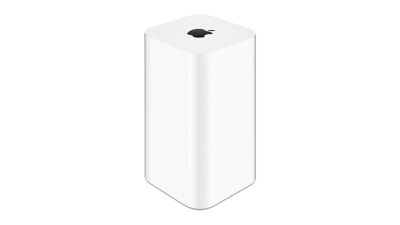
time capsule
Apple's Time Capsule was introduced at Macworld Expo in January 2008, combining a Wi-Fi router with NAS-style network storage designed to work in tandem with the Time Machine backup software. Apple officially ended development on the entire AirPort line in April 2018, with the AirPort Express at $99, the AirPort Extreme at $199, and the AirPort Time Capsule at $299, available only while supplies lasted. The lineup sold out entirely by November 2018. Prior to that, Apple had not updated its AirPort products since 2013.

AFP dates back to 1988, when Apple designed a native file-sharing protocol for the Macintosh as part of the AppleTalk networking suite. SMB became the primary file-sharing protocol in OS X 10.9 Mavericks in 2013, and the ability to run an AFP server was removed in macOS 11 Big Sur in 2020.

Apple formally deprecated the AFP client in macOS Sequoia 15.5, and, when macOS 26 Tahoe launched, a warning in System Settings confirmed that AFP support and Time Capsule compatibility would end with macOS 27. As expected, the first developer beta of macOS 27 Golden Gate contains no AFP client at all, ending a protocol with more than 40 years of history in the Apple ecosystem.

All Time Capsule models rely on AFP and SMBv1, the original Server Message Block version from 1987. From macOS 27 onwards, Time Machine requires SMBv2 or SMBv3, which covers modern NAS hardware but rules out every Time Capsule model in its stock form. macOS 27 also enforces stricter network security requirements, including TLS 1.2 as a minimum, which is a bar that Time Capsule hardware cannot meet.

The community response is a GitHub project called TimeCapsuleSMB, created by James Chang, an engineer at Microsoft. Rather than replacing Apple's firmware, it installs a modern Samba build directly onto the Time Capsule. The device runs a Samba 4.24.3 server, advertises itself over Bonjour, and accepts authenticated SMB3 connections, so users can connect via a standard SMB URL in Finder rather than relying on Apple's legacy stack.

Only the fifth-generation Time Capsule tower model from 2013 auto-restarts the Samba server after a reboot. Earlier models require a manual activate command every time the device loses power, meaning backups may silently stop after an outage. It is also worth noting that switching to SMB via TimeCapsuleSMB begins a new Time Machine backup chain, with the new destination treated as a fresh start. There is no published long-term restore testing for the project, so a second backup destination is advisable.

macOS 27 Golden Gate is currently in developer beta, with a public beta due in July and a general release set for September. It is compatible only with Apple silicon Macs, meaning Intel Mac users who stay on macOS 26 can continue using Time Capsule for the foreseeable future. Apple silicon owners who want to upgrade will need a compliant backup target in place first, whether that is a modern NAS, an external drive, or a patched Time Capsule running TimeCapsuleSMB.


Related Roundup: macOS Golden Gate

Popular Stories

macOS 27 on MacBook Pro

macOS 27 Will Mark the End of an Era

Tuesday May 26, 2026 7:16 am PDT by
During its Platforms State of the Union segment at WWDC 2025, Apple revealed that macOS 26 Tahoe is the final major macOS version for Intel-based Macs. The upcoming macOS 27 release will be compatible with Apple silicon Macs only, meaning that you will need a Mac with an M-series chip or a MacBook Neo with an A18 Pro chip in order to install the software update. Apple will unveil macOS 27...
macOS 27 Feature Blue

macOS Emerald to macOS Big Bear: What Will Apple Name macOS 27?

Tuesday June 2, 2026 8:20 am PDT by
Every year heading into WWDC, one thought on many Mac fans' minds is what Apple will choose as the name for the next version of macOS. The tradition dates all the way back to the beginning of Mac OS X with big cat names like Leopard, and Apple eventually shifted to California-themed names with the unveiling of OS X Mavericks. Apple has yet to announce the name for macOS 27, but macOS Emerald ...
macOS 27 on MacBook Pro

Apple Says macOS 27 Won't Be Compatible With These Macs

Wednesday June 3, 2026 8:29 am PDT by
During WWDC 2025, Apple revealed that macOS 26 Tahoe would be the final major macOS version for Intel-based Macs. macOS 27 will be compatible with Apple silicon Macs only, meaning that you will need a Mac with an M-series chip or a MacBook Neo with an A18 Pro chip in order to install the software update. Apple will unveil macOS 27 during its WWDC 2026 keynote this Monday, June 8, and the...

Top Rated Comments

turbineseaplane Avatar
23 hours ago at 06:50 am
It's so frustrating to me that Apple hasn't remained in the router and Time Capsule space.

Why isn't there an Apple router/Home Hub/Time Capsule solution on offer in 2026?
Score: 35 Votes (Like | Disagree)
23 hours ago at 07:11 am

Because you can make one from just about any computer. I personally run multiple TM backups within BSD jails.
Love these kinds of comments- completely insular and clueless that the vast amount of consumers cannot do that. Apple absolutely could offer a router and or router/Time Machine with modern specs.
Score: 18 Votes (Like | Disagree)
23 hours ago at 06:58 am

It's so frustrating to me that Apple hasn't remained in the router and Time Capsule space.

Why isn't there an Apple router/Home Hub/Time Capsule solution on offer in 2026?
Not much room to meaningfully differentiate anymore.

Unifi is great, and has a lot of ex Apple airport team. Enjoy it-- far better than if Apple tried to make routers today.
Score: 14 Votes (Like | Disagree)
23 hours ago at 07:16 am

Routers are a commodity.

They are controlling backups by pushing iCloud instead.
I think this is the elephant in the room on this. Apple's entire philosophy has shifted away from doing anything locally to renting everything from them.
Score: 12 Votes (Like | Disagree)
23 hours ago at 06:56 am
I had to move on from my AirPort Extreme because I needed some new time based permissions for some devices and children. But that router never gave me trouble in 8 years of constant use with tons of devices. My current router any given day it will just tap a nap and half the devices lose connection. Randomly all the time. I forgot how good I had it with the Airport.
Score: 12 Votes (Like | Disagree)
kiranmk2 Avatar
16 hours ago at 01:29 pm

Routers are a commodity.

They are controlling backups by pushing iCloud instead.
iCloud is not a backup - it is a syncing/cloud storage service. If you delete a file, you have 30 days to recover it from iCloud, yes. However, if you unintentionally overwrite, delete or modify contents of a file or simply want to see a previous version of the file, or a file becomes corrupted, iCloud can't help you recover from this. I don't really understand why Apple hasn't been selling a proper iCloud-based Time Machine option (so your 2 Tb iCloud storage actually behaves as a Time Machine).
Score: 3 Votes (Like | Disagree)