Apple Provides Tips For Making Your Persona Look Better - MacRumorsOpen MenuShow RoundupsShow Forums menuVisit ForumsOpen Sidebar
Skip to Content

Apple Provides Tips For Making Your Persona Look Better

Apple designed the Vision Pro to use a "Persona" or a digital representation of the wearer in FaceTime, Zoom, and other video apps. Apple says that the Persona is meant to be a "dynamic, natural representation" of the user's face, but many people have found it to be anything but natural.
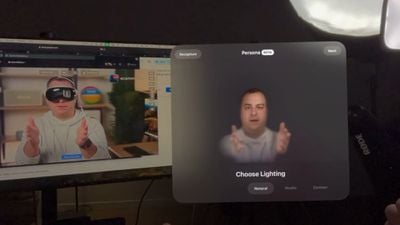
dan persona vision pro
In fact, many reviewers found the Personas to be creepy, weird, and off-putting because of the uncanny valley experience, and that may be why Apple has only released Personas in a beta capacity. Apple today provided instructions on setting up a Persona, complete with tips on how to get the best result.

You can watch MacRumors videographer Dan set up a Persona below, but it's basically as simple as tapping on Persona in Settings and following the instructions. Making a Persona uses the Vision Pro's camera and captures the user's face and facial expressions.


Here's what Apple says Vision Pro owners can do to make the best Persona:

  • Take your time getting ready. Capture will not start until the Vision Pro is at eye level.
  • Use front-facing, even lighting. Do not have bright windows or lamps behind or beside you. The Vision Pro may prompt you to adjust lighting.
  • Ensure your face is well-lit with no strong shadows.
  • Make sure your hair is not covering your face.
  • Use a simple background and stay away from nearby objects like chair backs and lamps.
  • Make sure there are no people behind you.
  • Make sure the Vision Pro is held horizontally at eye level throughout the capture.
  • When asked to smile, make as large and natural a smile as you can.
  • If you're not able to perform one of the expressions, such as raising an eyebrow or smiling with teeth, double clicking on the Digital Crown will skip the expression.
  • Hats, earrings, AirPods, and other items might not be captured fully. They will need to be removed and the Persona will need to be redone if they don't look right.

If your Persona does not come out as expected, you can redo the process and change variables until it looks better. Note that glasses cannot be captured, and must be added afterward through Apple's pre-selected styles.

Different lighting options can be applied to a Persona, including Natural, Studio, or Contour. There are also settings to adjust the temperature and brightness of the Persona.

When you capture your Persona, Apple is also capturing your eyes for the EyeSight feature that shows the wearer's eyes when other people are nearby.

Related Roundup: Apple Vision Pro
Buyer's Guide: Vision Pro (Neutral)
Related Forum: Apple Vision Pro

Popular Stories

General visionOS watchOS and tvOS Betas Feature Redux

Apple Releases Third watchOS 26.5, tvOS 26.5 and visionOS 26.5 Betas

Monday April 20, 2026 10:03 am PDT by
Apple today provided developers with the third betas of upcoming watchOS 26.5, tvOS 26.5, and visionOS 26.5 betas for testing purposes. The software comes a week after Apple released the second betas for each platform. The software updates are available through the Settings app on each device, and because these are developer betas, a free developer account is required. There's no word on ...
apple vision pro orange

Vision Pro Creator Mike Rockwell Has Considered Leaving Apple

Wednesday April 22, 2026 6:09 am PDT by
Mike Rockwell, the Apple executive who led development of the Vision Pro and is now in charge of rebuilding Siri, has considered leaving the company or moving into an advisory role as soon as next year, according to a new Bloomberg report by Mark Gurman. Rockwell is said to have reservations about reporting to his new boss, software chief Craig Federighi, and wants a bigger remit than the...
General visionOS watchOS and tvOS Betas Feature Redux

Apple Releases Fourth watchOS 26.5, tvOS 26.5 and visionOS 26.5 Betas

Monday April 27, 2026 10:01 am PDT by
Apple today provided developers with the fourth betas of upcoming watchOS 26.5, tvOS 26.5, and visionOS 26.5 betas for testing purposes. The software comes a week after Apple released the third betas for each platform. The software updates are available through the Settings app on each device, and because these are developer betas, a free developer account is required. There's no word on ...

Top Rated Comments

30 months ago
I think people are overreacting. Is it perfect? Absolutely not. But is it by far the best lifelike avatar on the market? Absolutely. And it's doing it all in real time with a full AVP on your face. From a technological standpoint it is incredible. It will improve over time and I look forward to seeing those improvements... But just... WOW
Score: 21 Votes (Like | Disagree)
elliotmoore91 Avatar
30 months ago
hahaha. Dan looks like an actual potato.
Score: 13 Votes (Like | Disagree)
30 months ago
I think I'll wait for the $599 Apple Vision SE in 2028.
Score: 9 Votes (Like | Disagree)
anthony13 Avatar
30 months ago
This product continues to baffle me.
Score: 9 Votes (Like | Disagree)
30 months ago
i didn't see any distinction between you and the persona.
Score: 9 Votes (Like | Disagree)
XboxEvolved Avatar
30 months ago
-Do not taunt Super Happy FunBall
Score: 7 Votes (Like | Disagree)