AirPods Pro 2: How to Enable or Disable Charging Case Sounds - MacRumorsOpen MenuShow RoundupsShow Forums menuVisit ForumsOpen Sidebar
Skip to Content

AirPods Pro 2: How to Enable or Disable Charging Case Sounds

by

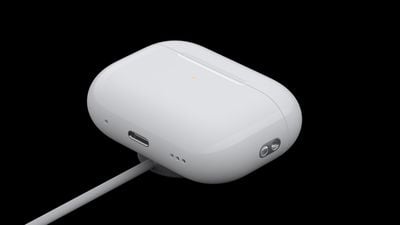
With AirPods Pro 2, Apple has improved the Charging Case by adding a U1 chip for Precision Finding with Find My. This means there is a speaker built into the case that can emit a sound to help you locate it.
airpods pro apple watch charger
However, the speaker also plays an audible chime whenever you start charging the Charging Case. The sound plays whether you connect the case to power via Lightning or place it down on a charging pad. If you find this distracting, here's an easy way to turn it off.

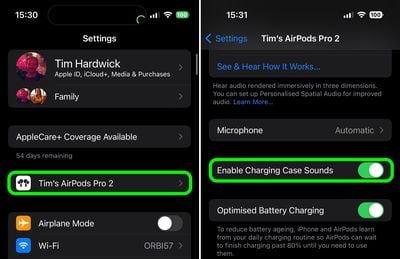
  1. Connect your AirPods Pro 2 to your iPhone.
  2. Launch the Settings app.
  3. Tap the AirPods Pro 2 tab just under your Apple ID.
  4. Scroll down and toggle off the switch next to Enable Charging Case Sounds.
settings

That's all you need to do. Note that the setting will remain grayed out if the Charging Case is currently connected to power.

Related Roundup: AirPods Pro 3
Buyer's Guide: AirPods Pro (Buy Now)
Related Forum: AirPods

Top Rated Comments

46 months ago
My charging case only made sounds the first time I used it. Now sounds aren't working. Has anybody else run into this issue?
Score: 4 Votes (Like | Disagree)
46 months ago
I love the chime! I wish you could change it into the Tim “Good Moaaaarning” Cook chime every time you charge it.
Score: 2 Votes (Like | Disagree)
46 months ago
I like this feature. Reassures me Ive got it right!
Score: 2 Votes (Like | Disagree)
46 months ago

I have a serious problem with this feature. I do not want to hear a chime every time I am charging the case, but if I turn it off I think that means it is off for all purposes. I definitely want it active if I need to use Find My. Is there a solution for this? Thanks.
Thanks for help. That’s just what I wanted to hear. 🙂
Score: 1 Votes (Like | Disagree)
46 months ago

My charging case only made sounds the first time I used it. Now sounds aren't working. Has anybody else run into this issue?
Yes, I have the same problem. I made a reset on the Airpods Pro 2, then it worked again once and stopped making the sound right again after the repairing.
Score: 1 Votes (Like | Disagree)
noobinator Avatar
46 months ago

That option is greyed out on my APP 2.

Same here. What gives? Why is it grayed out in some and for others it’s fine?
Grayed out over here too.
Score: 1 Votes (Like | Disagree)