In some workouts, you'll also see a Burn Bar that lets you compare your effort to others who have done the same workout. It is available for High Intensity Interval Training, Treadmill, Cycling, and Rowing workouts.
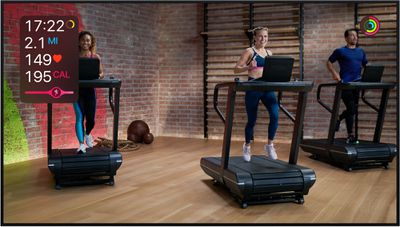
The Burn Bar is meant to be motivational, and it adjusts based on your weight to allow for an equal comparison when it comes to calories burned. To calculate your performance, the Burn Bar uses your heart rate, and you'll start seeing the bar two minutes into a relevant workout.
Based on the number of calories you've burned, the Burn Bar will show five options: Behind the Pack, In the Pack, Middle of the Pack, Front of the Pack, or Ahead of the Pack. Your progress will be visible in a little pink bar that shows where you're at relative to other people.
Throughout the workout, the Burn Bar reflects the last two minutes of work, so it will update continuously. At the end of a workout, the Burn Bar result will be an average of your effort across the entire result, with Burn Bar results available in the workout summary. If you don't like the burn bar, you can disable it by accessing the Apple Fitness+ metrics.
For more on Fitness+, make sure to check out our full Fitness+ guide.