

When using an iPad, you might notice blue frames appearing around the screen elements. This often happens when Full Keyboard Access is enabled. Full Keyboard Access is an accessibility feature that allows users to control the iPad using a keyboard. The blue frames indicate which element is currently focused and can be interacted with via the keyboard.

Causes of Blue Frames Appearing on iPad
In iPadOS, the blue frames are part of Full Keyboard Access feature, which is designed to help users who rely on a keyboard to navigate their iPad. When this feature is turned on, a blue frame highlights the currently selected item on the screen, indicating where keyboard actions will be applied.
The blue frames can sometimes appear unexpectedly when you connect an iPad to a Magic Keyboard or another accessory that connects via the Smart Connector at the rear. If you want them gone, here's what to do.
How to Disable Full Keyboard Access
If you prefer not to see these blue frames and do not need Full Keyboard Access, you can disable the feature by following these steps:
- Open the Settings app on your iPad.
- Scroll down and tap Accessibility.
- Under the Accessibility settings, tap Keyboards.
- Find the Full Keyboard Access option and toggle it off.
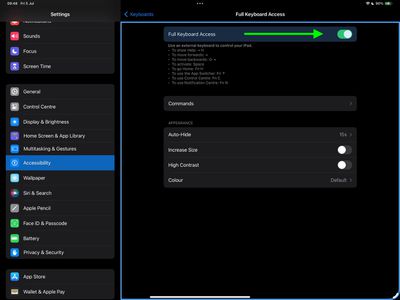
By turning off Full Keyboard Access, the blue frames will no longer appear around the elements on your screen.
Customize Full Keyboard Access
If you need to use Full Keyboard Access but want to customize how it works, you can adjust the settings in the following manner:
- Open the Settings app.
- Scroll down and tap Accessibility.
- Under Accessibility, tap Keyboards.
- Tap Commands to customize keyboard shortcuts for various actions.
Now you can adjust the appearance settings to change how the blue frame looks. These adjustments allow you to continue using Full Keyboard Access while tailoring it to your preferences.



















