

macOS: How to Change the Color of Desktop Widgets - MacRumorsOpen MenuShow RoundupsShow Forums menuVisit ForumsOpen Sidebar
Skip to Content

macOS: How to Change the Color of Desktop Widgets

by

In macOS Sonoma, widgets don't have to be hidden offscreen and largely forgotten in the Notifications Center panel, like they were in previous versions of Apple's macOS. Instead, they can be placed right on your Mac's desktop – and they're interactive, too.
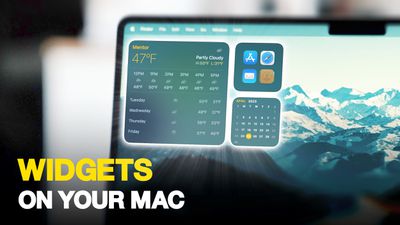
Widgets on Your Mac Thumb 3
When not in use, macOS desktop widgets fade into the background by taking on a monochrome style, which makes them less distracting and allow you to concentrate on the task at hand in the active app or window. When you click back on the desktop, however, their return to full color.

If you prefer the monotone look and would rather retain this aspect of uniformity on your desktop, there is a way you can make it permanent. The following steps show you how it's done.

  1. Open the System Settings app.
  2. Click Desktop & Dock in the side column.
  3. Scroll down to the "Widgets" section, then set the "Widget style" to Monochrome.
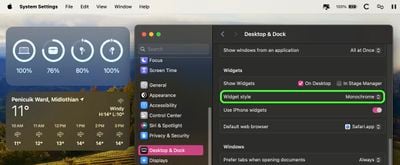
settings

That's all there is to it. If you want to revert back to full color widgets that change to monochrome when in the background, or you want widgets to appear in full color at all times, choose either the Automatic or Full-color "Widget style" option in System Settings, respectively.


Popular Stories

iPhone 18 Pro Deep Red Feature

iPhone 18 Pro Launching in Two Months With These 12 New Features

Friday July 17, 2026 10:39 am PDT by
It is now mid-July, and that means the iPhone 18 Pro and iPhone 18 Pro Max are now just two months away. The devices are expected to look similar to the iPhone 17 Pro and iPhone 17 Pro Max, but there will still be many year-over-year changes, with rumored features including a smaller Dynamic Island, 5G via satellite, and more. Apple is expected to unveil the iPhone 18 Pro, iPhone 18 Pro Max, ...
iPhone 18 Pro and Pro Max Feature

'Apple Upgrade' Program Reportedly Launching Next Week

Tuesday July 21, 2026 8:30 am PDT by
Apple and Klarna are partnering on a new "Apple Upgrade" program set to launch in the U.S. on Tuesday, July 28, according to Bloomberg's Mark Gurman. The program will allow you to finance most iPhone, iPad, Mac, and Apple Watch models, with a 24-month term for iPhones and Apple Watches and a 36-month term for iPads and Macs. Customers will be able to pay off the device early during the term, ...
iPhone 18 Pro Deep Red Feature

iPhone 18 Pro Launching in Two Months With These 12 New Features

Tuesday July 21, 2026 6:22 am PDT by
It is now mid-July, and that means the iPhone 18 Pro and iPhone 18 Pro Max are now just two months away. The devices are expected to look similar to the iPhone 17 Pro and iPhone 17 Pro Max, but there will still be many year-over-year changes, with rumored features including a smaller Dynamic Island, 5G via satellite, and more. Apple is expected to unveil the iPhone 18 Pro, iPhone 18 Pro Max, ...













