How to Change HomeKit Accessory Icons in the Home App - MacRumorsOpen MenuShow RoundupsShow Forums menuVisit ForumsOpen Sidebar
Skip to Content

How to Change HomeKit Accessory Icons in the Home App

by

Whenever you add a HomeKit accessory to Apple's Home app, a default icon is assigned to it. Smart lights, for example, are given the default bulb icon, but if you have various types of light fittings, that's not very helpful for identifying them in the app at a glance.

change homekit icons
What you may not know is that you can change the icons of many third-party ‌HomeKit‌ accessories to something that lets you distinguish them more easily. This is a particularly good way to represent what device you have plugged into a smart switch, for instance. Here's how it works.

How to Change HomeKit Accessory Icons

  1. Launch the Home app on your iPhone or iPad.
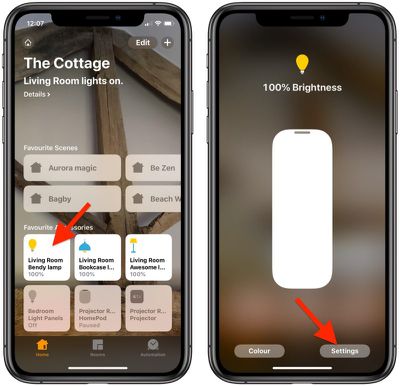
  2. Press and hold the accessory whose icon you would like to change.
    change homekit icons 0

  3. Tap Settings at the bottom right of the screen.
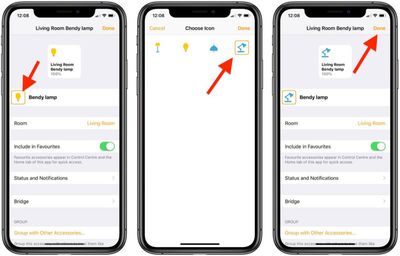
  4. Locate the icon next to the accessory name. If there's an orange square around the icon, you can change it. Tap it to do so.
  5. Choose a new icon by tapping it. In our example, you can change the default light bulb icon to a floor lamp, desk lamp, or ceiling lamp.
    change homekit icons 1

  6. Tap Done.
  7. Tap Done again.
  8. Tap once more to return to the main Home screen.
Note that you can't change the icons in the Home app for Apple devices like HomePods and Apple TVs. The same goes for some third-party accessories like thermostats for example, although it's worth checking if you're not sure.


Popular Stories

macOS 27 on MacBook Pro

Apple Says macOS 27 Won't Be Compatible With These Macs

Wednesday June 3, 2026 8:29 am PDT by
During WWDC 2025, Apple revealed that macOS 26 Tahoe would be the final major macOS version for Intel-based Macs. macOS 27 will be compatible with Apple silicon Macs only, meaning that you will need a Mac with an M-series chip or a MacBook Neo with an A18 Pro chip in order to install the software update. Apple will unveil macOS 27 during its WWDC 2026 keynote this Monday, June 8, and the...
MacBook Neo on Yellow Feature

MacBook Neo is So Popular That Apple Reportedly Doubled Production

Wednesday June 3, 2026 9:24 am PDT by
On an earnings call in late April, Apple's CEO Tim Cook said that customer response to the MacBook Neo was "off the charts," and the popularity of the laptop has reportedly led the company to significantly boost production. Apple supply chain analyst Ming-Chi Kuo this week said he believes that MacBook Neo shipments to Apple were doubled from an initial target of 5 million units to 10...
iphone 18 pro blue%402x

iPhone 18 Pro: Dark Cherry, Light Blue, and Dark Gray Chassis Leaked [Update]

Thursday June 4, 2026 5:18 am PDT by
Update: Since publication, new information has come to light suggesting the images have been AI-manipulated and are not in fact iPhone 18 Pro chassis parts. The original article follows. The color options Apple is reportedly planning for the upcoming iPhone 18 Pro and ‌iPhone 18 Pro‌ Max have appeared online today in the form of images of chassis parts of unknown authenticity....