

How to Change 'Sent From My iPhone' Email Signature - MacRumorsOpen MenuShow RoundupsShow Forums menuVisit ForumsOpen Sidebar
Skip to Content

How to Change 'Sent From My iPhone' Email Signature

by

Fed up of seeing "Sent from my iPhone" at the end of your emails? Customizing your email signature can add a personal touch to your messages and project a professional image. Here's how to change it on iPhone and iPad.
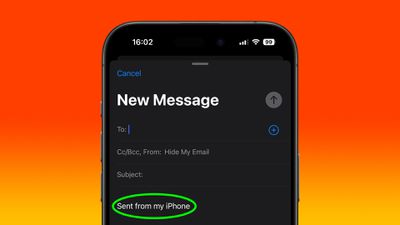
sent from my iphone signature
If you're an iPhone user, you've probably noticed the default "Sent from my iPhone" signature that accompanies emails sent in the Mail app. While this signature serves as a subtle advertisement for Apple's popular device, you may not feel it reflects your personality, or you might worry that it lacks professionalism.

Whether you're looking to add your contact information, a company logo, or a unique sign-off, changing your email signature on an iPhone is a simple process that can make a big difference in how your emails are perceived. The following steps show you how it's done.

  1. On iPhone or iPad, launch the Settings app.
  2. Choose Mail.
  3. Scroll down to the "Composing" section, then tap Signature.
  4. To use the same signature across all your email accounts, choose All Accounts. To enter a unique signature for each account, choose Per Account.
  5. Use the input field(s) to enter your custom signature(s).
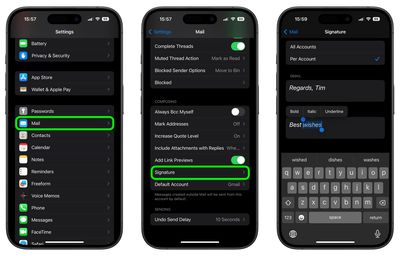
settings

Note that if you press and hold on the text you enter, you can access the Format option from the popup menu to apply bold, italic, and underlined formatting. Otherwise, that's all there is to it. The next time you send an email, your new personalized signature will be automatically applied.


Popular Stories

macOS 27 on MacBook Pro

Apple Says macOS 27 Won't Be Compatible With These Macs

Wednesday June 3, 2026 8:29 am PDT by
During WWDC 2025, Apple revealed that macOS 26 Tahoe would be the final major macOS version for Intel-based Macs. macOS 27 will be compatible with Apple silicon Macs only, meaning that you will need a Mac with an M-series chip or a MacBook Neo with an A18 Pro chip in order to install the software update. Apple will unveil macOS 27 during its WWDC 2026 keynote this Monday, June 8, and the...
MacBook Neo on Yellow Feature

MacBook Neo is So Popular That Apple Reportedly Doubled Production

Wednesday June 3, 2026 9:24 am PDT by
On an earnings call in late April, Apple's CEO Tim Cook said that customer response to the MacBook Neo was "off the charts," and the popularity of the laptop has reportedly led the company to significantly boost production. Apple supply chain analyst Ming-Chi Kuo this week said he believes that MacBook Neo shipments to Apple were doubled from an initial target of 5 million units to 10...
iphone 18 pro blue%402x

iPhone 18 Pro: Dark Cherry, Light Blue, and Dark Gray Chassis Leaked [Update]

Thursday June 4, 2026 5:18 am PDT by
Update: Since publication, new information has come to light suggesting the images have been AI-manipulated and are not in fact iPhone 18 Pro chassis parts. The original article follows. The color options Apple is reportedly planning for the upcoming iPhone 18 Pro and ‌iPhone 18 Pro‌ Max have appeared online today in the form of images of chassis parts of unknown authenticity....















