How to Check Which Version of the Irregular Rhythm Notification feature Your Apple Watch is Using - MacRumorsOpen MenuShow RoundupsShow Forums menuVisit ForumsOpen Sidebar
Skip to Content

How to Check Which Version of the Irregular Rhythm Notification feature Your Apple Watch is Using

by

Atrial fibrillation is a health condition that often goes undiagnosed, so ECG app and heart rhythm alerts on Apple Watch are highly useful for detecting early signs of disease. ECG readings also normally require a full ECG machine and a visit to the doctor, which is far less convenient than a reading taken with the Apple Watch.

apple watch ecg

The irregular rhythm notification feature intermittently checks heart rhythm in the background and sends a notification if an irregular heart rhythm is identified that could potentially be atrial fibrillation (AFib). Upon receiving a notification, users in territories where the feature is approved can immediately launch the ECG app and perform a more comprehensive test in just 30 seconds by placing their finger on the Digital Crown to generate an ECG waveform.

Apple has designed two algorithms that Apple Watch uses to measure electrocardiogram (ECG) waves. The second algorithm improves upon the first, by allowing the ECG app to check for atrial fibrillation (AFib) at higher heart rates - during exercise, for example. However, because of regulations in your country or region, version 2 might not be available to you. You can verify which version of the irregular rhythm notification feature you have on your Apple Watch or iPhone by following these steps.

On Apple Watch

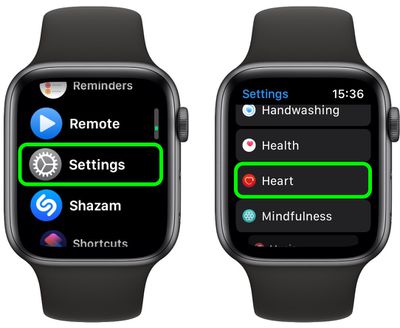
  1. On your Apple Watch, press the Digital Crown and select the Settings app.
  2. Scroll down and select Heart.
    watch

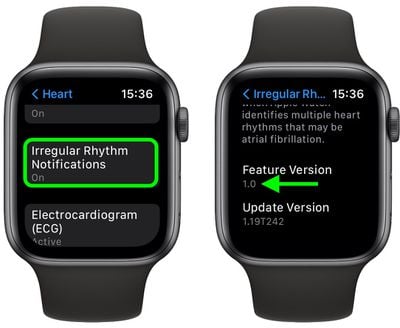
  3. Tap Irregular Rhythm Notifications.
  4. Scroll down to view the version number.
    watch

On iPhone

  1. On your iPhone, open the Health app.
  2. Tap the Browse tab.
  3. Scroll down and tap Heart.
  4. Tap Irregular Rhythm Notifications.
  5. Scroll down to Options, then tap About.

The version number of the irregular rhythm notification is listed next to Feature Version.

Related Roundup: Apple Watch 11
Buyer's Guide: Apple Watch (Caution)

Popular Stories

Apple Watch Series 10 Jet Black Touch ID

Apple Watch Series 12 and watchOS 27: What to Expect Later This Year

Friday May 8, 2026 2:07 pm PDT by
While not too much has been reported about the next Apple Watch models, there are a few rumors about potential design changes and watchOS 27 features. Apple Watch Series 12 and Apple Watch Ultra 4 models are expected to be released in September, and we have outlined some of the key rumored hardware and software changes below. A new Apple Watch SE is not expected this year, as that model was...
Apple Watch Series 10 Jet Black Touch ID

Next Apple Watch Models Unlikely to Add Touch ID, Focus on Battery Life

Monday May 11, 2026 3:41 am PDT by
Apple is prioritizing larger batteries and more advanced health sensors over fingerprint authentication for the Apple Watch, according to a new claim from a prominent Chinese leaker. In a new Weibo post, Instant Digital pushed back on recent speculation about biometric recognition coming to Apple's wearable lineup, claiming instead that the company remains content to let users unlock their...
TMRS 194 Apple Chatbot Thumb

The MacRumors Show: Gemini Announcements and Apple Watch Series 12 Rumors

Friday May 15, 2026 7:30 am PDT by
On this week's episode of The MacRumors Show, we discuss Google's latest wave of announcements for Android and Gemini, the newly announced Fitbit Air, and Apple Watch Series 12 rumors. Subscribe to The MacRumors Show YouTube channel for more videos The centerpiece of Google's announcements this week was Gemini Intelligence, Google's new umbrella platform for AI across phones, watches, cars,...