

 The ability to view live metric data is one of the most important feedback functions of any Apple Watch fitness app. In this article, we're going to show how you can easily customize the metrics that the stock Workout app shows you when you raise your wrist during exercise.
Checking in on your progress during a workout is best achieved with a quick glance at your watch screen, so choosing which statistics are displayed is an important consideration if you want to minimize the amount of attention this requires. By default, Apple Watch displays things like duration, calories burned, heart rate, and distance, but you can choose to see only those that are important to you based on the type of workout you're doing. Keep reading to learn how it's done.
How to Customize Your Metrics for Different Workouts
The Workout app offers either a multiple metrics readout or a single metric view. The Multiple Metric view lets you choose up to five different metrics for individual workouts. The Single Metric option reduces this to one, however turning the Digital Crown in this mode lets you scroll through all available metrics for the current workout. Here's how to choose between and set up the two viewing modes.
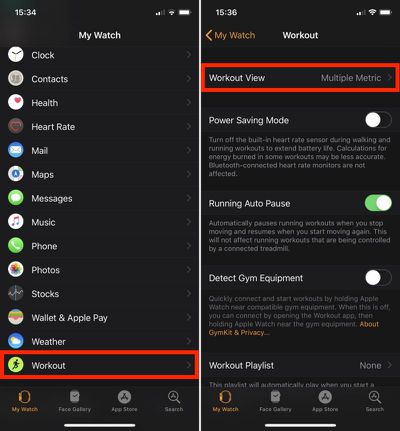
- Launch the Watch app on your iPhone.
- Tap Workout in the app list.
- Tap Workout View at the top of the menu.

- Tap either Single Metric or Multiple Metric.
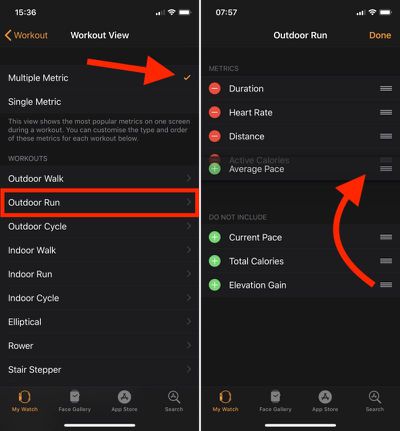
- If you chose the Multiple Metric option you will see the list of individual workouts beneath. Tap a workout to customize its view.
- To remove a metric from the view, tap the red minus symbol next to it in the list. To add a metric, tap the green plus symbol. You can also drag metrics between the two lists and reorder them to suit using the horizontal bars along the right. Note that the order will be reflected in your Apple Watch's display.
Tip: When using the Multiple Metric view, turn the Digital Crown on your Apple Watch to highlight a particular statistic on the screen for easier at-a-glance reading.
















Top Rated Comments
But this hidden UI thing is really getting irritating. I HATED the fact that my pulse was displayed in hard-to-read dark red when I was running outdoors, and it took me over a year to accidentally discover that rolling the crown let you move the highlight around.
I'm happy the functionality was there, but as someone who reads Apple tech articles daily if I never stumbled on this feature I figure maybe 5% of Apple Watch users actually know about it. Full feature documentation is hard to find; why isn't it a big link on your iPhone when you first pair your watch? Then the docs could go straight to iBooks and you'd have easy reference material that can updated automatically over time.