

On iPhone, Apple offers a Voice Isolation feature for use during cellular calls. Keep reading to learn what Voice Isolation does and how to enable it.
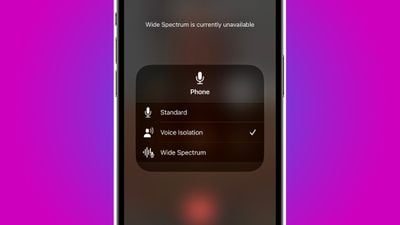
In iOS 15 and later, Apple includes several new features to make video conferencing with FaceTime and other video calling apps more appealing. One of these features, called Voice Isolation, makes it easier for people to hear your voice on a video call, and in iOS 16.4 and later, it's also available to use for regular phone calls.
When you're on a call, your device's mic usually picks up a wide range of sounds in the environment, but with Voice Isolation, machine learning distinguishes these sounds, blocks out any ambient noise and prioritizes your voice so that it comes through clearly.
The following steps show you how to enable voice isolation when on a regular call on an iPhone running iOS 16.4 or later.
- Open the Phone app and start a regular audio phone call with someone.
- Once you're in the call, pull down the Control Center by dragging down diagonally from the top-right corner of the screen (if your iPhone has a Home button, swipe up from the bottom).
- Tap the Mic Mode button at the top.
- Select the Voice Isolation option.
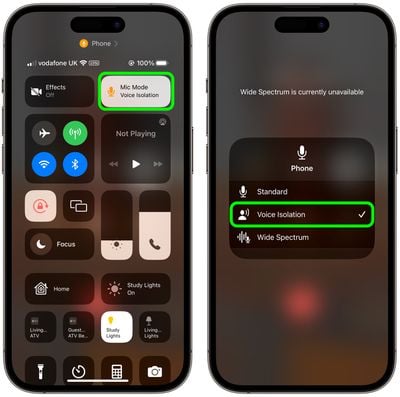
Voice Isolation will now be activated, and you can turn it off at any time simply by accessing the Control Center again and selecting Standard.
When Apple originally introduced Voice Isolation for FaceTime, it also debuted another audio option called Wide Spectrum, a feature that the company says can pick up "an entire symphony of sound – your voice and everything around you." Essentially, this mode brings every single sound into your call, making it ideal for when you want the other person to hear everything that's happening in the space you're in. Note that Wide Spectrum isn't available for regular phone calls – it only works with FaceTime.















