

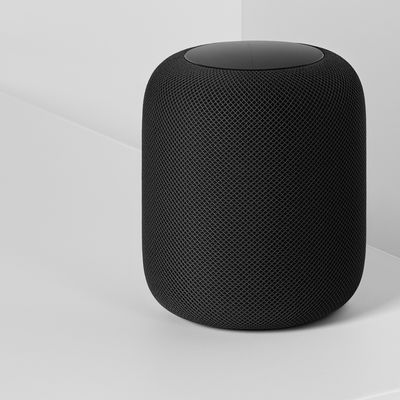
Apple's new HomePod smart speaker is designed primarily for Apple devices, and it's heavily tied to the Apple ecosystem. Natively, you can only stream music on the HomePod through an Apple Music subscription, iTunes purchases, or iTunes Match content uploaded to iCloud Music Library.
It might sound like you're out of luck if you subscribe to a third-party music service like Spotify, Pandora, Amazon Prime Music, Google Play Music, Tidal, or another option, but it's not impossible -- you can still play content from these services to HomePod, you'll just need to use AirPlay to do it.
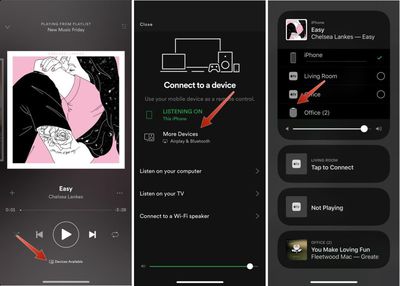
With most music apps, you can start up a song and then choose a device to play to right from within the app. These instructions will be specific to Spotify.
- Open Spotify and choose a track to play.
- On the main screen that shows song details, tap on "Devices Available."
- Choose "More Devices."

- Tap on the icon for your HomePod, and music will be streamed directly to it.
Here's an alternative method that works with Spotify and all other music apps:
- Start a song in Spotify or another app.
- Open the Control Center on the iPhone or iPad.
- 3D Touch or long press on the music widget.
- Tap on the AirPlay icon in the upper right side of the widget.
- Select the HomePod icon.
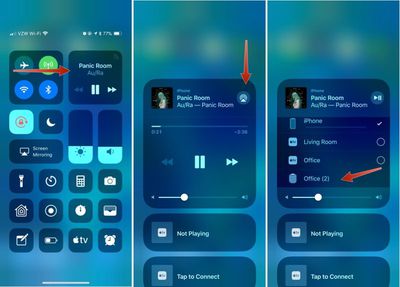
It will take a few seconds for the iPhone or iPad to connect to HomePod, but once it's connected, your music will be streamed to HomePod from your iPhone.
You generally need an Apple device to stream music to the HomePod because it requires AirPlay functionality, but some HTC phones support AirPlay, and there are unofficial third-party Android apps that work with AirPlay, so these devices may also work with the HomePod. You can't, however, connect devices to the HomePod over a Bluetooth connection.
When streaming music to HomePod through AirPlay, you're not going to have full Siri support, but you can use Siri to play/pause music, change the volume, and change music tracks.





















Top Rated Comments
I'll stick with my Echo and Sonos.
Specifically
- Music discovery sucks compared to Spotify
- Lack of year-end playlists (your most listened tracks etc.) and other fun features...sucks
- UI sucks
- Lack of free tier sucks for some people
- In conclusion, Apple Music sucks and the only reason to get it instead of Spotify is if you’re desperate to be as far up Apple’s #*@# as possible.