

 iCloud Keychain is a feature of your Apple account that you can use to keep your website login credentials, personal details, credit card details, and wireless network information up to date and available across all your Apple devices.
With so many usernames and passwords to remember these days, iCloud Keychain provides a convenient way of always having this information at hand. And with its AutoFill feature, iCloud Keychain can even enter your credentials for you when required.
It's also very secure, thanks to Apple's use of end-to-end encryption. This means that only you can access your information, and only on devices where you're signed in to iCloud. Keep reading to learn how to enable iCloud Keychain on your iOS devices.
How to Enable iCloud Keychain on Your iPhone or iPad
- Open the Settings app and tap your Apple ID banner at the top of the Settings menu.
- Tap iCloud.
- Scroll down the list and select Keychain.
- Toggle on the iCloud Keychain switch and enter your Apple ID password if prompted.
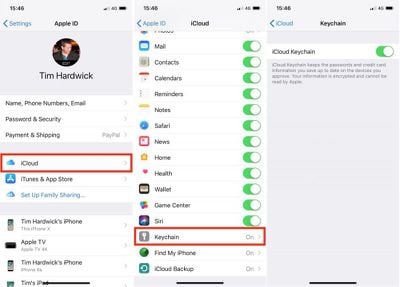
If this is the first time you've enabled iCloud Keychain, you'll be asked to create an iCloud Security Code or use your existing device passcode. You'll also need to enter a phone number where you can receive SMS messages for authorization purposes. If you've already enabled iCloud Keychain in the past, you'll be prompted to enter the passcode that was used to set it up previously.
Accessing Your Login Details in iCloud Keychain
With iCloud Keychain enabled, Apple's Autofill feature will fill in your login credentials for you whenever you come across the relevant input fields on a website or in an app. On occasion, you may encounter a login screen that doesn't play nice with Autofill. In such cases, you'll need to copy and paste your username and password manually. Here's how it's done.
- Open the Settings app on your iOS device.
- Tap Accounts and Passwords.
- Tap App & Website Passwords and use Touch ID if prompted.
- Tap the relevant login entry in the list, or using the search field at the top of the Passwords screen, type in the name of the app or website for which you need login credentials.
- Long press on the username/password and tap the Copy pop-up option.
- Now navigate back to the relevant app or website, long press the username/password input field, and then tap the Paste pop-up option.
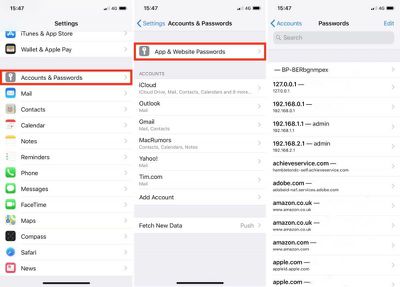
Note that you can delete login credentials by tapping Edit at the top right of the Passwords screen. You can also tap a website entry and use the Edit option to change existing username and password fields.
Adding Credit Cards and Personal Information
You can add personal information and credit card information to iCloud Keychain at any time using your iPhone or iPad, after which it will be available across all of your devices. Simply follow these steps:
- Open the Settings app.
- Tap Safari.
- Tap AutoFill.
- To add personal information, tap My Info and select your contact card from the list of contacts. To add credit card details, tap Saved Credit Cards and then tap Add Credit Card.
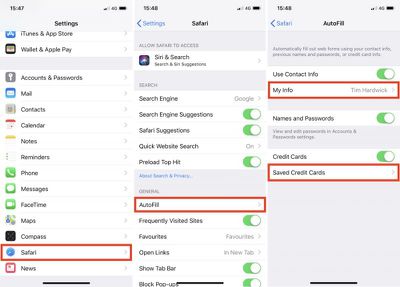
The last screen you see here also includes three toggles for selectively disabling/re-enabling AutoFill functions, which can come in handy if someone else is going to be using your iPhone or iPad.




















Top Rated Comments