iOS 16: How to Isolate, Copy, and Share Subjects From Photos - MacRumorsOpen MenuShow RoundupsShow Forums menuVisit ForumsOpen Sidebar
Skip to Content

iOS 16: How to Isolate, Copy, and Share Subjects From Photos

by

In iOS 16, Apple has enhanced its Visual Look Up capability for photos by making it possible to isolate the subject of a picture from its background so that you can copy it to the clipboard for use elsewhere or share it in another app.


Apple says the feature relies on advanced machine learning, and in our time experimenting with it in iOS 16, its ability to recognize subjects in photos is pretty impressive.

Indeed, its ease of use is likely to make performing painstaking subject isolation actions in image editing apps a thing of the past. Here's how it works.

  1. Launch Photos and select an image from your library containing a well-defined subject.
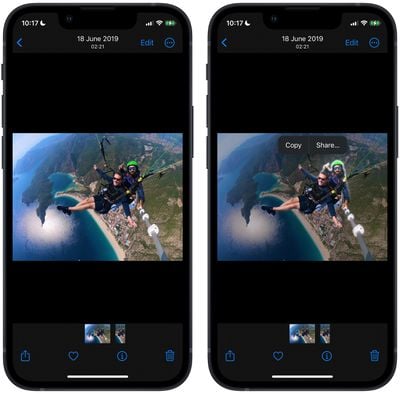
  2. Press and hold on the subject until it ripples and a white glow flows around its outline.
  3. In the popup menu that appears, tap Copy to send the isolated subject to the clipboard for pasting elsewhere, or tap Share... to access the standard sharing options in the Action menu and send it on its way.
    photos

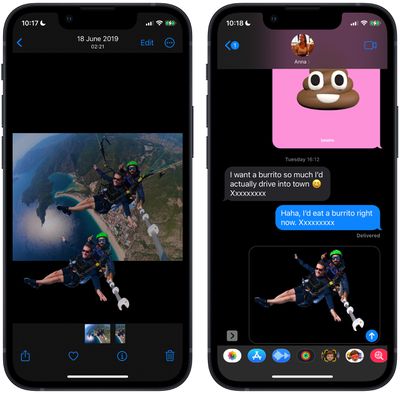
  4. Alternatively, press and hold the subject to lift it from the background. Now, without taking your finger off the screen, use another finger to exit the ‌Photos‌ app and launch Messages, Mail, Notes, or another app that accepts images.
  5. Now drag and let go of the subject to place it where you want in the input field.
    photos

That's all there is to it. You can even use it in paused frames in videos. The feature works not just in ‌Photos‌, but also in screenshots and the Quick Look feature in the Files app.

As mentioned, the feature uses advanced machine learning and image analysis, therefore it is only available on phones with the A12 Bionic or newer chip. The A12 Bionic processor debuted in 2018 in the iPhone XS, iPhone XS Max, and the iPhone XR, so you need to be using one of these iPhones or a later model for it to work. iOS 16 is expected to be released in the fall.


Related Forum: iOS 16

Top Rated Comments

MrGimper Avatar
52 months ago

That looks cool. I assumed it would only work on portrait photos as it has information on where the subject is. But this is an entirely different league.
Nope, I’ve used it already to extract people from pictures I just downloaded off the web. It’s very good.
Score: 11 Votes (Like | Disagree)
bradman83 Avatar
52 months ago
This is going to seriously improve my ability to add additional cats to memes (because memes can never have enough cats in them).
Score: 7 Votes (Like | Disagree)
NightFox Avatar
52 months ago

Seems useless, don't get the hype around this
If you haven't wasted days of your life trying to cut out people or objects in PhotoShop, then you never will truly understand the hype.
Score: 5 Votes (Like | Disagree)
52 months ago
Really nice feature. And it is simple to use. Great that it can be used in videos too.
Score: 3 Votes (Like | Disagree)
PsykX Avatar
52 months ago
Now this is next level.

And to say I baffled someone last week by demonstrating this feature in Pixelmator Pro. This will seriously improve my workflow.
Score: 3 Votes (Like | Disagree)
52 months ago
That looks cool. I assumed it would only work on portrait photos as it has information on where the subject is. But this is an entirely different league. Nice!
Score: 3 Votes (Like | Disagree)

Popular Stories

meta instants

Meta Launches 'Instants' App for Sharing Disappearing Photos on Instagram

Wednesday May 13, 2026 11:32 am PDT by
Meta today announced the launch of Instants, a new image sharing option on the Instagram social network. Instants are ephemeral photos that disappear from Instagram after they're viewed by a user's friends or after a 24-hour period. Reactions and replies to Instants images show up in DMs instead of on the post. Instants photos are only displayed for a short period, but they are saved to a...
sweeping AI driven upgrades feature

First Look at AI Camera and Photos Features in iOS 27 Revealed

Thursday May 28, 2026 6:32 am PDT by
Apple is planning sweeping AI-driven upgrades to its Camera and Photos apps in iOS 27, Bloomberg's Mark Gurman reports. Image via Bloomberg. The report offers a first look at the appearance of several major iOS 27 features that Apple plans to announce at its Worldwide Developers Conference on June 8. The images are based on information viewed by Bloomberg and people said to be familiar with ...
macOS 27 on MacBook Pro

Apple Says macOS 27 Won't Be Compatible With These Macs

Wednesday June 3, 2026 8:29 am PDT by
During WWDC 2025, Apple revealed that macOS 26 Tahoe would be the final major macOS version for Intel-based Macs. macOS 27 will be compatible with Apple silicon Macs only, meaning that you will need a Mac with an M-series chip or a MacBook Neo with an A18 Pro chip in order to install the software update. Apple will unveil macOS 27 during its WWDC 2026 keynote this Monday, June 8, and the...