

If you've set up first-generation or second-generation AirPods with your iPhone and your Mac is signed in to iCloud with the same Apple ID, then your AirPods should be ready to use with your Mac.
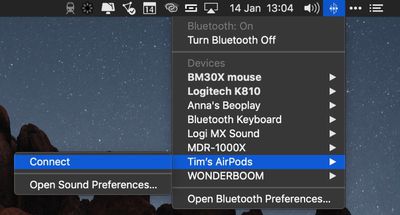
Ideally, all you need to do is put your AirPods in your ears, click the Bluetooth icon in your Mac's menu bar, select your AirPods from the dropdown list, and click Connect.
If you don't see your AirPods in the Bluetooth menu, you can pair them manually with your Mac in the following way.
How to Connect AirPods to Mac
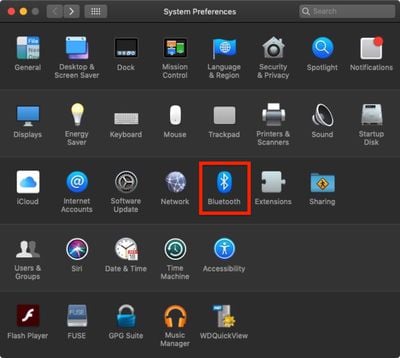
- On your Mac, launch System Preferences from the Apple menu bar ( -> System Preferences...).
- Click the Bluetooth pane.

- Make sure Bluetooth is turned on.
- With your AirPods in their charging case, open the lid.
- Press and hold the button on the back of the charging case until the status light between the AirPods flashes white.
- Select your AirPods in the Bluetooth devices list and click Connect.
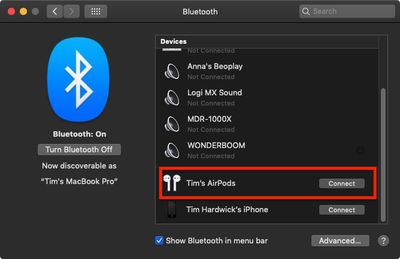
Next time you want to use your AirPods with your Mac, place them in your ears and they should automatically pair. If they don't (if they pair with your nearby iPhone instead, for example) simply click the Bluetooth icon in your Mac's menu bar, select your AirPods in the dropdown list, and click Connect.
How to Customize AirPod Controls on a Mac
Apple AirPods support a number of gestural touch controls that you can customize, including the option to change tracks with a double tap.
All of these options can be accessed in the Settings app while the AirPods are connected to your iPhone or iPad. But you can also access them when your AirPods are connected to your Mac. Here's how:
- On your Mac, launch System Preferences from the Apple menu bar ( -> System Preferences...).
- Click the Bluetooth pane.
- In the Bluetooth devices list, click the Options button next to your AirPods.
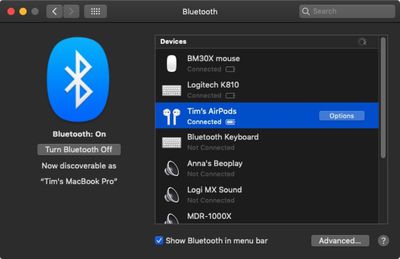
From this menu, you can enable or disable manual ear detection, choose to use the left or right AirPod microphone, and choose what happens when you double tap an AirPod.
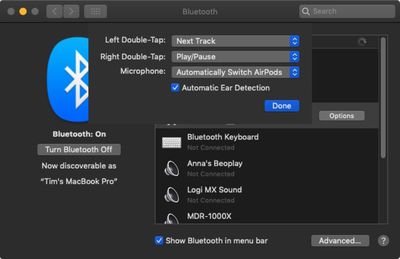
Double-tap options include Siri, Play/Pause, Off, Next Track, and Previous Track. Note that you can also set different gestures for the left and the right AirPod.























Top Rated Comments
This is the biggest problem with AirPods + multiple devices. Why should the user go through 3 steps to connect? Why not give a pop-up to connect or dismiss when the Mac or iPad, or any other device detects AirPods?
Selected My AirPods: Connected
Selected Preferences > Sound > Output - BUT NO AIRPODS IN THE DEVICES!!!!
They connect just fine to my phone.
This isn't putting your head inside a 1000 watt microwave. This is such a tiny risk that it can't be scientifically calculated because it's estimated to be fractions around 1/1,000,000th of 1%.
And in case of Control Centre there is no need to unlock.