Apple's AirTags are small, button-shaped devices that are designed to be attached to items like keys and wallets to allow these accessories to be tracked using Bluetooth right alongside Apple devices in the Find My app.

If you've set up a AirTag and attached it to an item, you can track said item in the Find My app, should you misplace it. Find My uses Bluetooth signals from a lost AirTag to relay its location back to its owner, and on devices that also have U1 chips, there's a Precision Finding feature that enables you to more accurately determine where an AirTag when it's in range.
But what if the AirTagged item isn't in sight, even when it's nearby? If you know you've lost your keys down the back of a couch, for example, it can still be pretty hard to find them. Fortunately, Apple has thought of this, which is why you can make an AirTag play a sound to help you find it.
How to Make an AirTag Play a Sound
If an AirTag is nearby, you can get it to play a sound so that you can locate it easier.
- In the Find My app, tap Items.
- Tap the AirTag that you want to play a sound.

- Tap Play Sound.
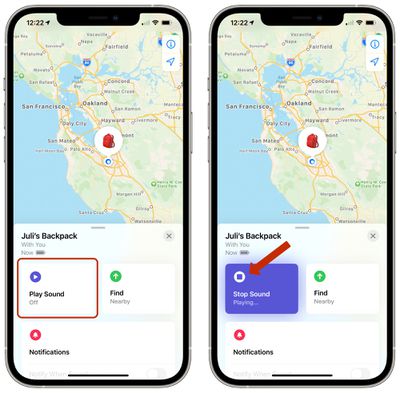
To stop playing the sound before it automatically ends, tap Stop Sound. You can also pick up the AirTag and give it a squeeze to make it stop.
Use Siri to Play a Sound
If you ask Siri to find my [item] or play a sound on my [item], Siri will ping the AirTag and cause it to make a noise so that you can locate it.
You can also get map directions to an item's current or last known location, and if you have a supported iPhone and are near your AirTag, you can find its precise location.