

You can create custom sounds and ringtones for text alerts, phone calls, and more on your iPhone, but did you know the same functionality exists for vibrations? Setting a special vibration alert for someone in your Contacts app enables you to recognize when a specific person is calling you or has sent you a text, without you even having to look at your iPhone or iPad screen.
Receiving a haptic alert for incoming calls and/or messages can be handy to have if, say, you're in a quiet environment and don't want to disturb the peace. A custom vibration alert can be useful if your iPhone is on silent in your pocket and you're currently in a meeting, for instance. Recognizing the vibration as someone specific means you can decide if you need to leave the room to take the call.
Follow these steps to set up a custom vibration for the person you have in mind.
How to Assign a Custom Vibration to a Contact
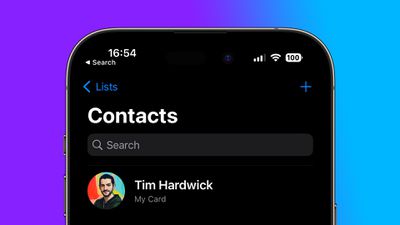
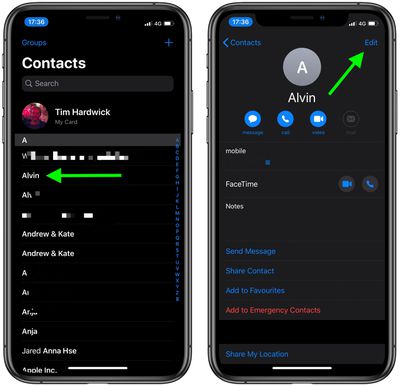
- Launch the Contacts app on your iPhone.
- Select a contact from the list.
- Tap Edit in the top-right corner of the screen.

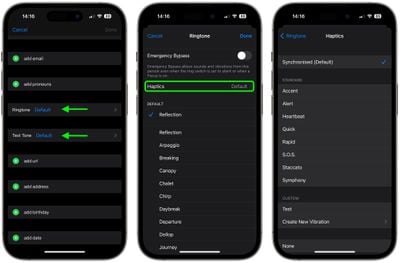
- Tap Ringtone or Text Tone, depending on what your vibration to be associated with.
- Tap Haptics.
- Select a custom vibration under the Standard list, or tap Create New Vibration under Custom. If you chose the latter, tap the screen to create a vibration pattern, and when you're happy with it, tap Save.
- Tap Ringtone or Text Tone in the top-left corner of the screen to go back.
- Tap Done in the top-right corner of the screen.
- Tap Done again.
Did you know that you can assign custom alert tones for WhatsApp contacts? Check out our guide to learn how.




















