

Ahead of the release of macOS Big Sur, Apple has released the Safari 14 update for macOS Catalina and macOS Mojave users, bringing with it a number of new features and improvements.
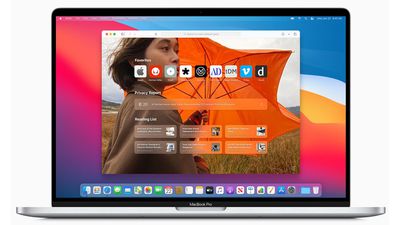
One of the most dramatic changes is the overhauled Start Page, which now includes a browsing privacy report, iCloud tabs, Siri suggestions, and more. It also features several customizable options, such as the ability to choose your own Start Page wallpaper.
My new Safari 14 enjoy with @dlanham wallpapers pic.twitter.com/iokdA5YHB1 — NOB NUKUI (@nobtaka) September 18, 2020
The new Safari 14 update can be downloaded by opening up System Preferences and choosing the Software Update option. Once the update is installed, you can choose your own Start Page wallpaper by following the steps below.
- Launch Safari 14 on your Mac.
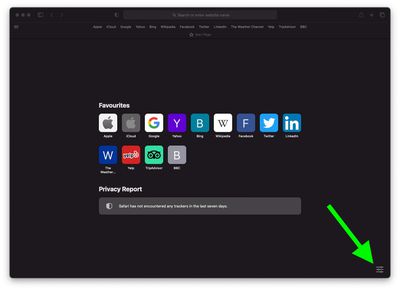
- Click the Settings icon in the bottom-right corner of the Start Page.

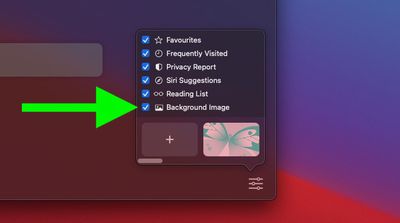
- Click the checkbox next to the Background Image option if it isn't already ticked.
- Choose one of the wallpapers from the gallery carousel. Alternately, click the plus (+) button to open a file browser dialog and select another image on your Mac.
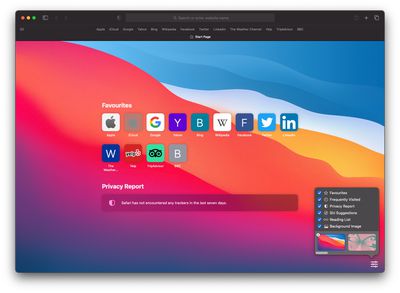
As well as a new Start Page, Safari 14 brings improved performance and a new tab bar design that provides tab previews so you can see what you have open at a glance. For more on the security content in Safari 14, check out Apple's release notes.





















Top Rated Comments
At least for me it's a mirror image of what my Top Sites was.
I use Safari all day long (as a website developer) and have not noticed any memory issues. It likely depends on the sites that you're visiting. It's possible that those sites have some code issues that could be fixed within them.